

Alumni

🆕 Create and sell bundles for Retail

Hi sellers! 👋


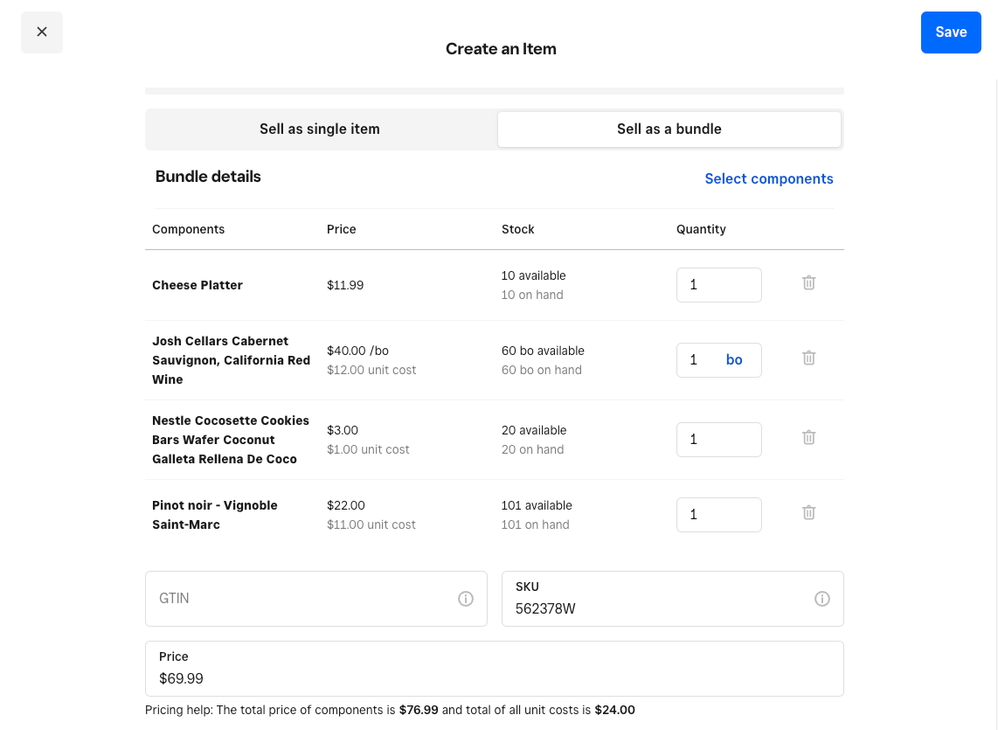
We’re excited to announce that we’ve added the ability for Square for Retail Plus sellers to create and manage bundles in Square Dashboard! This feature allows you to combine multiple components into one item bundle and sell those items together while still having the ability to track inventory of the individual components. This is great for all types of retail sellers that want to create gift sets, product sets and can even be used with Square Subscriptions.


This update can help you:

  • Better track inventory of individual components regardless of how you sell the items
  • Increase sales and AOV by cross-selling and upselling of similar products to your customers
  • Create promotional products around special events and holidays 


retail-bundles-ga.png

Where can I create product bundles?

  • Bundle creation can be accessed when creating a new item in your Square Catalog
  • A new option will be listed called “Sell as a bundle”

Who can access product bundles?

  • This feature is available in all regions and will only appear for Square for Retail Plus sellers. We’ll also be adding this feature for Square Online Plus sellers sometime later in August.
  • If you're a Square for Retail Plus subscriber and this feature isn't showing up for you, check back again early next week (7/31) as it will be fully available to everyone then

Comment below with your feedback on this feature and let us know what kind of bundles you’re creating! Check out the Square support article as well for more information.  

62 Replies
Alumni

While we don't have an update for when this will be available for Square for Restaurants, @CaitSidhe. This is something we're tracking, though as we know that this is an often-requested feature! 

Alumni

Got it and thanks for the feedback here. This will really help us as we continue to make future updates and enhancements to this feature.

Are there any plans to include bundle variations? I was so excited about the introduction of bundles, but without variations they are not of much use to us. 


I own a yarn store, so my biggest use case for bundles is creating kits that include the required amount of yarn for specific projects. Customers want a choice in what color they use though, so a kit with only one color option simply won't sell.


For example, if we have a kit for a scarf that requires 3 colors, it would be great to have multiple variations for the customer to choose from where each variation is a different color combo. This feature would make bundles very useful to us because they actually would sell very well.

So can confirm that anything sold out of a bundled item does not show up on the inventory sell through report, which is the most important report for me for ordering. 


So I'm hoping that at some point that they may fix this issue. Luckily I've only got a few bundles at the moment, but I would like to create alot of them.

Thank you @mkochanowski for this Bundles Announcement! I'm a Square Online seller and website designer for Square Online sellers that will benefit from using this feature for their customers.


I've tested POS > Items > Item Library > Create an Item > details [Bundle] + Checkout Link.

When I navigate to the checkout link I notice that the bundle components aren't listed individually during the checkout process.


Is there a setting in Item Details that would populate the bundle components during the checkout flow?


This is the test bundle / checkout link that I generated: https://checkout.square.site/merchant/P67MP48FGXEDG/checkout/A24SMH2VST7NBW64JQ37KNKZ


Thank you for any helpful guidance you can provide.

Alumni

@HermitThrush We do plan on adding the ability to include bundle variations at some point but we don't have an exact ETA on this at the moment. Stay tuned for more info on this feature.

Alumni

@taylorandjones Thanks for the feedback here! This is an area we hope to make improvements on in the future but we currently don't list the individual components of the bundle at checkout at this point. We'd recommend including information on the individual components as part of the bundle description for now until we have an update made to support this. Thanks!  

Square Champion

This is great! Thanks for the update!

Square Champion

@mkochanowski ;

I think there is a bug in the system.  

I sell a 10 hr Ivory Votives   288 per Case     72 per Box or individually.

Today we did a recount.

We have 403 currently in stock  1 Case of  288, 1 pack of 72 and 43 individuals = 403

My inventory is showing 403 individuals, 6 packs of 72 and 1 case of 288.  

6 packs of 72 would be 6 * 72 or 432 which is over the 403 quantity.


Removed pictures because Google was finding my SKU in its search with Pricing

Hi Keith,


I ran into similar issues when using Units of Measure. The conclusion we came up with is that it appears to be a rounding issue when displaying the bulk quantity Units of Measure without any decimal precision.


The following is what I believe is happening in your example:


The case quantity is being determined as 403 / 288, which is 1.399 and being rounded down to 1 full case available.

The pack quantity is being determined as 403 / 72, which is 5.597 and being rounded up to 6 cases available.


I changed our Units of Measure to include decimal precision. This gives us a better idea of what is actually available.


There is additional functionality that Square needs to provide if they want to truly state that they support Units of Measure. After a lot of trial and error, it seems you have to pick your poison when it comes to facilitating inventory adjustments vs. purchasing. All functionality for items with multiple Units defined should provide the capability of selecting which UOM to use and not force us to do manual conversions and/or create manual purchase orders in the UOM that the vendor expects.


Regards,

Patti


Square Champion

@TwinkleToes ;

Yes I agree with what you are saying is that it is a Rounding error. Now with all the $$ Square pays its programmers you would think they would have have the round Down for all these rounding problems for the Sell By Units Calculation.


From you:

The case quantity is being determined as 403 / 288, which is 1.399 and being rounded down to 1 full case available.

The pack quantity is being determined as 403 / 72, which is 5.597 and being rounded up to 6 cases available.


If everything was Rounded Down I would have 1 Full case to sell and 5 packs to sell..... Which is what I do have.

I just can not sell a 6th full Pack.  So the Square engineers should realize that and make this feature without the Round up enabled at all.  

I can even use the Rounddown function in Google Sheets see the red circle below.

rounddn.png


Its the little things like this that Squares programmers do not look at when writing their codes for these things.  


It would be simple for Square to fix this in this case since you would never want to charge a customer for a FULL case when they are only getting a partial case.


Thank you though for confirming this, and that it is not only me.

Alumni

Hey there @TwinkleToes I really appreciate you reaching out and providing this feedback! I would reach out to our Ideate Board and provide this feedback. I'm sorry our system still isn't working out for you as needed. If you need anything else definitely let us know. 


Square Champion

@MayaP ;

I will get this on the Ideate board shortly as I see no reason for there to be a Round up step in the programming.  The programmers could either round down or just use whole numbers when rounding to eliminate this issue. 


🙂   Thank you for letting us know that we have to put this in the ideate board.  I would just think this is a Square Programming error.

Square Champion

@MayaP , @mkochanowski , @TwinkleToes ;


Here is the Link to the Ideate for this rounding problem:

Square-for-Retail/Eliminate-the-Rounding-problem-with-Sell-by-Units/idi-p/685176#M1108 


Hopefully this can be fixed soon.  🙂

Square Champion

@mkochanowski ;

Just an idea when creating Bundle Variations.

Maybe have like Candle Bundle:

   2 Candles from a category 28oz jars

   2 Candles from a different Category   16oz Jars

   2 Candles from a third Category etc.... 3x3 Pillars


That way my customers could get the Bundle Pricing without us having to Guess what scents the customers may want or get as gifts for their friends and Family.  Currently we need to IDentify each Item not just a category or quantity.


I know with Discounts I could say if 3 candles from category 16oz jars scanned and Automatic discount of $X.XX would be applied, no matter what 3 jars were brought up to the register.  


Just a thought.

Square Champion

Can there be a service line item charge that could be included on the bundle price.  This would cover our labor of putting together the basket.  (however even though it is service I would keep it as a taxable item because you sell the gift basket as an item)

thank you,

Square Champion

@mkochanowski ;

Yesterday with all the other problems with Square we ran into an issue with Bundled Items.  I went to create a new Bundle, but before doing this i wanted to check to see if an Item I created was as a bundle or not.  So I went to my Square Stand > More > Items and scanned the Bundle Barcode ---- Square than exits.  I called Support and they told me to try a Regular Item, which I was not able to do since I was at home.  I came in this morning and the regular item worked fine but the bundle exited Square.   I am able to scan both barcodes to add the item and the Bundle to my Checkout cart but just can not search in the More > Items area even when I type in the Bundles SKU.


I made a short video for you to see. :


(view in My Videos)

Square Champion

I love that bundles have been added but wish there was a way I didn't have to create new items (we sell detail supplies such as microfibers) 

we have 3 pack, 10 pack and 12 pack. To create a bundle and it to track inventory correctly, we have to create these individual packs as separate items and then sell as a bundle.  Will this be worked out so I don't have to create new items for every bundle we have? Thanks for everything you all do! I also know there is the Trunk Bundle app which ive considered but seems Square may be on to something in house.

Alumni

Hi there, @EcoAutoClean 👋 Thanks for reaching out.

I connected with the Square for Retail Team so they could take a look at your feedback. They let me know that it sounds like you should be using Sell-by Units instead of bundles: Create units for “3-pack”, “10-pack”, “12-pack”, etc and you can hold stock as singles that convert to 3x, 10x, 12x from those sell-by units.

I hope this information is helpful, but please do let me know if you have any additional questions.

Square Champion

THANK YOU!!!! I'll look into this!!!!  Second feedback is if we could turn an existing item into a bundle vs having to create a whole new one.  This is still a great direction and very appreciative! 

Not having this feature for restaurants (or some other feature that allows all ways an item appears on the menu to be tracked in one place) makes it near impossible to sell online, at least without causing major issues with inventory tracking.  If I want to sell a dozen bagels online I have to go to 13 different places in the menu for each bagel I run out of to track inventory.  That is just not practical to do, particularly on a busy weekend day.  And constantly telling customers you're sorry but you can't fulfill their order for a bagel we don't have in stock is an awful customer service experience.

Hi there, I am a Square Online Plus Subscriber, how can I add bundles to our square website? I don't see any options. Thanks! 

Any support on this? Or is this still in development? Any answer would be great, just not sure if I'm missing something. Thank you!

Square Champion

@ABGbake ;

It is active since July or August 2023.   

Here is a Link to more information : 8057-create-managing-bundles-with-square-for-retail 


Now if you are still having problems or missing something maybe an idea of what you are doing, and trying to do we might be able to give you an idea how to set it up.

As far as I know, it is still not available for Square for Restaurants.  It's ridiculous that this feature or a similar feature isn't available for Restaurants.  Any food service business that wants to sell multiples (for instance a dozen bagels or a dozen donuts, etc.) has no way to accurately track inventory, making selling online near impossible.  People in the Square community have been asking for this feature for years (literally) and it still is not available.  Very frustrating.

Similar Threads
What's New From Square: August Features Coming Soon (Volume 10)
What's New From Square: August Features Coming Soon (Volume 9)
What's New From Square: July Features Coming Soon (Volume 8)
What's New From Square: July Features Coming Soon (Volume 7)