
- Home
- >
- Community Archive
- >
- Public Archive
- >
- Archived Discussions (Read Only)
- >
- Re: Why are sales not showing up in my activity?

- Subscribe to RSS Feed
- Mark Thread as New
- Mark Thread as Read
- Float this Thread for Current User
- Printer Friendly Page
Why are sales not showing up in my activity?
I had an event last night with multiple charges made yet only one is showing in my register. I need to be able to account for tickets and auction items sold, where are they, what happened to them? Each sale appeared to be successful and brought us back to the new sale screen, so where are the sales???
- Mark as New
- Subscribe to RSS Feed
- Permalink
- Report



- Subscribe to RSS Feed
- Mark Thread as New
- Mark Thread as Read
- Float this Thread for Current User
- Printer Friendly Page
Sorry to hear about the trouble seeing your activity! Your sales should appear in the Transaction section of the Square app right after you take them.
You can search for a transaction from the app and you can also confirm successful transactions from your online Sales Summary.
I can't look into account specific issues here in the Community, as it's a public forum, so if you still need a hand locating your transactions, please contact our Support team.

- Subscribe to RSS Feed
- Mark Thread as New
- Mark Thread as Read
- Float this Thread for Current User
- Printer Friendly Page
Same thing happend to me. My sale did not show up in my transactions but when I went to my sales history it was there. I did get paid the next day though. I don't know why it didn't show up in my transactions????
It had me wondering and worried I would not get paid. It had me wondering if I needed to run her card again. Glad I waited it out did not make her pay double. She would have been upset.
- Mark as New
- Subscribe to RSS Feed
- Permalink
- Report

- Subscribe to RSS Feed
- Mark Thread as New
- Mark Thread as Read
- Float this Thread for Current User
- Printer Friendly Page
Two things to look at.
1) is your date range set correctly on your sales report. This gets me every time.
2) Your browser, Make sure you have a current browser, Chrome seems to be the one with the fewest issues.

- Subscribe to RSS Feed
- Mark Thread as New
- Mark Thread as Read
- Float this Thread for Current User
- Printer Friendly Page
Exact same issue yesterday none of card transactions are listed in reports.. What gives...?



- Subscribe to RSS Feed
- Mark Thread as New
- Mark Thread as Read
- Float this Thread for Current User
- Printer Friendly Page
So sorry for the late reply @Oasis1! I took a look and I see that you were able to call our CS team who helped you with this by the time I read your post.
Seller Community Manager
- Mark as New
- Subscribe to RSS Feed
- Permalink
- Report

- Subscribe to RSS Feed
- Mark Thread as New
- Mark Thread as Read
- Float this Thread for Current User
- Printer Friendly Page
Same issue

- Subscribe to RSS Feed
- Mark Thread as New
- Mark Thread as Read
- Float this Thread for Current User
- Printer Friendly Page
@elkeddeh - Sorry to hear! Have you already tried closing the app? Signing out and then back in?
Sean
he/him/his
Product Manager | Square, Inc.
- Mark as New
- Subscribe to RSS Feed
- Permalink
- Report
- Subscribe to RSS Feed
- Mark Thread as New
- Mark Thread as Read
- Float this Thread for Current User
- Printer Friendly Page
@elkeddeh - Were you still having issues with this? I want to make sure we get you taken care of. 🙂
Sean
he/him/his
Product Manager | Square, Inc.
- Mark as New
- Subscribe to RSS Feed
- Permalink
- Report

- Subscribe to RSS Feed
- Mark Thread as New
- Mark Thread as Read
- Float this Thread for Current User
- Printer Friendly Page
Same issue twice this week. Sale was paid by client through Appointments but hasn't show up in Sales Report, nor has it been deposited. What's going on?

- Subscribe to RSS Feed
- Mark Thread as New
- Mark Thread as Read
- Float this Thread for Current User
- Printer Friendly Page
@Lynne That does sound a bit strange. All completed payments will appear in your recent activity. Just to clarify, you were booking appointments using the Square Booking Tool, and then completing payment by using the Square Register app to charge their payment card, correct?
If so, these payments should appear in your Transactions Tab, or there could be additional information in your Transaction Status tab.
If you're still not seeing the payments, you'll need to reach out to our Support Team for account & payment specific help.
- Mark as New
- Subscribe to RSS Feed
- Permalink
- Report
- Subscribe to RSS Feed
- Mark Thread as New
- Mark Thread as Read
- Float this Thread for Current User
- Printer Friendly Page
EJ, the appointment was paid by the client in the Appointments app at the time she booked her appointment. I/she didn't pay for it in Register. We have set it up so that clients can prepay for their class(es) at the time of scheduling. The sale STILL hasn't shown up. I'll contact the support team.
- Mark as New
- Subscribe to RSS Feed
- Permalink
- Report
- Subscribe to RSS Feed
- Mark Thread as New
- Mark Thread as Read
- Float this Thread for Current User
- Printer Friendly Page
Finally solved. I had a transaction from December 29th stuck on the top of my activities. Very weird . Wouldn't even let me sign out from the app. I had to delete the app and download again to get it solved.
First activity date was showing December 29 and 2nd activity date January 9.

- Subscribe to RSS Feed
- Mark Thread as New
- Mark Thread as Read
- Float this Thread for Current User
- Printer Friendly Page
We are also experiencing this issue. And it is not one or two charges that are mysteriously not only showing up in our sales reports nor are detailed receipts nor on our apps on our phones, but we have hundreds and hundreds of dollars missing from those reports and we have multiple locations across more than one state. Also, all of our locations are showing us in a city that we have not been two and three years.

- Subscribe to RSS Feed
- Mark Thread as New
- Mark Thread as Read
- Float this Thread for Current User
- Printer Friendly Page
Hey @LofM - That definitely does not sound typical. Contact us directly and our Support team can help you look into this.
Seller Community UX Designer
- Mark as New
- Subscribe to RSS Feed
- Permalink
- Report

- Subscribe to RSS Feed
- Mark Thread as New
- Mark Thread as Read
- Float this Thread for Current User
- Printer Friendly Page
I'm having a similar issue. We're a non-profit and tend to infrequent but large payments. Over a two-year period we had 9 customer transactions, plus another 4 transaction pairs that were generated by Square for validation.
Of the 9 customer transactions, all were confirmed as being deposited in our bank account... but only 3 of the 9 appear in the Square reports to this day.
Near as I can tell, the difference was that all 3 of the CCD-type transactions (Corporate Credit/Debit for business account transfers) appear successfully in Squre reports, but none of the 6 PPD-type transactions (Prearranged Payment and Deposit for personal account transfers) appear at all.
- Mark as New
- Subscribe to RSS Feed
- Permalink
- Report
- Subscribe to RSS Feed
- Mark Thread as New
- Mark Thread as Read
- Float this Thread for Current User
- Printer Friendly Page
Hello @Bob3590! From your post it sounds like 'Prearranged Payment and Deposits' are bank transfers from your contributors, is that correct? If that's the case unless these payments were recorded in Square as a check or other tender transactions they won't appear in your sales reports. You'd need to check your bank statement for a record of those transfers.
If you did record these payments with the Square app, first I recommend checking the date selector on your Dashboard is set to the correct timeframe. Thanks to @RHatch for that tip! When you click on the date range you'll see more options:
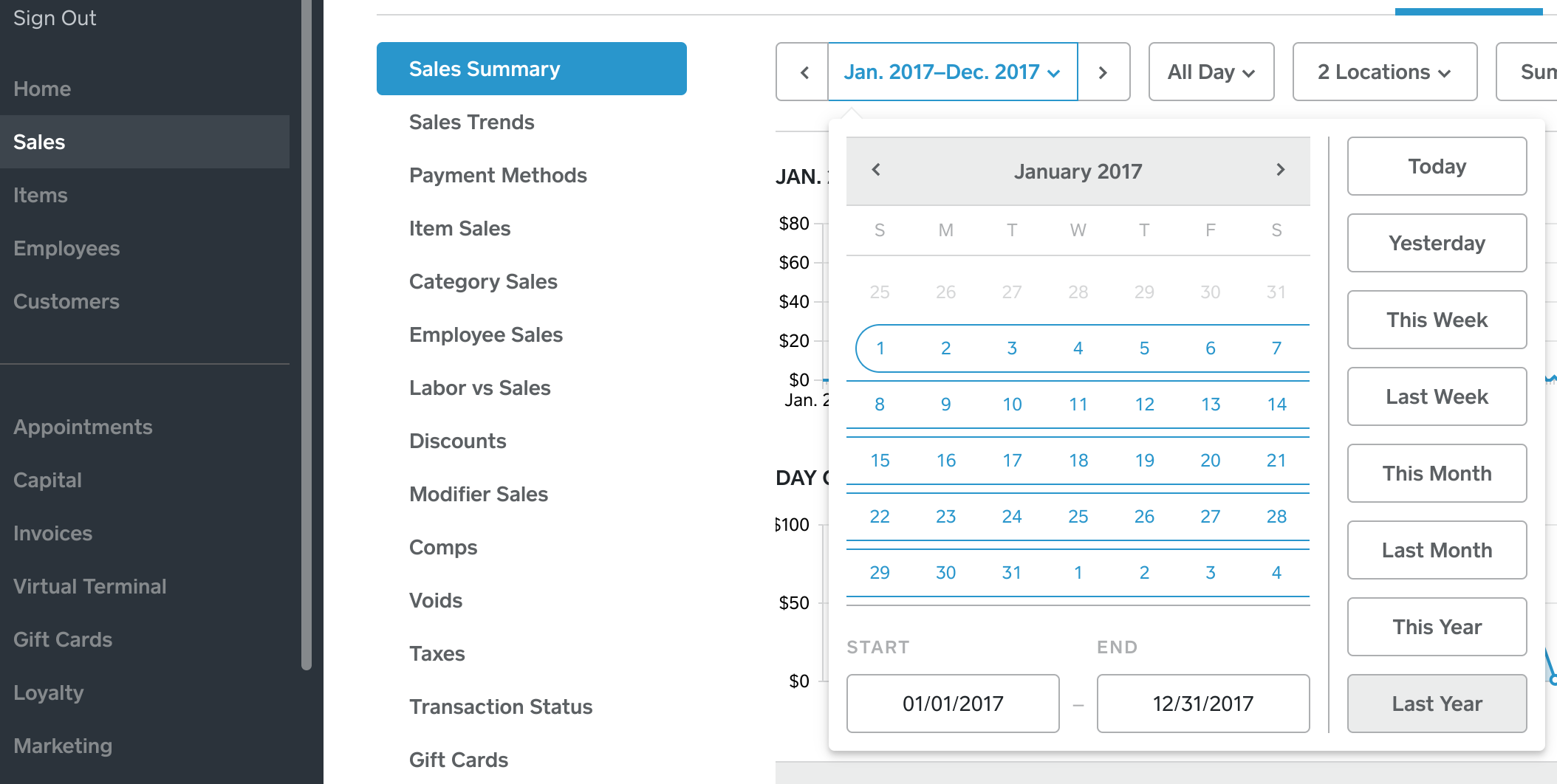
Second: check you've signed in to Square using the correct email address. If different people in your organization have managed the Square account over the last 2 years they might have accidentally created another account using a different/personal email address.
If you're still not able to find these transactions definitely call our Support team so we can investigate further!
Seller Community Manager
- Mark as New
- Subscribe to RSS Feed
- Permalink
- Report

- Subscribe to RSS Feed
- Mark Thread as New
- Mark Thread as Read
- Float this Thread for Current User
- Printer Friendly Page
Just finished reading through this thread.
Yesterday (Christmans Eve 2018), our store was very busy yet only 2 transactions posted to the web even though all were listed under Transactions in the Square App. As of early this morning, only the same 2 transactions were visible. About an hour ago the rest posted up. There's something VERY wrong with this...can anyone explain?
I, just like most others on this thread, have been using Square for several years and have never seen issues like this in the past.
- Mark as New
- Subscribe to RSS Feed
- Permalink
- Report
- Subscribe to RSS Feed
- Mark Thread as New
- Mark Thread as Read
- Float this Thread for Current User
- Printer Friendly Page
Hi @tstewart22, that does sound odd - have you made sure that you're signed in to the same account on both your Dashboard and the app?
Sometimes a partially blank screen is caused by your browser. I suggest switching to Chrome/Firefox or Safari or making sure your browser is up to date.
If your transactions still haven't appeared definitely call our CS team and they can confirm your transactions and help invesigate why you aren't seeing them online. The steps to call are in this Support Center article.
Seller Community Manager
- Mark as New
- Subscribe to RSS Feed
- Permalink
- Report
- Subscribe to RSS Feed
- Mark Thread as New
- Mark Thread as Read
- Float this Thread for Current User
- Printer Friendly Page
Having an issue too! We are hosting an event for school and using a square link that was sent out in a mass email as our registration platform. I am the treasurer for the PTO so have been on top of the registrations and know for a fact that I have MANY transactions (including my own) that have deducted from personal accounts but NOT showing up ANYWHERE on square's end to pay out to the PTO account. So if my money was deducted from my account (along with others) where is it?
I was on the phone with someone from Square last week for over an hour and a 1/2, transferred 4 different times and got no where 😞 HELP!!!!! Where is our money for the school???
- Mark as New
- Subscribe to RSS Feed
- Permalink
- Report

- Subscribe to RSS Feed
- Mark Thread as New
- Mark Thread as Read
- Float this Thread for Current User
- Printer Friendly Page
Hi @rohn623,
While we can't look into transactions via this public forum, here's some things to check out:
- Do you have multiple locations? The sales may have been under one of your other locations.
- Where are you looking for these sales? When signed in to the app, you'll only see sales for the location you're signed in to. Check out Transactions in your Dashboard for a full overview, and make sure you're viewing all locations.
- If you do have multiple locations, ensure a bank account is linked to each one by heading to Account & Settings > Business > Locations.
Please let us know how you go!
- Mark as New
- Subscribe to RSS Feed
- Permalink
- Report
- Subscribe to RSS Feed
- Mark Thread as New
- Mark Thread as Read
- Float this Thread for Current User
- Printer Friendly Page
I'm Currently experiencing this same issue... I use Square Appointment to run my salon. Finished my color service at 1pm... charged my client via her credit card... its showing that she was charged $190 plus tip... yet that amount is not showing on my Active Balance... over $200... that it's showing as Paid... yet I can't access or find. Please help, as it's impossible to speak to a human.
- Mark as New
- Subscribe to RSS Feed
- Permalink
- Report
- Subscribe to RSS Feed
- Mark Thread as New
- Mark Thread as Read
- Float this Thread for Current User
- Printer Friendly Page
This is still going on. I had over a 100 dollars worth of sales disappear from Sunday. No idea what happened and yet I still wasn't paid.
- Mark as New
- Subscribe to RSS Feed
- Permalink
- Report

Square Community