
- Home
- >
- Community Archive
- >
- Public Archive
- >
- Archived Discussions (Read Only)
- >
- Re: Turn off tip tracking

- Subscribe to RSS Feed
- Mark Thread as New
- Mark Thread as Read
- Float this Thread for Current User
- Printer Friendly Page
Turn off tip tracking
We are a Restaurant and don't use Square's built-in tip pooling methods. We divide tips according to our own system. However, Square still tracks tips and shows employees their "Earned Tips" in the Teams app. This creates confusion because the Tips that Square says the employees have earned does not match. Is there a way to turn this off?.
Thanks
- Mark as New
- Subscribe to RSS Feed
- Permalink
- Report

- Subscribe to RSS Feed
- Mark Thread as New
- Mark Thread as Read
- Float this Thread for Current User
- Printer Friendly Page
did you figure this out?
- Mark as New
- Subscribe to RSS Feed
- Permalink
- Report



- Subscribe to RSS Feed
- Mark Thread as New
- Mark Thread as Read
- Float this Thread for Current User
- Printer Friendly Page
If you want to disable Tip tracking for employees you would edit the Team Member's Job Compensation and make sure it is set to Tips Ineligible.
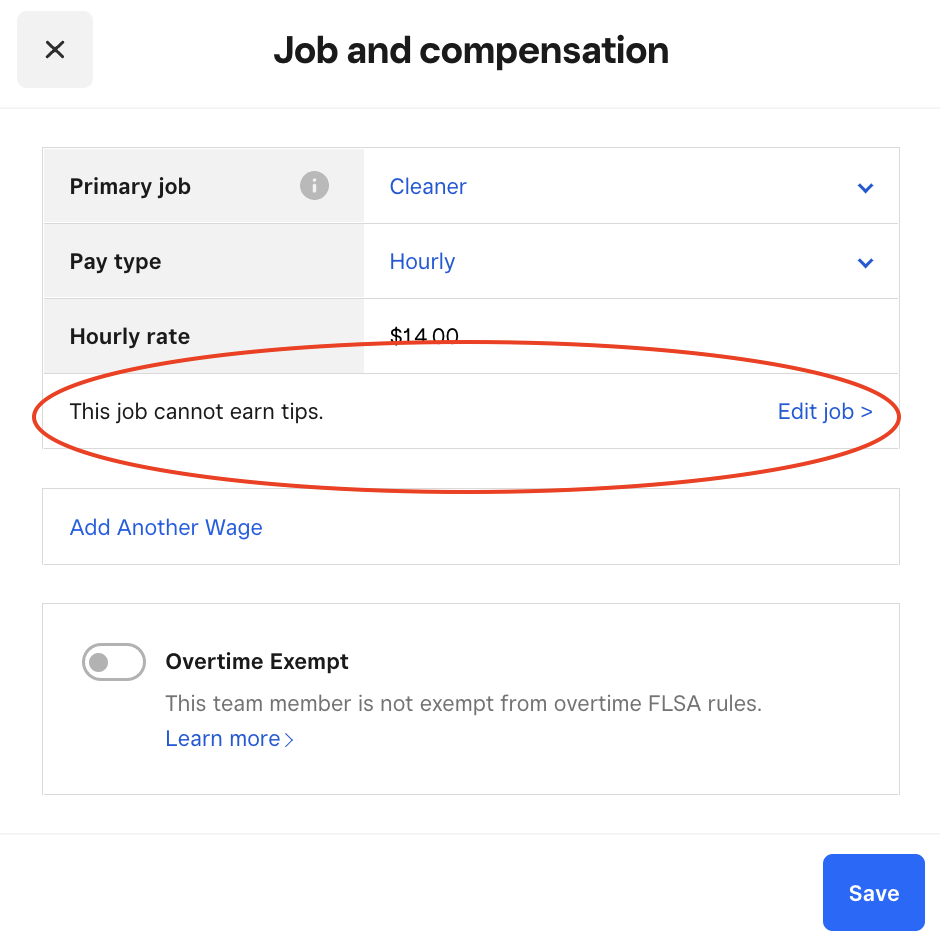
Doing this will still prompt for tips but not assign them to the employee.
Community Moderator, Square
Sign in and click Mark as Best Answer if my reply answers your question.
- Mark as New
- Subscribe to RSS Feed
- Permalink
- Report
- Subscribe to RSS Feed
- Mark Thread as New
- Mark Thread as Read
- Float this Thread for Current User
- Printer Friendly Page
I tried to do this in my payroll, but it does not give me that option?
- Mark as New
- Subscribe to RSS Feed
- Permalink
- Report
- Subscribe to RSS Feed
- Mark Thread as New
- Mark Thread as Read
- Float this Thread for Current User
- Printer Friendly Page
Hello, @Pawtenders
Just wanted to make sure that you are looking at the right place. This setting is adjusted from your Team Members section on the Square Dashboard.
Once there you can select your team members and under Job and Compensation, you can edit Tip Eligibility.
I hope this information is helpful!
P.S. Welcome to the Seller Community
Community Moderator, Square
Sign in and click Mark as Best Answer if my reply answers your question.
- Mark as New
- Subscribe to RSS Feed
- Permalink
- Report

Square Community