
- Home
- >
- Community Archive
- >
- Public Archive
- >
- Archived Discussions (Read Only)
- >
- There's no place to set sales tax in Square Regist...

- Subscribe to RSS Feed
- Mark Thread as New
- Mark Thread as Read
- Float this Thread for Current User
- Printer Friendly Page
There's no place to set sales tax in Square Register
Since the last Square update, I haven't had a place where I can manage my sales tax. I've searched the Dashboard thoroughly (or thought I had), but I can't find it. Where do I go?
- Labels:
-
Dashboard
-
Square Register
- Mark as New
- Subscribe to RSS Feed
- Permalink
- Report



- Subscribe to RSS Feed
- Mark Thread as New
- Mark Thread as Read
- Float this Thread for Current User
- Printer Friendly Page
Hello @GlassJudy!
If you're looking to edit your taxs from your online Square Dasboard head to the Items section > then click Taxes on the left-hand side of the screen. Click on the name of a tax to make changes.
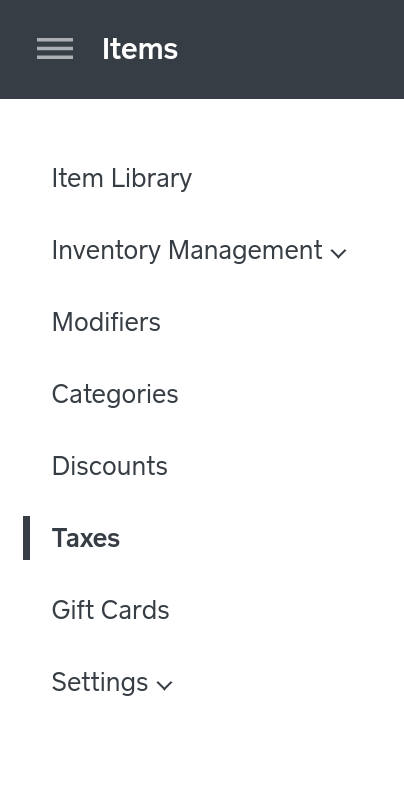
I don't believe the steps to update tax settings from your Square Register have changed recently. From your Register tap the down arrow at the top the screen > then tap Settings > and then select Tax from the menu on the left.
If you're still not able to update your tax settings let me know!
Seller Community Manager



- Subscribe to RSS Feed
- Mark Thread as New
- Mark Thread as Read
- Float this Thread for Current User
- Printer Friendly Page
I don't have a Square Register, but @pessosices maybe you can help.
- Mark as New
- Subscribe to RSS Feed
- Permalink
- Report
- Subscribe to RSS Feed
- Mark Thread as New
- Mark Thread as Read
- Float this Thread for Current User
- Printer Friendly Page
Hello @GlassJudy!
If you're looking to edit your taxs from your online Square Dasboard head to the Items section > then click Taxes on the left-hand side of the screen. Click on the name of a tax to make changes.
I don't believe the steps to update tax settings from your Square Register have changed recently. From your Register tap the down arrow at the top the screen > then tap Settings > and then select Tax from the menu on the left.
If you're still not able to update your tax settings let me know!
Seller Community Manager
- Subscribe to RSS Feed
- Mark Thread as New
- Mark Thread as Read
- Float this Thread for Current User
- Printer Friendly Page
Thanks, I thought i had tried that and it didn't work.
- Subscribe to RSS Feed
- Mark Thread as New
- Mark Thread as Read
- Float this Thread for Current User
- Printer Friendly Page
You're welcome! Let me know if you have any other questions!
Seller Community Manager
- Mark as New
- Subscribe to RSS Feed
- Permalink
- Report

Square Community