
- Home
- >
- Community Archive
- >
- Public Archive
- >
- Archived Discussions (Read Only)
- >
- How can I import/upload multiple items to the Item...

- Subscribe to RSS Feed
- Mark Thread as New
- Mark Thread as Read
- Float this Thread for Current User
- Printer Friendly Page
How can I import/upload multiple items to the Item Library for my Online Store?
[The title of this thread has been edited from the original: Uploading multiple items to the store]
Hello,
I keep seeing that users have been able to upload a csv. file of their store items to their store site. How can I do this? I do not see an option for this. Thank you
- Mark as New
- Subscribe to RSS Feed
- Permalink
- Report



- Subscribe to RSS Feed
- Mark Thread as New
- Mark Thread as Read
- Float this Thread for Current User
- Printer Friendly Page
Hey @ScienceMill-
Welcome to the Seller Community! 🌟
Take a look at this Support Center article on how to import/upload items into your Square Item Library to be feature on your Square Online Store. The Import option is under Actions in the Item Library of the Online Dashboard:
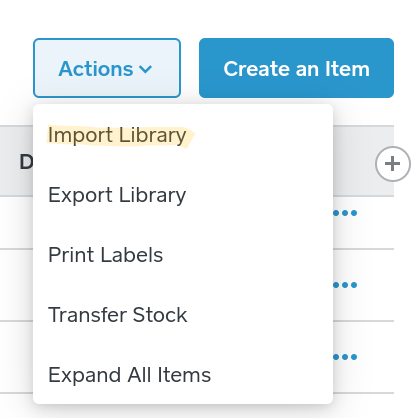
I hope this is helpful! Let me know if you have any questions about this.

- Mark as New
- Subscribe to RSS Feed
- Permalink
- Report

- Subscribe to RSS Feed
- Mark Thread as New
- Mark Thread as Read
- Float this Thread for Current User
- Printer Friendly Page
I am trying to print out my item library from our online shop - I don't see where the "action" button is from the Weebly dashboard - can you provide a screen shot - I am on our PC - but don't see this.
- Mark as New
- Subscribe to RSS Feed
- Permalink
- Report



- Subscribe to RSS Feed
- Mark Thread as New
- Mark Thread as Read
- Float this Thread for Current User
- Printer Friendly Page
Hey @PortsmouthSoaps you'll need to export the Item Library from Square's Dashboard, not the Online Store. Isabelle provides a link and a screenshot on this thread I moved you to.
Community Moderator, Square
Sign in and click Mark as Best Answer if my reply answers your question.
- Mark as New
- Subscribe to RSS Feed
- Permalink
- Report

Square Community