
- Home
- >
- Community Archive
- >
- Public Archive
- >
- Archived Discussions (Read Only)
- >
- Am I able to edit an invoice "draft"? I

- Subscribe to RSS Feed
- Mark Thread as New
- Mark Thread as Read
- Float this Thread for Current User
- Printer Friendly Page
Am I able to edit an invoice "draft"? I
I see that I can't edit an invoice. That's fine. BUT, I started a new invoice ad saved it as a draft, thinking I could continue editing it later. But I can see how to do that. Is it not possile to edit a draft in invoices? Help!
- Mark as New
- Subscribe to RSS Feed
- Permalink
- Report



- Subscribe to RSS Feed
- Mark Thread as New
- Mark Thread as Read
- Float this Thread for Current User
- Printer Friendly Page
When you save an invoice as a draft you can go back and edit it @jklean66!
To view your drafts head to the Invoices section of your online Square Dashboard > click All Invoices > click Drafts. Click on the draft you want to make changes to and then click Edit in the lower right.
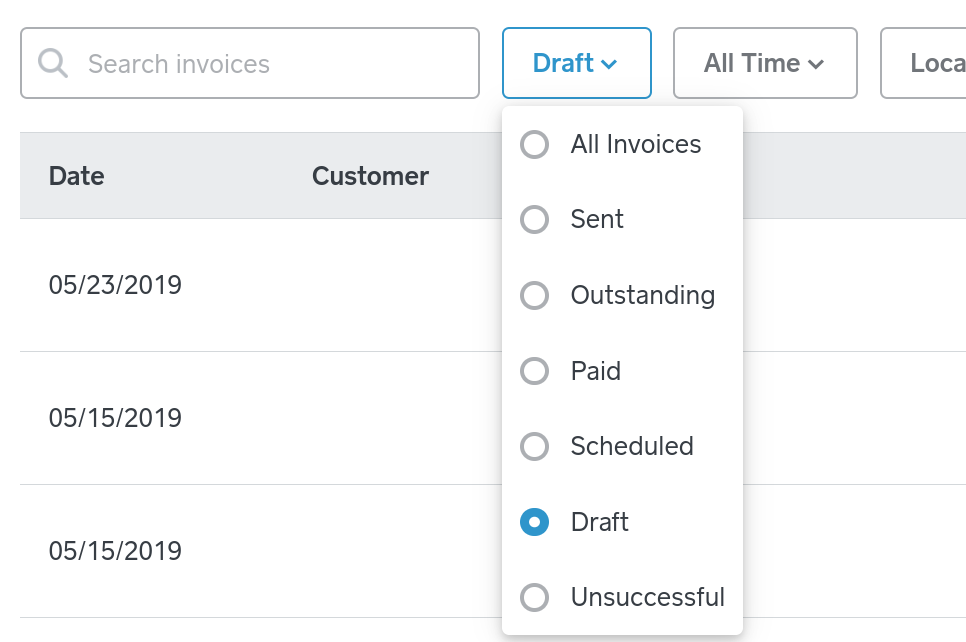
Or from the Point of Sale app, navigate to the Invoices section > tap Filter in upper right > tap Draft to see a list of draft invoices. From the list tap on an draft you need to make changes to > tap Send (or Save as Draft) to continue!
Seller Community Manager
- Mark as New
- Subscribe to RSS Feed
- Permalink
- Report
- Subscribe to RSS Feed
- Mark Thread as New
- Mark Thread as Read
- Float this Thread for Current User
- Printer Friendly Page
Thank you! Got it!
Jennifer
- Mark as New
- Subscribe to RSS Feed
- Permalink
- Report

Square Community