

Alumni
🆕 Receipt printing flexibility on connected Square Terminal

Hi sellers! 👋


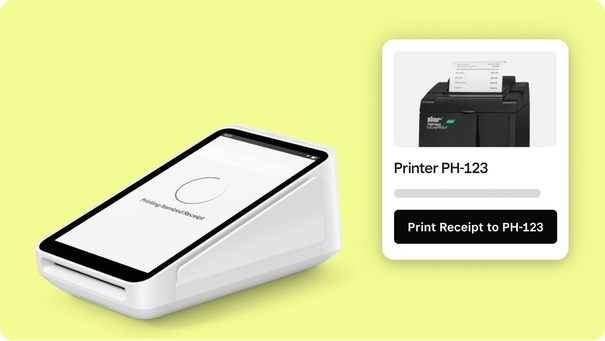
You can now streamline checkouts by printing receipts for cash payments right from your connected Square Terminal and printing receipts from external printers. 


jasminecheung_0-1691518228090.png


This new feature allows for a wider range of receipt printing settings in your connected Square Terminal, and customers are able to select their preferred form of receipt for both card or cash payments directly on the display. With increased printing options, we’re helping your business look more professional and improve the overall customer purchase experience.


To update printer settings:

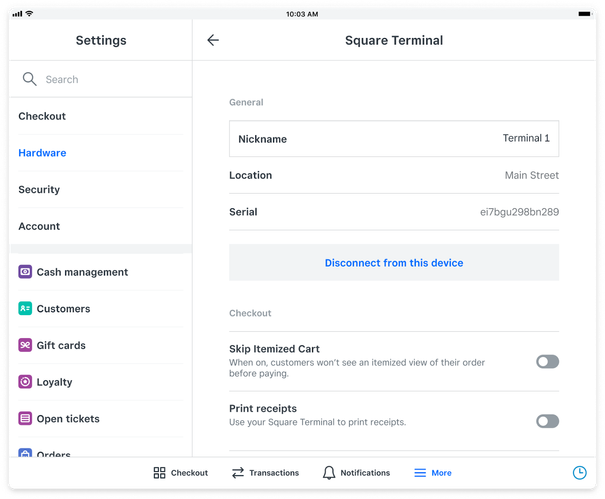
  1. From your Square Point of Sale app, go to Settings > Hardware > Square Terminal

  2. Toggle Print receipts to use your Square Terminal to print receipts for all types of transactions. 

jasminecheung_0-1691518484699.png


💡 Note: Square Terminal cannot print receipts from transaction history at this time, and Square Terminal must be connected to Square Point of Sale in order to access printer flexibility.


For more information on connected Square Terminal and its printer settings, check out Customer Support to learn how to Connect Square Terminal with your Point of Sale.

17 Replies
Square Champion

I think this is a great way to utilize the terminal more and more as a customer facing screen that frees the cashier up to better serve the customer and needs of the business.

Square Champion

You are correct, @Donnie-M.  Hopefully this works on Restaurants and Retail very soon.  I want it, too! LOL

Hi does this now allow all receipts to print at the main receipt printer and not the connected terminal ideally if the customer presses print I’d want it to print to the main printer not terminal

A feature we'll use daily. 

I would like to know this same thing. 

This is great! We have two Square Stands that don't have receipt printers. The Square Registers next to them do. With this addition, is there functionality coming that will allow us to print receipts to the Square Registers? Currently we have to wait for the Register to free up so we can pull the transaction up and print a duplicate.

When will this be available for Square Retail?

Alumni

Hi @MJWRetail and @thestorehouse, this can be achieved. When your Square Terminal is paired with the Square Point of Sale, navigate to Settings for the Square Terminal and toggle the Print Receipts button off. This disables printing of receipts on the Terminal, but still allows the Terminal to accept payment. Receipts will then print from any external printers connected to your Point of Sale when you click print from your screen.

Alumni

Hi @tylerwood, if your receipt printers are network printers, they can be configured to print from multiple devices (both Stands and Registers).

Alumni

Thank you for letting us know that this is something you'd like to see for Square for Retail, @CenturyCycle. We'll pass this feedback on to our team and will share an announcement if this becomes available on Retail, too. 

I am using the Square Terminal for card payments.  I also have a cash drawer and printer.  If someone pays by card and wants a receipt, then a receipt prints out on the terminal only.  Exactly as I want it.  If I have a customer paying by cash and wanting a receipt, the receipt printer prints but the terminal does too!  How can I stop this?


Alumni

Hello @WithitWitch,


I'd like to ask a few more questions to ensure I can provide you with the most accurate information.


Are you accepting cash payments using your Square Terminal? And have you set up a printer profile to print to both printers?


Check out this article about creating printer profiles here.

Hi, no the square terminal is only for taking card payments as people cant get to the stand screen to pay due to where I have to locate it - sometimes I need to be able to take payments outside of my shop.  I have set up a printer profile, but this is only for the receipt printer.  When I select cash payment, the terminal springs to life and asks if I want a receipt.  I select to print receipt on the stand (ipad) and receipts print out from both the terminal and the printer.  When on the terminal I have de-selected print receipts then nothing prints at all from it, but I need it to print card receipts


Square

Thanks @WithitWitch, just taking over from Robyn. 


I believe that this is intended behaviour. 


As long as the Terminal is connected to your Point of Sale, it will give you the option to print a receipt for any transaction whether it's cash or card. 


When I'm selecting to print a receipt for a cash sale I'm using the ipdad/stand, I'm not selecting to print a receipt on the terminal.  Its a waste of paper to have 2 printed out

Any progress on this being available for Square Retail?

How is this coming along? The longer I use this software, the more shortfalls I keep finding. Other options are starting to become attractive. 

Similar Threads
🆕 Improved checkout accuracy with sound feedback
🆕 Reconciliation Report CSV export now available
🆕 Search and sell faster with a connected keyboard
🇨🇦 Fresh off the line: Square’s latest features to transform your restaurant operations