
- Home
- >
- Community Archive
- >
- Public Archive
- >
- Archived Discussions (Read Only)
- >
- Re: Where are customer Reminder Notes?

- Subscribe to RSS Feed
- Mark Thread as New
- Mark Thread as Read
- Float this Thread for Current User
- Printer Friendly Page
Where are customer Reminder Notes?
In the customer area we can add notes about customers and we can also choose to set a reminder attached to that note. I set one a while back for a customer and I briefly saw some notice pop up on my phone but I wasn't at work so I couldn't take action on it and now I can't find anywhere in the Dashboard for me to see these reminders and so now I don't know which customer had this note!
- Mark as New
- Subscribe to RSS Feed
- Permalink
- Report



- Subscribe to RSS Feed
- Mark Thread as New
- Mark Thread as Read
- Float this Thread for Current User
- Printer Friendly Page
Hey @HauntedBookShop -
Welcome back!
The Notes are under the Customer's profile in the Directory. You will have to click on it and then scroll to that section. There isn't a way to look at the specific notes or reminders only.
Please let me know if you have any other questions.
Community Moderator, Square
Sign in and click Mark as Best Answer if my reply answers your question.
- Mark as New
- Subscribe to RSS Feed
- Permalink
- Report
- Subscribe to RSS Feed
- Mark Thread as New
- Mark Thread as Read
- Float this Thread for Current User
- Printer Friendly Page
So then I need to remember who I set the reminder for in order to get the reminder?
- Mark as New
- Subscribe to RSS Feed
- Permalink
- Report
- Subscribe to RSS Feed
- Mark Thread as New
- Mark Thread as Read
- Float this Thread for Current User
- Printer Friendly Page
That is correct.
Community Moderator, Square
Sign in and click Mark as Best Answer if my reply answers your question.
- Mark as New
- Subscribe to RSS Feed
- Permalink
- Report
- Subscribe to RSS Feed
- Mark Thread as New
- Mark Thread as Read
- Float this Thread for Current User
- Printer Friendly Page
Doesn't that, um, kinda defeat the purpose of a reminder? To have to remember it?
- Subscribe to RSS Feed
- Mark Thread as New
- Mark Thread as Read
- Float this Thread for Current User
- Printer Friendly Page
I see what you mean, but the reminders are set up as one time reminder - not a continuous one.
This can be tagged as a Feature Request for our Product Team.
Community Moderator, Square
Sign in and click Mark as Best Answer if my reply answers your question.
- Mark as New
- Subscribe to RSS Feed
- Permalink
- Report
- Subscribe to RSS Feed
- Mark Thread as New
- Mark Thread as Read
- Float this Thread for Current User
- Printer Friendly Page
Thanks. It's just that I'm not even seeing it one-time or where that would even appear to remind me for that singular occurence
- Mark as New
- Subscribe to RSS Feed
- Permalink
- Report
- Subscribe to RSS Feed
- Mark Thread as New
- Mark Thread as Read
- Float this Thread for Current User
- Printer Friendly Page
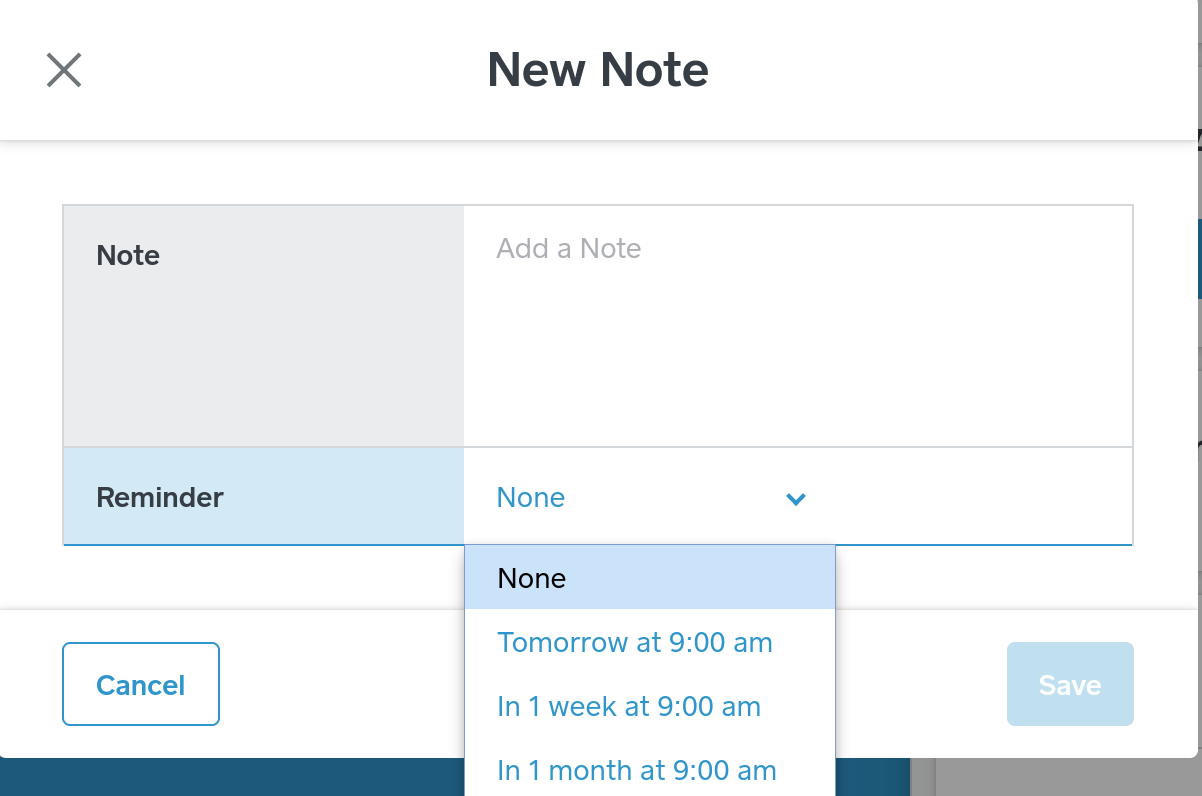
This is what the drop down menu looks like whenever those reminders are set. There is a custom options that allows you to pick the date and time.
Community Moderator, Square
Sign in and click Mark as Best Answer if my reply answers your question.
- Mark as New
- Subscribe to RSS Feed
- Permalink
- Report
- Subscribe to RSS Feed
- Mark Thread as New
- Mark Thread as Read
- Float this Thread for Current User
- Printer Friendly Page
And this is how it would look in your Customer's profile. The reminder would only send once, but it will keep the record a reminder was set. 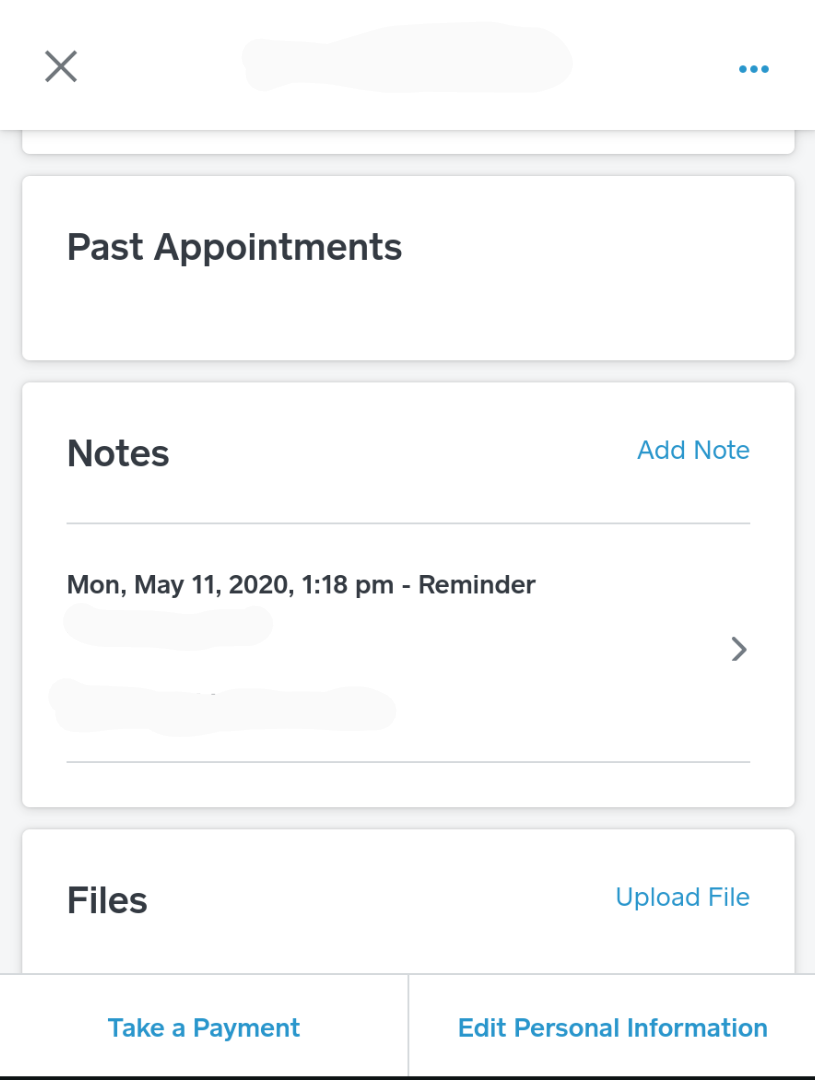
Community Moderator, Square
Sign in and click Mark as Best Answer if my reply answers your question.
- Mark as New
- Subscribe to RSS Feed
- Permalink
- Report
- Subscribe to RSS Feed
- Mark Thread as New
- Mark Thread as Read
- Float this Thread for Current User
- Printer Friendly Page
Thanks but where is the reminder sent?
- Mark as New
- Subscribe to RSS Feed
- Permalink
- Report
- Subscribe to RSS Feed
- Mark Thread as New
- Mark Thread as Read
- Float this Thread for Current User
- Printer Friendly Page
The reminder is sent to your email on your account.
Community Moderator, Square
Sign in and click Mark as Best Answer if my reply answers your question.
- Mark as New
- Subscribe to RSS Feed
- Permalink
- Report

- Subscribe to RSS Feed
- Mark Thread as New
- Mark Thread as Read
- Float this Thread for Current User
- Printer Friendly Page
I run a gutter clearance company, and would like the customer note reminders to show up on my calendar. not as a booking but as a reminder... eg... I clear someones gutters - then I set a reminder for one years time, id like to see the reminder in the calendar to be able to see when and how many reminders I have coming up ahead of me..
I can't schedule it as a repeat booking because their not definite bookings- but are reminders.
the current method means I currently have tens/ hundreds of notification reminders set, but have not idea whether I have 5 or 20 reminders that will pop up etc.
- Mark as New
- Subscribe to RSS Feed
- Permalink
- Report
- Subscribe to RSS Feed
- Mark Thread as New
- Mark Thread as Read
- Float this Thread for Current User
- Printer Friendly Page
Its a crucial feature point because I need to be able to see how much potential repeat work I have coming up alongside newly picked up customers. I have no way of seeing how busy I am potentially going to be ahead of me..
if I set it as a yearly booking then my calendar will look completely full and busy but infact none of these customers will have been contacted or booked in...
- Mark as New
- Subscribe to RSS Feed
- Permalink
- Report

- Subscribe to RSS Feed
- Mark Thread as New
- Mark Thread as Read
- Float this Thread for Current User
- Printer Friendly Page
Thank you for highlighting this feature request, and letting us know how you'd like to use this feature for your business @Hughbarker14!
I'll pass your feedback on to the Square Appointments team, and will reach out here with any updates.
PS. I noticed it's your first post, welcome to the Seller Community 😊
- Mark as New
- Subscribe to RSS Feed
- Permalink
- Report
- Subscribe to RSS Feed
- Mark Thread as New
- Mark Thread as Read
- Float this Thread for Current User
- Printer Friendly Page
Does anyone know if you can have the reminder set up to show on your ipad instead of it emailing through?
I am needing to set reminders up for my staff to see when customers are expiring or need updated documents but they don't have access to my meial so im wanting them to see it on the IPAD when they log in first thing in the morning ?
- Mark as New
- Subscribe to RSS Feed
- Permalink
- Report

Square Community