
- English Community
- Communauté Français
- Comunidad Español
- 日本語コミュニティ
- Home
- >
- Community Archive
- >
- Public Archive
- >
- Archived Discussions (Read Only)
- >
- Re: Process auto payment with card on file

- Suscribirse a un feed RSS
- Marcar tema como nuevo
- Marcar tema como leído
- Flotar este Conversación para el usuario actual
- Página de impresión sencilla
How do you charge a card on file?
After I have a client fill out a card authorization form, add the card info to their info on the square directory, how do I then use that stored card to charge for services?
- Marcar como nuevo
- Suscribirse a un feed RSS
- Resaltar
- Imprimir
- Informe de contenido inapropiado



- Suscribirse a un feed RSS
- Marcar tema como nuevo
- Marcar tema como leído
- Flotar este Conversación para el usuario actual
- Página de impresión sencilla
@timeoutplay You can charge a customer's card on file from the Register (or the Point of Sale app).
First I would make sure that your payment type settings include Card on File - these are the options you see in the Register after you tap 'Charge'.
To enable the Card on File Payment type from your Register:
- Tap the down arrow at the top of the screen > tap Settings.
- Tap Payment Types.
- You'll see current payment types at the top > scroll down and toggle on Customer Card on File.
Then, from the Checkout section of your Register:
- Enter the amount to charge this customer/select the items they purchased and tap Charge.
- Tap Card on File > tap on your customer's name from the list.
- You'll see the last four digits of their saved card at the top of the screen > tap Charge.
Seller Community Manager
- Marcar como nuevo
- Suscribirse a un feed RSS
- Resaltar
- Imprimir
- Informe de contenido inapropiado

- Suscribirse a un feed RSS
- Marcar tema como nuevo
- Marcar tema como leído
- Flotar este Conversación para el usuario actual
- Página de impresión sencilla
I'm jumping in for @JustinC here, @CoKiv!
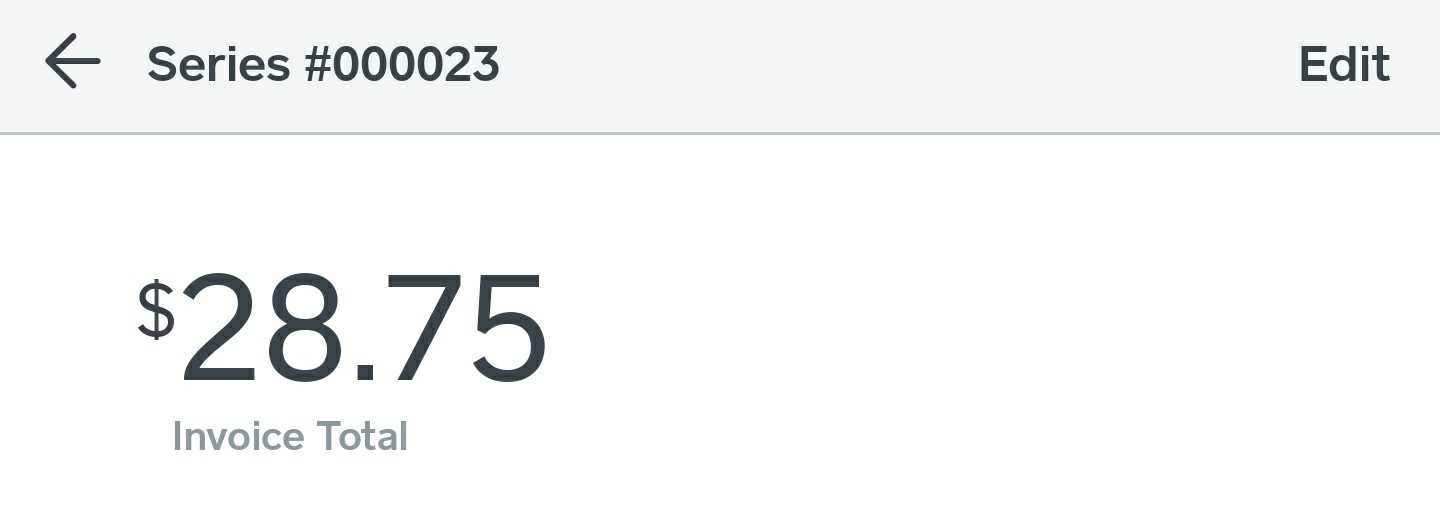
Please try heading logging into your Invoices app again, and opening up the recurring series you'd like to edit. The Edit button should be in the top right-hand corner of your screen. Please let me know if you're not seeing it! I've included a screenshot here for reference:
Community Moderator, Square
Sign in and click Mark as Best Answer if my reply answers your question.
- Marcar como nuevo
- Suscribirse a un feed RSS
- Resaltar
- Imprimir
- Informe de contenido inapropiado

- Suscribirse a un feed RSS
- Marcar tema como nuevo
- Marcar tema como leído
- Flotar este Conversación para el usuario actual
- Página de impresión sencilla
Does square not have a customer service phone number so someone can walk me through it? I ended up plugging in the customers card for her, and opening up her invoice and choosing to pay with card on file. I have absolutely no idea whether or not the card will charge automatically next month now and it’s really embarrassing to not have answers for customers. This is very frustrating.
- Marcar como nuevo
- Suscribirse a un feed RSS
- Resaltar
- Imprimir
- Informe de contenido inapropiado

- Suscribirse a un feed RSS
- Marcar tema como nuevo
- Marcar tema como leído
- Flotar este Conversación para el usuario actual
- Página de impresión sencilla
Hi there, @CoKiv! So sorry for the frustration, here. We can definitely take a deep dive with you and insure that your customer will continued to be charged recurringly.
The number to call is 1 (855) 700-6000 - but you'll also need your customer code. The steps to look up your code are here.
We will keep an eye out for your contact!
Community Moderator, Square
Sign in and click Mark as Best Answer if my reply answers your question.
- Marcar como nuevo
- Suscribirse a un feed RSS
- Resaltar
- Imprimir
- Informe de contenido inapropiado
- Suscribirse a un feed RSS
- Marcar tema como nuevo
- Marcar tema como leído
- Flotar este Conversación para el usuario actual
- Página de impresión sencilla
Okay so I called and spoke to customer service. He confirmed that the customer I was worried about was indeed on autopay. He looked at the recurring invoice. So invoices went out today and hers is unpaid. This is getting terribly frustrating. What do i need to do to set her up for auto pay?
- Marcar como nuevo
- Suscribirse a un feed RSS
- Resaltar
- Imprimir
- Informe de contenido inapropiado

- Suscribirse a un feed RSS
- Marcar tema como nuevo
- Marcar tema como leído
- Flotar este Conversación para el usuario actual
- Página de impresión sencilla
Hi @CoKiv-
Thanks for posting in the Seller Community.
FIrst, you will need to collect the card information, and add it to her Customer Directory profile. Here are the instructions on how to do so:
- Open the Square app or Square Dashboard.
- Tap Customer > select an existing customer from the list or tap Create New Customer.
- Tap Edit Personal Information > scroll to the bottom and tap Add Card.
- Dip or swipe the card, or manually key in the card information.
Once you've completed this step, please ensure that your recurring invoice has the appropriate charge card on file payment method:
- Head to the Invoices section of your online Square Dashboard > Create or Select an existing Invoice.
- Select a customer with a saved card on file.
- Under Invoice Method, select the card on file you’d like to charge.
- Select a Frequency and when you’d like to charge the card.
- Add Items to your invoice, then Charge immediately or Schedule for a future date.
I hope this helps. If you have any additional questions about this, please take a look here.

- Marcar como nuevo
- Suscribirse a un feed RSS
- Resaltar
- Imprimir
- Informe de contenido inapropiado
- Suscribirse a un feed RSS
- Marcar tema como nuevo
- Marcar tema como leído
- Flotar este Conversación para el usuario actual
- Página de impresión sencilla
Okay I went to the invoice, it is for a customer that has card saved on file. There is not a section that says “Invoice method” as your instructions state. It allows me to add a payment and charge her card, but I don’t want to have to do that every month.
- Marcar como nuevo
- Suscribirse a un feed RSS
- Resaltar
- Imprimir
- Informe de contenido inapropiado
- Suscribirse a un feed RSS
- Marcar tema como nuevo
- Marcar tema como leído
- Flotar este Conversación para el usuario actual
- Página de impresión sencilla
Hey @CoKiv-
When setting up the recurring invoice originally, it should look like this:
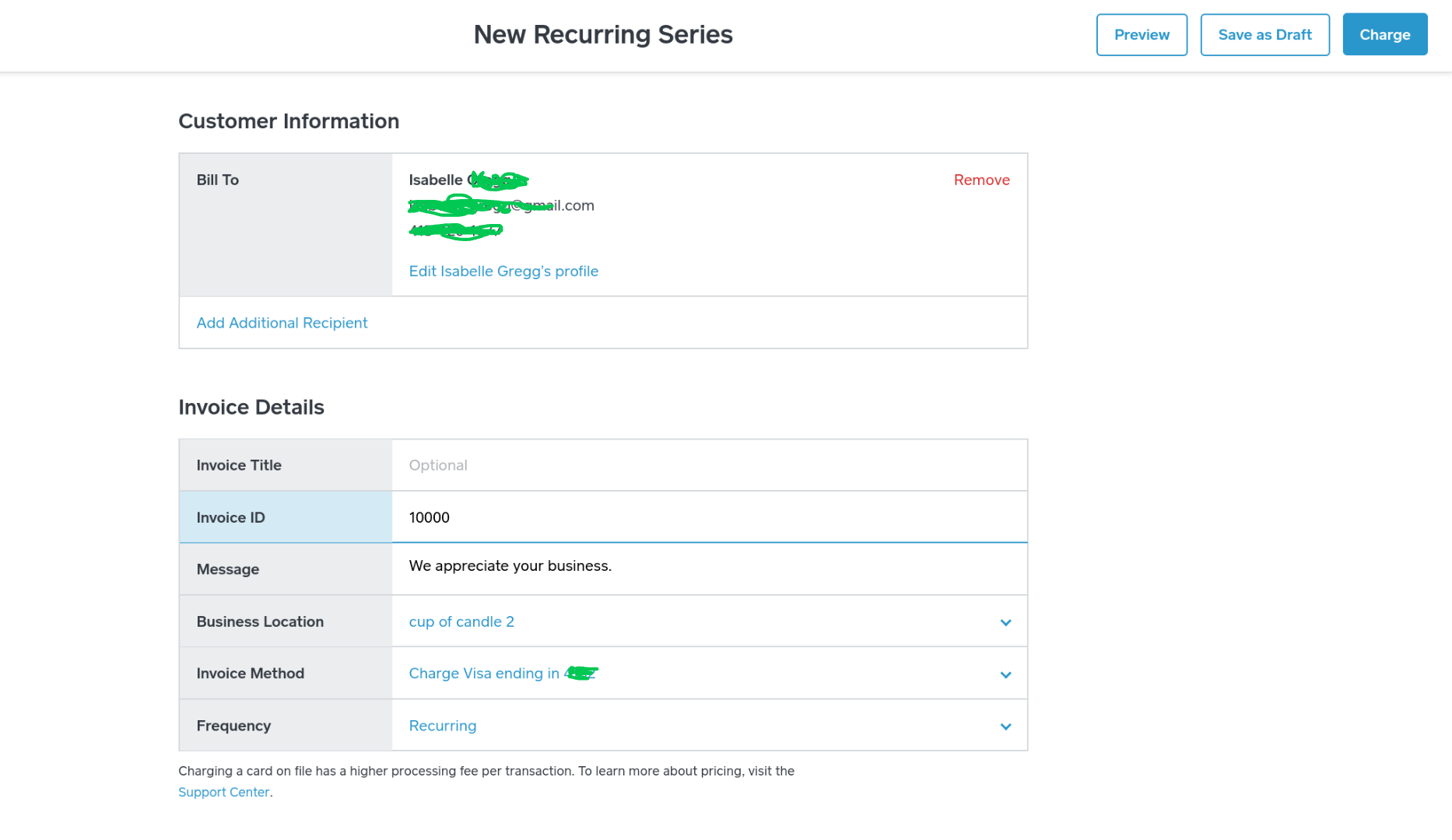
That will ensure that the customer will be charged monthly, via card on file. If they've already been charged for this month, I would create a new recurring invoice, ensure the method is correct, and set the start date to a month from now (instead of starts today) so they aren't charged twice. Is that helpful?
Let me know! ✨
- Marcar como nuevo
- Suscribirse a un feed RSS
- Resaltar
- Imprimir
- Informe de contenido inapropiado
- Suscribirse a un feed RSS
- Marcar tema como nuevo
- Marcar tema como leído
- Flotar este Conversación para el usuario actual
- Página de impresión sencilla
I went to set up a new recurring series and I do not have the option for invoice method. It’s simply not there on my app.
- Marcar como nuevo
- Suscribirse a un feed RSS
- Resaltar
- Imprimir
- Informe de contenido inapropiado
- Suscribirse a un feed RSS
- Marcar tema como nuevo
- Marcar tema como leído
- Flotar este Conversación para el usuario actual
- Página de impresión sencilla
Okay. Hmm. Can you try doing this from the Square Online Dashboard? I'd like to see if it works there @CoKiv.
- Marcar como nuevo
- Suscribirse a un feed RSS
- Resaltar
- Imprimir
- Informe de contenido inapropiado

- Suscribirse a un feed RSS
- Marcar tema como nuevo
- Marcar tema como leído
- Flotar este Conversación para el usuario actual
- Página de impresión sencilla
I am considering Square for a temple. We have devotees who have authorized us to charge their CC a fixed amount per month (say $50/mo.). Can I do that w/o sending them an invoice?
- Marcar como nuevo
- Suscribirse a un feed RSS
- Resaltar
- Imprimir
- Informe de contenido inapropiado
- Suscribirse a un feed RSS
- Marcar tema como nuevo
- Marcar tema como leído
- Flotar este Conversación para el usuario actual
- Página de impresión sencilla
Yes, @madhikari!
If you attach a card on file via an invoice, it would charge them every month, and the invoice would be the receipt. Would that work for you?
Additionally, you could just charge their card on file via Virtual Terminal on a monthly basis. They wouldn't receive any form of invoice in this case, just a receipt. Let me know if you have any questions about this! 💡
- Marcar como nuevo
- Suscribirse a un feed RSS
- Resaltar
- Imprimir
- Informe de contenido inapropiado

- Suscribirse a un feed RSS
- Marcar tema como nuevo
- Marcar tema como leído
- Flotar este Conversación para el usuario actual
- Página de impresión sencilla
I have a donor that increased their amount from 125 to 175. How do I make that change?
- Marcar como nuevo
- Suscribirse a un feed RSS
- Resaltar
- Imprimir
- Informe de contenido inapropiado
- Suscribirse a un feed RSS
- Marcar tema como nuevo
- Marcar tema como leído
- Flotar este Conversación para el usuario actual
- Página de impresión sencilla
Hi Allan7 👋 You will either need to refund the original amount and then re-take payment with the increased amount. Or you can process a separate transaction with the difference between the desired amount and what has already been processed.
Community Moderator, Square
Sign in and click Mark as Best Answer if my reply answers your question.
- Marcar como nuevo
- Suscribirse a un feed RSS
- Resaltar
- Imprimir
- Informe de contenido inapropiado

- « Anterior
-
- 1
- 2
- Siguiente »
Square Community