
- Home
- >
- Community Archive
- >
- Public Archive
- >
- Archived Discussions (Read Only)
- >
- Re: How do I schedule start date and end date for ...

- Subscribe to RSS Feed
- Mark Thread as New
- Mark Thread as Read
- Float this Thread for Current User
- Printer Friendly Page
How do I schedule start date and end date for summer appointments ?
I am setting up my business starting in the summer. For setting up an appointment schedule, I can't find a way to set up a start date and an end date. It looks like I have to manually go in and uncheck the boxes for each default week leading up to the summer, and then each week in the fall and so on. Additionally, in the fall, my schedule will be completely different. Is there a way to set up multiple schedules, with different start and end dates?
- Mark as New
- Subscribe to RSS Feed
- Permalink
- Report



- Subscribe to RSS Feed
- Mark Thread as New
- Mark Thread as Read
- Float this Thread for Current User
- Printer Friendly Page
Welcome to the Seller Communiyt @TRRSF. You can customize your schedule week by week using the 'Customize Staff Availability' on your Calendar but there isn't a way to do it for a date range yet. That would be a great addition, I'll share this request with the Appointments team.
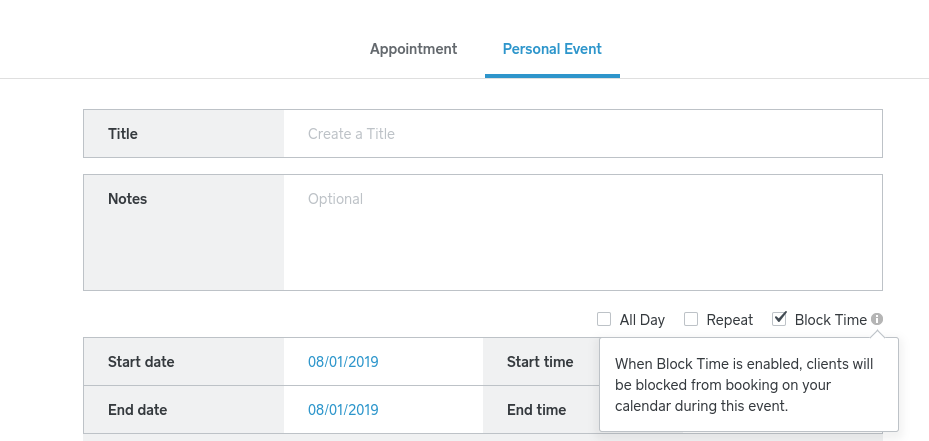
But as a workaround you could do the opposite and block off your availability for the fall - for example, if you haven't finalized your schedule yet or want to accept appointments for the summer only. To do this, create a Personal Event and select the option to Block Time (see screenshot below). This will prevent customers from being able to book during that specific time range and you can remove it when you're ready to accept appointments in the fall. (If you have members of staff create a Personal Event for each!)
Seller Community Manager
- Mark as New
- Subscribe to RSS Feed
- Permalink
- Report

- Subscribe to RSS Feed
- Mark Thread as New
- Mark Thread as Read
- Float this Thread for Current User
- Printer Friendly Page
The title of this thread has been edited from the original: Daily Rentals
I own some beach property that I want to rent on a daily basis. In the appointment calendar there is no way to specify a start date and an end date to show availability or not available and to calculate total days reserved for invoicing. Is there a way to use it as a booking availability.
Thanks
- Mark as New
- Subscribe to RSS Feed
- Permalink
- Report

- Subscribe to RSS Feed
- Mark Thread as New
- Mark Thread as Read
- Float this Thread for Current User
- Printer Friendly Page
Welcome to the Community @HighRidge. Square Appointments cannot specify start/end dates or calculate the total cost of the rental automatically. Your best bet is to leave the price variable and enter the calculated total at checkout.
As a workaround to start and end dates, hopefully this thread will help. Check out Helen's up top
Community Moderator, Square
Sign in and click Mark as Best Answer if my reply answers your question.
- Mark as New
- Subscribe to RSS Feed
- Permalink
- Report

Square Community