
- Home
- >
- Community Archive
- >
- Public Archive
- >
- Archived Discussions (Read Only)
- >
- Is there an option to accept or deny an appointmen...

- Subscribe to RSS Feed
- Mark Thread as New
- Mark Thread as Read
- Float this Thread for Current User
- Printer Friendly Page
Can I confirm/accept or deny client booked appointments?
[The title of this thread has been edited from the original: Auto Confirming appointments]
Want to be able to confirm the appointment manually
- Mark as New
- Subscribe to RSS Feed
- Permalink
- Report



- Subscribe to RSS Feed
- Mark Thread as New
- Mark Thread as Read
- Float this Thread for Current User
- Printer Friendly Page
Hey @Cojack1982-
I want to make sure I understand what you're asking for.
Are you looking to be able to accept or reject appointments after your clients book them?
If so, we have a Reservation Guarantee setting where it will require the Seller to accept or deny incoming appointments:
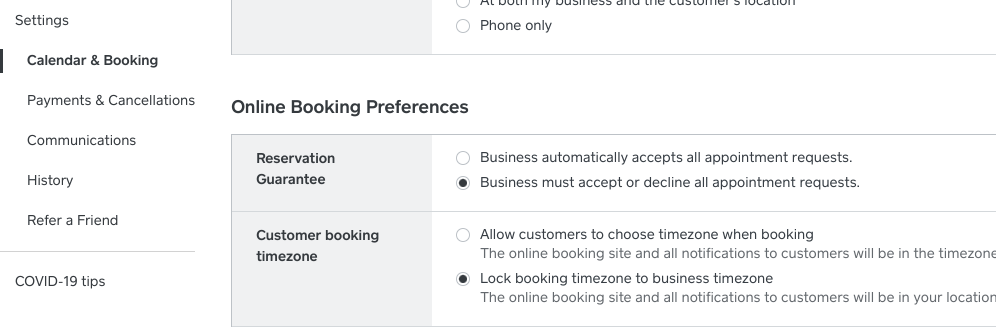
I hope that's helpful! Let me know if you have any questions about this.

- Mark as New
- Subscribe to RSS Feed
- Permalink
- Report

- Subscribe to RSS Feed
- Mark Thread as New
- Mark Thread as Read
- Float this Thread for Current User
- Printer Friendly Page
I have my calender set this way but the other day and client booked and I never was asked to accept the appointment. How is this?
- Mark as New
- Subscribe to RSS Feed
- Permalink
- Report

- Subscribe to RSS Feed
- Mark Thread as New
- Mark Thread as Read
- Float this Thread for Current User
- Printer Friendly Page
Hi there @Penderysalon,
Just so we're on the same page with you here, are you able to send through a screenshot of your current Calendar & Booking settings?
We'll keep a lookout for your reply!
Community Moderator, Australia, Square
Sign in and click Mark as Best Answer if my reply answers your question.
- Mark as New
- Subscribe to RSS Feed
- Permalink
- Report
- Subscribe to RSS Feed
- Mark Thread as New
- Mark Thread as Read
- Float this Thread for Current User
- Printer Friendly Page
Is there an option to accept or deny an appointment When someone books ?
- Mark as New
- Subscribe to RSS Feed
- Permalink
- Report

- Subscribe to RSS Feed
- Mark Thread as New
- Mark Thread as Read
- Float this Thread for Current User
- Printer Friendly Page
Hi @jamiekagy7- Glad you asked because YES, there is! I moved your post here so you can check out Isabelle's answer to this exact question.
Community Program Manager, Square
- Mark as New
- Subscribe to RSS Feed
- Permalink
- Report
- Subscribe to RSS Feed
- Mark Thread as New
- Mark Thread as Read
- Float this Thread for Current User
- Printer Friendly Page
Client got my confirmation but it doesn't show up on my calendar and when i go to client, it says appointment unconfirmed. How do I confirm manually?
- Mark as New
- Subscribe to RSS Feed
- Permalink
- Report

- Subscribe to RSS Feed
- Mark Thread as New
- Mark Thread as Read
- Float this Thread for Current User
- Printer Friendly Page
Hey @LECMassage - are you able to tap the appointment on your calendar and see an option to confirm? I'm looping in our Appointments experts for a hand.
Community Moderator, Square
Sign in and click Mark as Best Answer if my reply answers your question.
- Mark as New
- Subscribe to RSS Feed
- Permalink
- Report
- Subscribe to RSS Feed
- Mark Thread as New
- Mark Thread as Read
- Float this Thread for Current User
- Printer Friendly Page
Hi Justin,
Appt doesn't show in my calendar. I assumed since it was not showing as confirmed, it was not on my calendar. I have to go to contacts to see clients appt and from there I had to take payment. Very weird.
- Mark as New
- Subscribe to RSS Feed
- Permalink
- Report
- Subscribe to RSS Feed
- Mark Thread as New
- Mark Thread as Read
- Float this Thread for Current User
- Printer Friendly Page
Gotcha. From the Appointments Details page, you will be able to see the appointment confirmation details. If an appointment has not yet been confirmed by your client, you can either resend a confirmation request or mark the appointment as confirmed.
You can also view all of your client’s confirmation status’ directly from your Appointments Calendar on your Appointments Dashboard.
Confirmed appointments will show a check mark next to the appointment, and unconfirmed appointments will show a question mark.
Community Moderator, Square
Sign in and click Mark as Best Answer if my reply answers your question.
- Mark as New
- Subscribe to RSS Feed
- Permalink
- Report
- Subscribe to RSS Feed
- Mark Thread as New
- Mark Thread as Read
- Float this Thread for Current User
- Printer Friendly Page
Is this a way I can manually accept appointments? Mine are being accepted automatically.
- Mark as New
- Subscribe to RSS Feed
- Permalink
- Report



- Subscribe to RSS Feed
- Mark Thread as New
- Mark Thread as Read
- Float this Thread for Current User
- Printer Friendly Page
If you go into Appointments>Settings>Calendar & Booking look under Reservation Guarantee check the box that says "business must accept or decline al appointment requests"
Square Champion
Check out Square support center for additional help.
"If you don't stand for something, you'll fall for anything"
- Subscribe to RSS Feed
- Mark Thread as New
- Mark Thread as Read
- Float this Thread for Current User
- Printer Friendly Page
I’ve noticed on some square pages. U have the option to view the appointment and accept or deny. I’d like to be able to filter my appointments like this can anyone please direct me how to turn on this feature.
- Mark as New
- Subscribe to RSS Feed
- Permalink
- Report

Square Community