
- Home
- >
- Community Archive
- >
- Public Archive
- >
- Archived Discussions (Read Only)
- >
- Re: APPOINTMENT DASHBOARD???

- Subscribe to RSS Feed
- Mark Thread as New
- Mark Thread as Read
- Float this Thread for Current User
- Printer Friendly Page
APPOINTMENT DASHBOARD???
Hi, I just started this and it keeps automatically accepting appointments without me being able to approve them. I googled it and the only way i can get to the APPOINTMENT DASHBOARD to fix this setting plus more is through that specific link which then once i fix the settings does not have a SAVE BUTTON???? I cant figure out how to change this. PLEASE HELP 😞
- Mark as New
- Subscribe to RSS Feed
- Permalink
- Report



- Subscribe to RSS Feed
- Mark Thread as New
- Mark Thread as Read
- Float this Thread for Current User
- Printer Friendly Page
Sorry to see the trouble has brought you to the Seller Community!
Are you using a computer to access your Dashboard, or a mobile device @klawmuse?
If you haven't already tried using a Chrome web browser, let's give that a shot! ✨
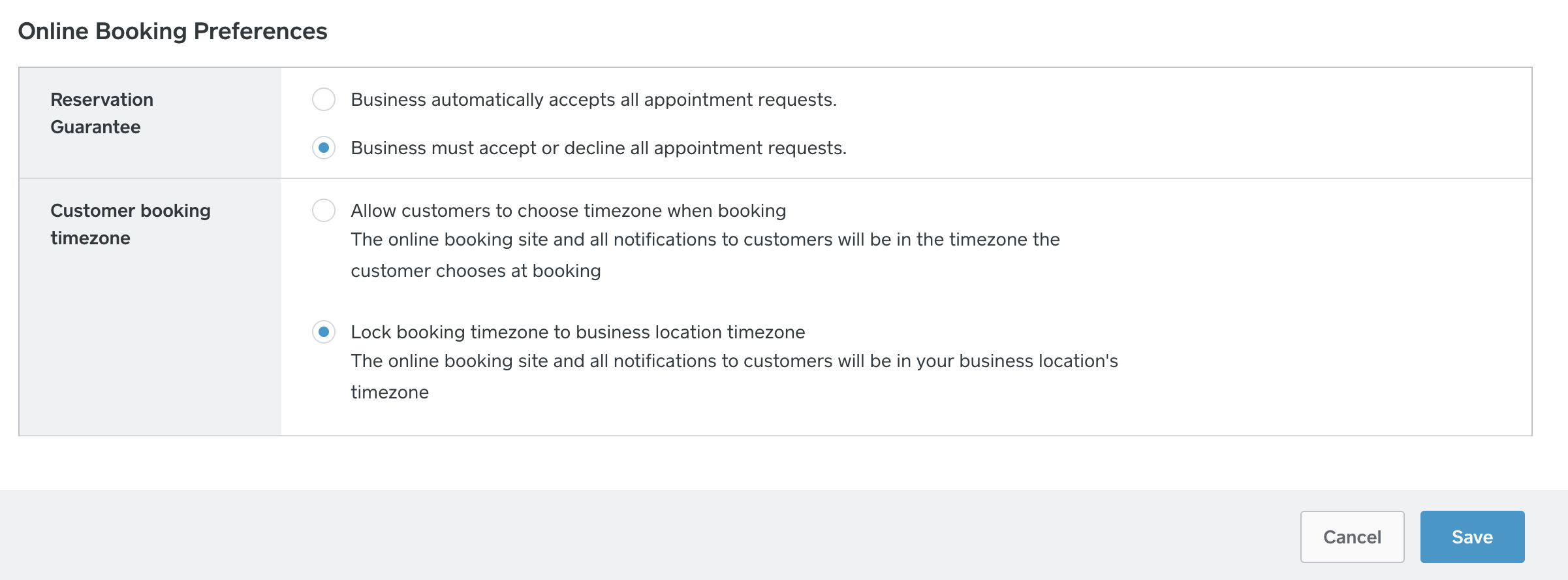
This is the page you can adjust this setting on, under Online Booking Preferences.
The Save button will be in the bottom corner:
Community Moderator, Square
Sign in and click Mark as Best Answer if my reply answers your question.
- Mark as New
- Subscribe to RSS Feed
- Permalink
- Report
- Subscribe to RSS Feed
- Mark Thread as New
- Mark Thread as Read
- Float this Thread for Current User
- Printer Friendly Page
Hi Valentina! I discovered that you must use a computer to change that setting. I was able to do it from my laptop. Thank you for the help!
- Mark as New
- Subscribe to RSS Feed
- Permalink
- Report
- Subscribe to RSS Feed
- Mark Thread as New
- Mark Thread as Read
- Float this Thread for Current User
- Printer Friendly Page
I'm glad you figured it out @klawmuse! ✨
Community Moderator, Square
Sign in and click Mark as Best Answer if my reply answers your question.
- Mark as New
- Subscribe to RSS Feed
- Permalink
- Report

Square Community