
- Home
- >
- Community Archive
- >
- Public Archive
- >
- Archived Discussions (Read Only)
- >
- Silly question but I'm lost - online sale notifica...

- Subscribe to RSS Feed
- Mark Thread as New
- Mark Thread as Read
- Float this Thread for Current User
- Printer Friendly Page
I just turned on/published our square website
I did a test sale to see what would happen, and I did not receive an email notice of the sale
What I did receive, was an email stating "You accepted $1.07 from a card ending in "
Is this the notification I'm going to receive when an online sale occurs?
Do I then have to log in to the back end to see what the customer purchased?
Kind of hokey if it is
Thanks in advance
- Mark as New
- Subscribe to RSS Feed
- Permalink
- Report

- Subscribe to RSS Feed
- Mark Thread as New
- Mark Thread as Read
- Float this Thread for Current User
- Printer Friendly Page
Hey there @jandjwoodables, congratulations on launching your Square Online Site, and welcome back to the Square Seller Community!
When you process a sale, you should receive (via email) a copy of the customers e-receipt, and a sales report on how much money you have accepted - how it affects your balance after fees.
If you're not receiving emails correctly, have you:
- Checked your Spam/Junk folder?
- Checked it's sending to the correct email?
- Made sure these domains are listed as 'safe': @squareup.com, @messaging.squareup.com, @communications.squareup.com?
Please also whitelist the following email addresses by adding them to your contacts:
- [email protected]
- [email protected]
- [email protected]
- [email protected]
- [email protected]
- no-reply@ editmysite.com (no space, space present to avoid auto-linking and bad HTML)
If you've added all the emails above and the emails are still not being sent through to your inbox or spam folder, the next step would be to contact your email provider directly as emails might be blocked or delayed by them.
On the receipt copy you should be able to see all the details such as shipping address, products, shipping method, order number, and customer details - which is what I'm guessing you were looking for?
If this helped, please mark it as best answer to help others looking for similar solutions in the future! 😎✨
Sign in and click Mark as Best Answer if my reply answers your question!

Shop MJD Photography
Visit MJD Web Services
- Subscribe to RSS Feed
- Mark Thread as New
- Mark Thread as Read
- Float this Thread for Current User
- Printer Friendly Page
I spent 3 hours with Tayva and Mario - they went over every possible scenario'
It's broke and needs fixing
- Mark as New
- Subscribe to RSS Feed
- Permalink
- Report
- Subscribe to RSS Feed
- Mark Thread as New
- Mark Thread as Read
- Float this Thread for Current User
- Printer Friendly Page
Hey there @jandjwoodables, congratulations on launching your Square Online Site, and welcome back to the Square Seller Community!
When you process a sale, you should receive (via email) a copy of the customers e-receipt, and a sales report on how much money you have accepted - how it affects your balance after fees.
If you're not receiving emails correctly, have you:
- Checked your Spam/Junk folder?
- Checked it's sending to the correct email?
- Made sure these domains are listed as 'safe': @squareup.com, @messaging.squareup.com, @communications.squareup.com?
Please also whitelist the following email addresses by adding them to your contacts:
- [email protected]
- [email protected]
- [email protected]
- [email protected]
- [email protected]
- no-reply@ editmysite.com (no space, space present to avoid auto-linking and bad HTML)
If you've added all the emails above and the emails are still not being sent through to your inbox or spam folder, the next step would be to contact your email provider directly as emails might be blocked or delayed by them.
On the receipt copy you should be able to see all the details such as shipping address, products, shipping method, order number, and customer details - which is what I'm guessing you were looking for?
If this helped, please mark it as best answer to help others looking for similar solutions in the future! 😎✨
Sign in and click Mark as Best Answer if my reply answers your question!
Shop MJD Photography
Visit MJD Web Services
- Subscribe to RSS Feed
- Mark Thread as New
- Mark Thread as Read
- Float this Thread for Current User
- Printer Friendly Page
Thanks for the reply Matt,
Nope, I am not getting a receipt of the actual sale, just the "Payment Received" email
There is no block on the emails as I manage them myself, nothing in spam, no junk.
I get other emails from my square account such as low stock alerts, transfers etc. but nothing if a sale was made from the website other than the "Payment Received" email
Thanks in advance
- Mark as New
- Subscribe to RSS Feed
- Permalink
- Report
- Subscribe to RSS Feed
- Mark Thread as New
- Mark Thread as Read
- Float this Thread for Current User
- Printer Friendly Page
So, it seems there is a problem. Not only with me getting notifications, but also with customer support!
I contacted support about my problem, and spoke with Tayra on 6/17/21 who tried to get my problem fixed but said it needed to be escalated to technical support.
She put me in contact with Mario P on the same day 6/17/21 who confirmed there was a problem and he would have technical people look into it and let me know the outcome.
It is now 6/28/21 - 11 days has passed and nothing, nada, zip. I have attempted to contact Mario (phone and email) and now I get no response what so ever.
If this is what you call customer service, you may want to change your business model because your customer service is non-existent!
Unless I have this issue resolved, I will be recommending to other vendors I associate with NOT to use Square and find an alternative that actually cares about their customers!
- Mark as New
- Subscribe to RSS Feed
- Permalink
- Report



- Subscribe to RSS Feed
- Mark Thread as New
- Mark Thread as Read
- Float this Thread for Current User
- Printer Friendly Page
Our team may have already covered this with you, but let's make sure you have checked this setting first!
Head to your Square Online overview page > Settings / Shared Settings > Notifications
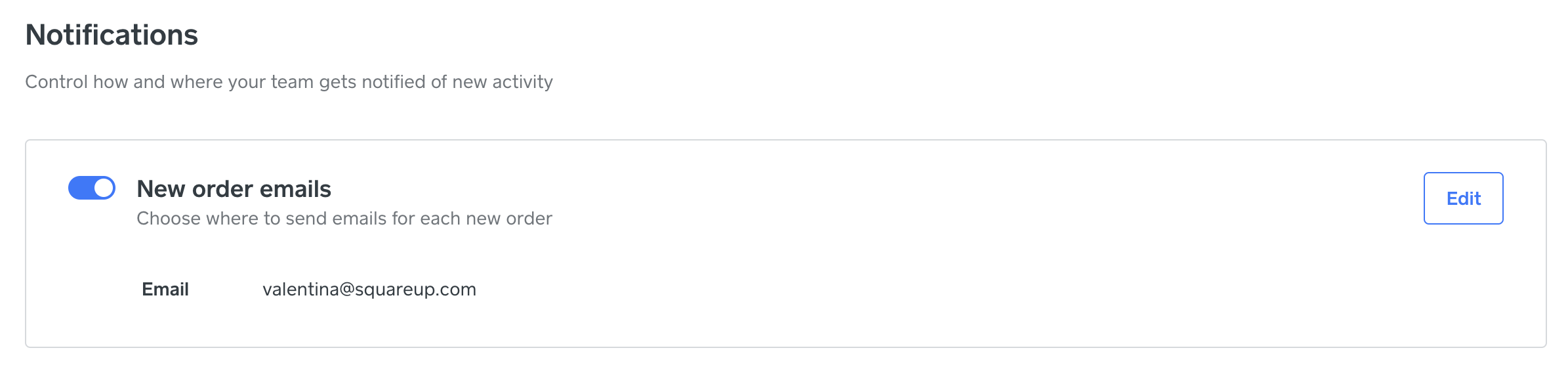
Is this toggled ON within your account, @jandjwoodables?
Community Moderator, Square
Sign in and click Mark as Best Answer if my reply answers your question.
- Mark as New
- Subscribe to RSS Feed
- Permalink
- Report
- Subscribe to RSS Feed
- Mark Thread as New
- Mark Thread as Read
- Float this Thread for Current User
- Printer Friendly Page
Thank you for your response
Yes, we have gone over every switch - it is not working - I do not get any emails and I am no longer hearing from support!
- Mark as New
- Subscribe to RSS Feed
- Permalink
- Report
- Subscribe to RSS Feed
- Mark Thread as New
- Mark Thread as Read
- Float this Thread for Current User
- Printer Friendly Page
It's possible that the email address associated with receiving these order emails is different than the one you are checking.
Did our team happen to help confirm the email we are currently sending these notifications to, @jandjwoodables?
Community Moderator, Square
Sign in and click Mark as Best Answer if my reply answers your question.
- Mark as New
- Subscribe to RSS Feed
- Permalink
- Report
- Subscribe to RSS Feed
- Mark Thread as New
- Mark Thread as Read
- Float this Thread for Current User
- Printer Friendly Page
Yes, Mario confirmed the email address
- Mark as New
- Subscribe to RSS Feed
- Permalink
- Report
- Subscribe to RSS Feed
- Mark Thread as New
- Mark Thread as Read
- Float this Thread for Current User
- Printer Friendly Page
It's possible that these messages are going to a spam folder, or to a different email address than you expect.
Did you ever change the email address associated with your Square account @jandjwoodables?
If so, your Square Online website may still be sending order emails to the old email address.
Community Moderator, Square
Sign in and click Mark as Best Answer if my reply answers your question.
- Mark as New
- Subscribe to RSS Feed
- Permalink
- Report
- Subscribe to RSS Feed
- Mark Thread as New
- Mark Thread as Read
- Float this Thread for Current User
- Printer Friendly Page
I spent 3 hours with Tayva and Mario - they went over every possible scenario'
It's broke and needs fixing
- Mark as New
- Subscribe to RSS Feed
- Permalink
- Report
- Subscribe to RSS Feed
- Mark Thread as New
- Mark Thread as Read
- Float this Thread for Current User
- Printer Friendly Page
If you haven't heard back, I would recommend reaching back out either by responding to the ongoing email chain, or by giving us a call. So sorry to hear about the ongoing troubles, @jandjwoodables 🪵
Community Moderator, Square
Sign in and click Mark as Best Answer if my reply answers your question.
- Mark as New
- Subscribe to RSS Feed
- Permalink
- Report
- Subscribe to RSS Feed
- Mark Thread as New
- Mark Thread as Read
- Float this Thread for Current User
- Printer Friendly Page
I have not heard anything and it is still broke almost 2 full weeks now
Not a happy customer!
- Mark as New
- Subscribe to RSS Feed
- Permalink
- Report
- Subscribe to RSS Feed
- Mark Thread as New
- Mark Thread as Read
- Float this Thread for Current User
- Printer Friendly Page
Did you try reaching back out yesterday? I would recommend calling today, since phone support is unavailable over the weekend and I would like our team to have a chance to take a look before the weekend begins, @jandjwoodables!
Community Moderator, Square
Sign in and click Mark as Best Answer if my reply answers your question.
- Mark as New
- Subscribe to RSS Feed
- Permalink
- Report
- Subscribe to RSS Feed
- Mark Thread as New
- Mark Thread as Read
- Float this Thread for Current User
- Printer Friendly Page
I've been very busy lately so I've not had time to sit on the phone for 3 hours and go through this fiasco all over again with all new people
Not a happy customer
- Mark as New
- Subscribe to RSS Feed
- Permalink
- Report

- Subscribe to RSS Feed
- Mark Thread as New
- Mark Thread as Read
- Float this Thread for Current User
- Printer Friendly Page
Why are posts duplicated?
- Mark as New
- Subscribe to RSS Feed
- Permalink
- Report
- Subscribe to RSS Feed
- Mark Thread as New
- Mark Thread as Read
- Float this Thread for Current User
- Printer Friendly Page
I'm not sure what you mean, @bsia - how can we help?
Community Moderator, Square
Sign in and click Mark as Best Answer if my reply answers your question.
- Mark as New
- Subscribe to RSS Feed
- Permalink
- Report
- Subscribe to RSS Feed
- Mark Thread as New
- Mark Thread as Read
- Float this Thread for Current User
- Printer Friendly Page
On this page I see 2 posts from MJD photography, exactly the same. And I've seen duplicate posts on other topics also.
Is it just showing up like that to me, or to everyone. Do you see 2 of the same on this page?
- Mark as New
- Subscribe to RSS Feed
- Permalink
- Report
- Subscribe to RSS Feed
- Mark Thread as New
- Mark Thread as Read
- Float this Thread for Current User
- Printer Friendly Page
If a post is marked as a Best Answer or Verified Answer, you will see it pinned to the top - as well as in it's original spot.
I hope this helps, @bsia.
Community Moderator, Square
Sign in and click Mark as Best Answer if my reply answers your question.
- Mark as New
- Subscribe to RSS Feed
- Permalink
- Report

Square Community