
- Home
- >
- Community Archive
- >
- Public Archive
- >
- Archived Discussions (Read Only)
- >
- I have an iphone 7 Plus, square w/lighting connect...

- Subscribe to RSS Feed
- Mark Thread as New
- Mark Thread as Read
- Float this Thread for Current User
- Printer Friendly Page
I have an iphone 7 Plus, square w/lighting connector wants to use my microphone?
I have an iphone 7 Plus, square w/lighting connector wants to use my microphone?
I have gone to Privacy and there is nothing under mirophone.
I have gone to General and there is no POS or Restrictions to choose.
Square shows up directly under settings showing blue tooth on, but I cannot find where to give square access to my microphone? My wife has a iPhone 6 with the 3.5 connection and it works great with her phone but not my 7 plus? What can I do to get access to the microphone?
- Mark as New
- Subscribe to RSS Feed
- Permalink
- Report



- Subscribe to RSS Feed
- Mark Thread as New
- Mark Thread as Read
- Float this Thread for Current User
- Printer Friendly Page
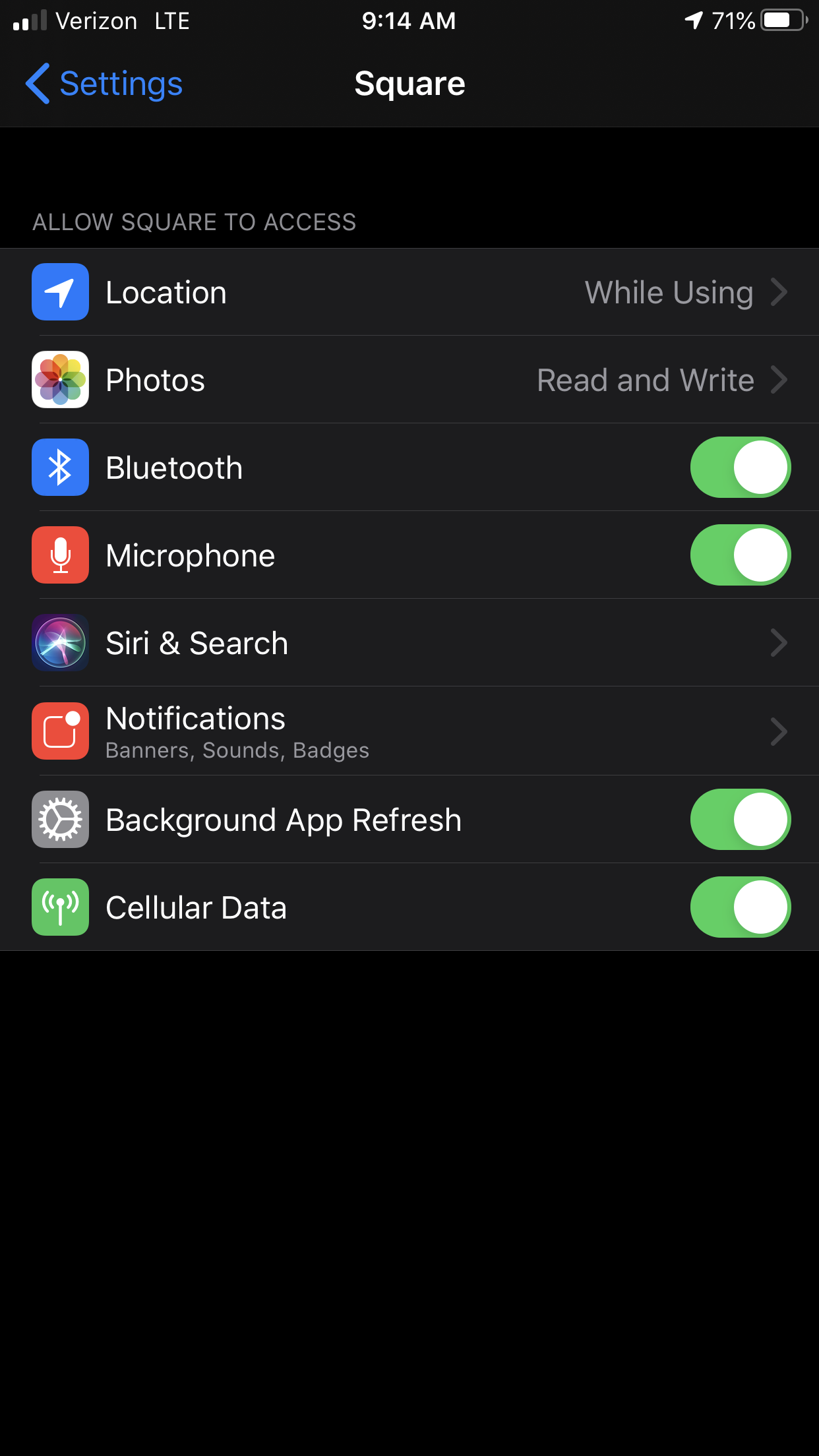
Hey! Thanks for reaching out and welcome to the community! I also have an iPhone, and when you open the app, it should ask for you to enable Microphone settings... you will almost always see "Enable" or "Settings" in the pop up. Clicking either of those will take you directly to the Square's app settings within your iPhone, where you will enable the microphone there.
Otherwise, you will do this:
1: Visit Settings on your iPhone (the icon with the gray gears)
2: Search "Square"
3: Open Square and look for "Microphone"
4: Toggle it on
I have a screenshot below from an iPhone in Dark Mode. 🙂
Community Moderator, Square
Sign in and click Mark as Best Answer if my reply answers your question.
- Mark as New
- Subscribe to RSS Feed
- Permalink
- Report

Square Community