
- Home
- >
- Community Archive
- >
- Public Archive
- >
- Archived Discussions (Read Only)
- >
- How would I apply a deposit fee?

- Subscribe to RSS Feed
- Mark Thread as New
- Mark Thread as Read
- Float this Thread for Current User
- Printer Friendly Page
How would I apply a deposit fee?
I have services that I do (hairstyles) I want to my clients to pay a deposit fee online through this booking site but I want the remainder in cash. I still want them to be able to see the full price of the services but I just dont want them to pay the full amount online. How can I set this up?
- Mark as New
- Subscribe to RSS Feed
- Permalink
- Report



- Subscribe to RSS Feed
- Mark Thread as New
- Mark Thread as Read
- Float this Thread for Current User
- Printer Friendly Page
Welcome to the Community, @DessDoesIt_ -
There is an option to require a payment whenever your customer books a service, but you would have to turn this on in your settings.
Go to your Dashboard > Appointments > Settings > Payments & Cancellations. It would look something like this when setting up.
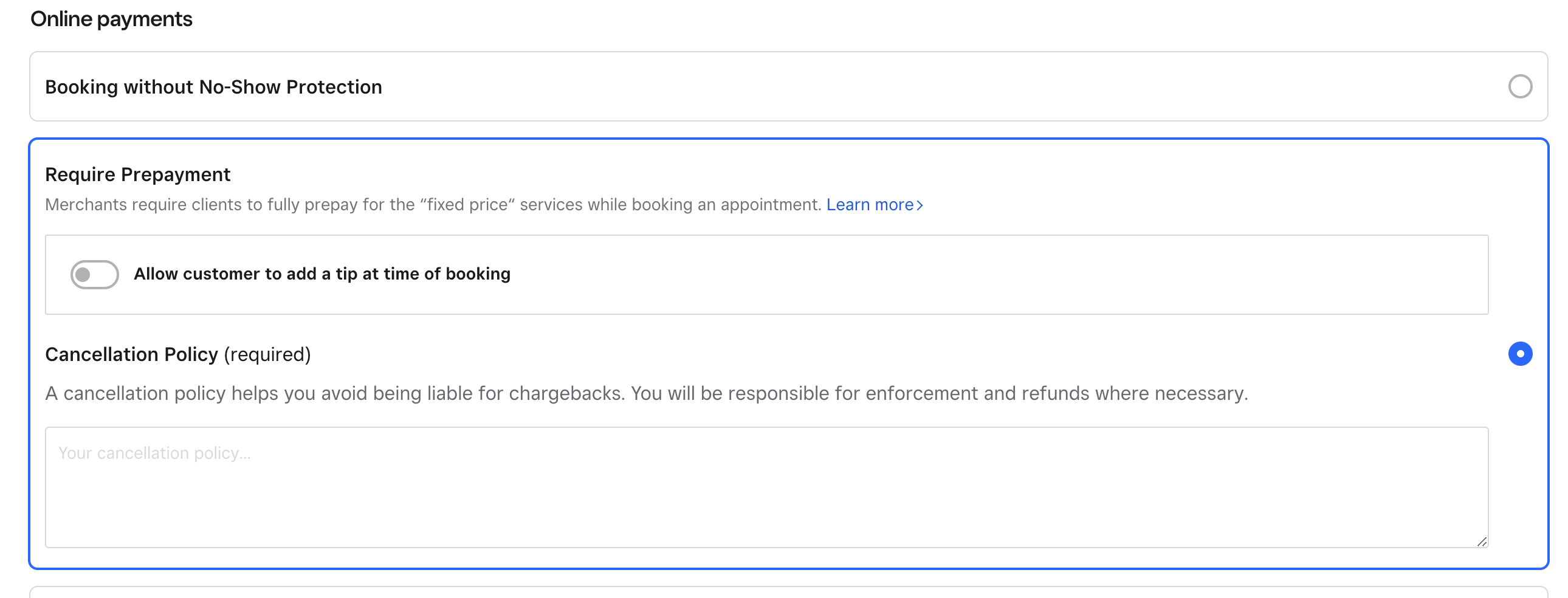
Please let me know if you have any other questions.
Community Moderator, Square
Sign in and click Mark as Best Answer if my reply answers your question.
- Subscribe to RSS Feed
- Mark Thread as New
- Mark Thread as Read
- Float this Thread for Current User
- Printer Friendly Page
Hi,
My Square does not say "Require Prepayment," it says "Require Full Prepayment" and the only option is to require the full prepayment of every service. I do not want that, and I'd like to only charge a small fee that goes towards the service booked.
Is there a way to fix this?
Thanks
- Mark as New
- Subscribe to RSS Feed
- Permalink
- Report



- Subscribe to RSS Feed
- Mark Thread as New
- Mark Thread as Read
- Float this Thread for Current User
- Printer Friendly Page
@Kassi_ ;
Is there a way to do this with the Square for Retail app? We have candle making in store, but for groups over 5 ppl we want to take a Deposit/ No Show fee. Since our customers call to make the appointments the Online approach does not work for us. Most of our Make Your Own candle customers are Vacationers who would be coming here for the first time and not regulars that know of our website. I mean I can take the order then Save it to a Saved Cart but there is no way for me to take a Deposit over the phone so that the Balance is due when they show up and make their own candles. Plus we were thinking of making Longer actual Candle Making Classes and would require Deposits for NO shows and this also ends up mainly being by Phone calls for people looking for something to do in our area while on vacation.
Owner
Pocono Candle
Mark as Best Answer if this Helped you solve an issue or give it a thumbs up if you like the answer.
Square Support Number 855-700-6000.
Make Sure App and OS is up to date on your Device.
- Mark as New
- Subscribe to RSS Feed
- Permalink
- Report

Square Community