
- Home
- >
- Community Archive
- >
- Public Archive
- >
- Archived Discussions (Read Only)
- >
- How to pay online with eGift card

- Subscribe to RSS Feed
- Mark Thread as New
- Mark Thread as Read
- Float this Thread for Current User
- Printer Friendly Page
How to pay online with eGift card
How do you purchase on Square online with a Square egift card? I've scoured the Community and Help sections and all I can find is one sentence that says "Your customers can also use your eGift cards to place orders through Square Online". But there's nowhere on the checkout page to do this---unless an eGift card is considered a coupon code, and that's where you enter it? If that's the case, the field label needs to be edited to include gift cards. It's not intuitive at all.
I also checked Settings and Advanced Settings for my online store and there weren't any settings for eGift cards as payment options....just credit cards, PayPal etc.
Can somebody help?
- Mark as New
- Subscribe to RSS Feed
- Permalink
- Report



- Subscribe to RSS Feed
- Mark Thread as New
- Mark Thread as Read
- Float this Thread for Current User
- Printer Friendly Page
Welcome to Seller Community, @gxouris.
Have you enabled eGift cards within your Square Dashboard yet? Once you enable them there it should provide the option during checkout. You should also see an option in Settings > Gift Cards of the Square Online overview page to add a link to purchase them to your site navigation.
Square Community, Platform
- Mark as New
- Subscribe to RSS Feed
- Permalink
- Report

- Subscribe to RSS Feed
- Mark Thread as New
- Mark Thread as Read
- Float this Thread for Current User
- Printer Friendly Page
Yes, eGift cards are enabled, but the option to pay with an eGift card is still not at the checkout. The only options are credit card and coupon code.
- Mark as New
- Subscribe to RSS Feed
- Permalink
- Report



- Subscribe to RSS Feed
- Mark Thread as New
- Mark Thread as Read
- Float this Thread for Current User
- Printer Friendly Page
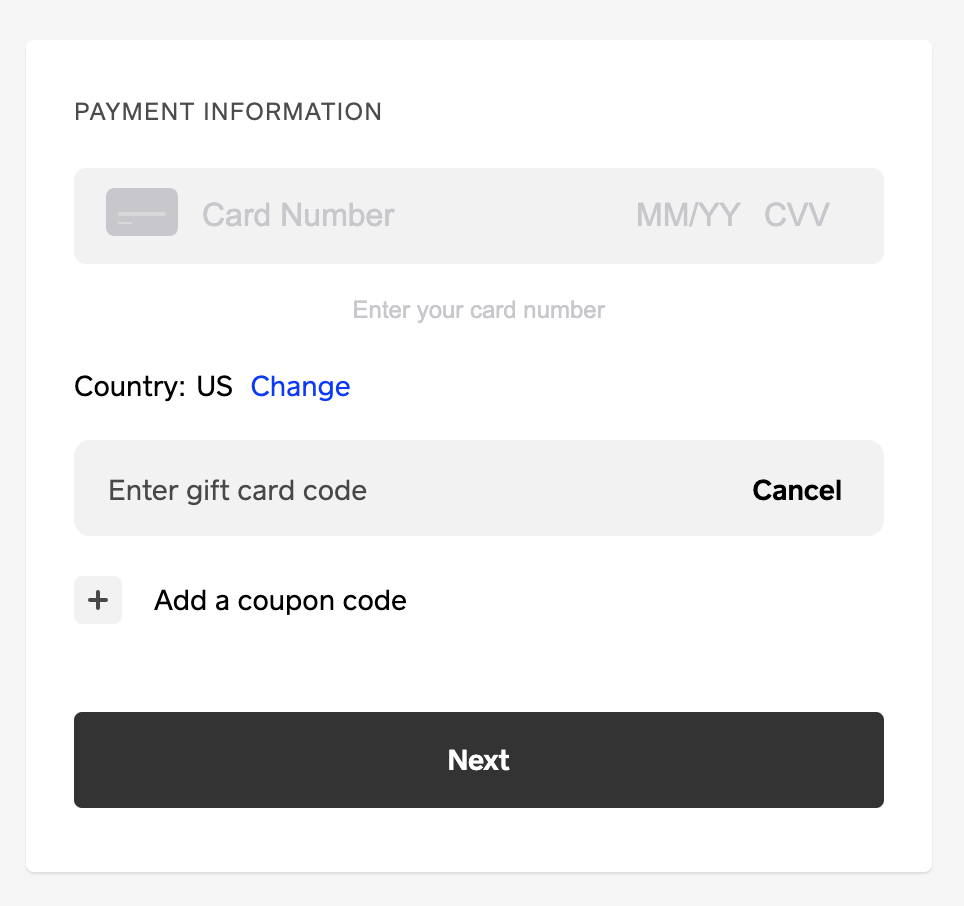
@GeorgeX I see it in the checkout as an option. Is this what you are looking for?
Community Moderator, Square
Sign in and click Mark as Best Answer if my reply answers your question.
- Mark as New
- Subscribe to RSS Feed
- Permalink
- Report
- Subscribe to RSS Feed
- Mark Thread as New
- Mark Thread as Read
- Float this Thread for Current User
- Printer Friendly Page
Yes! That is what I'm looking for, but it's not on my screen. I'm going to have to call Support because it doesn't make sense that it's not showing up for me. thanks.
- Mark as New
- Subscribe to RSS Feed
- Permalink
- Report

- Subscribe to RSS Feed
- Mark Thread as New
- Mark Thread as Read
- Float this Thread for Current User
- Printer Friendly Page
Hey @gxouris,
Is it possible that the order is for delivery? That would be the only time a Gift Card option wouldn't show at checkout since you can't use e-Gift cards on delivery orders at this time.
Community Moderator, Square
Sign in and click Mark as Best Answer if my reply answers your question.
- Mark as New
- Subscribe to RSS Feed
- Permalink
- Report

Square Community