
- Home
- >
- Community Archive
- >
- Public Archive
- >
- Archived Discussions (Read Only)
- >
- How to merge duplicate profiles

- Subscribe to RSS Feed
- Mark Thread as New
- Mark Thread as Read
- Float this Thread for Current User
- Printer Friendly Page
How to merge duplicate profiles
I tried to merge two duplicate profiles for the same patient. It appeared that it happened but it failed to merge and I have lost the duplicate! The message said that it could not merge. Maybe the issue is that one profile had Elizabeth as her first name and the other had her nickname Libby. Help!
- Mark as New
- Subscribe to RSS Feed
- Permalink
- Report



- Subscribe to RSS Feed
- Mark Thread as New
- Mark Thread as Read
- Float this Thread for Current User
- Printer Friendly Page
Hi @sacredsymptoms - Welcome to The Seller Community, it's always nice to see a new face 😊
That sounds frustrating. But I believe I have just the fix for you.
If our system has not recognized a duplicate, you can manually merge two profiles.
To do so:
Select the duplicate Customer Profile.
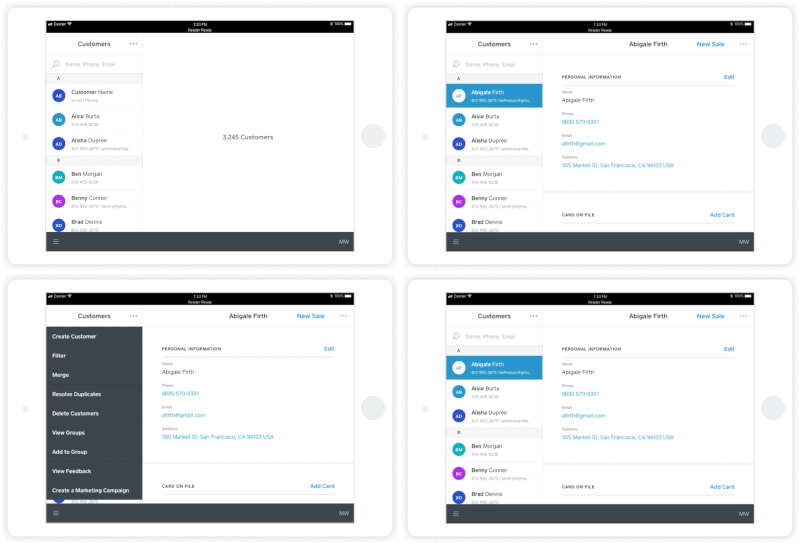
Click the three-dotted Actions menu > Merge with another customer > search and select the profile you’d like to merge.
Carefully review the profiles being combined, as a merge can’t be undone > click Merge.
Note: From the drop-down menu on the main Customers screen of your Square App, you can create a new profile, filter customers, manage groups, add customers to groups, resolve duplicates, merge customers, bulk delete, and view feedback from virtually any screen.
Let me know how this goes.
As always, feel free to stop by The Community with question, concerns and even feature requests. We are more than happy to assist. ✨
Community Moderator, Square
Sign in and click Mark as Best Answer if my reply answers your question.
- Mark as New
- Subscribe to RSS Feed
- Permalink
- Report

Square Community