
- Home
- >
- Community Archive
- >
- Public Archive
- >
- Archived Discussions (Read Only)
- >
- Re: How to load item pictures

- Subscribe to RSS Feed
- Mark Thread as New
- Mark Thread as Read
- Float this Thread for Current User
- Printer Friendly Page
How to load item pictures
I'm trying to load item pictures but constantly get " picture cannot load" message. I appreciate any help you give.
- Mark as New
- Subscribe to RSS Feed
- Permalink
- Report



- Subscribe to RSS Feed
- Mark Thread as New
- Mark Thread as Read
- Float this Thread for Current User
- Printer Friendly Page
Hey @Tomtheturner
can you give me a bit more context?
Are you trying to upload pics to your POS device from Dashboard or your Online Store? What device are you using to upload these images - a mobile device or computer?
I'll be on the lookout for your reply
Community Moderator, Square
Sign in and click Mark as Best Answer if my reply answers your question.
- Mark as New
- Subscribe to RSS Feed
- Permalink
- Report
- Subscribe to RSS Feed
- Mark Thread as New
- Mark Thread as Read
- Float this Thread for Current User
- Printer Friendly Page
I use an LG V40 thinq for my small business. I'm trying to load pictures from it into the app. Only if I edit the photo dirt in Amazon photos can I then upload a picture. If I try it from Google Photos or my Gallery, no luck. So I have loaded most of what I need by going thru the extra steps. But now, the pictures I do have on my item list do not populate on my IPad.
Any help is appreciated.
- Mark as New
- Subscribe to RSS Feed
- Permalink
- Report
- Subscribe to RSS Feed
- Mark Thread as New
- Mark Thread as Read
- Float this Thread for Current User
- Printer Friendly Page
Hmm, if you were able to successfully upload the image from Amazon photos to the POS on your LG, they should reflect in the POS app on your iPad.
Are you logging into the same account on your iPad? Can you check if the POS app version is up to date as well as the iOS in in the iPad settings?
Community Moderator, Square
Sign in and click Mark as Best Answer if my reply answers your question.
- Mark as New
- Subscribe to RSS Feed
- Permalink
- Report
- Subscribe to RSS Feed
- Mark Thread as New
- Mark Thread as Read
- Float this Thread for Current User
- Printer Friendly Page
I believe both devices are up to date. In fact I know the LG is for sure. I'll double check it. Any reason as to why only about 5 images load on the Apple when I probably have around 15 total. Certainly not a huge amount.
One last question, once they do load can I arrange them to my liking?
- Mark as New
- Subscribe to RSS Feed
- Permalink
- Report
- Subscribe to RSS Feed
- Mark Thread as New
- Mark Thread as Read
- Float this Thread for Current User
- Printer Friendly Page
Thanks for following up @Tomtheturner !!!
There shouldn't be a reason why only some images appear on the iPad vs your LG device. Please confirm that both devices' OS are up to date as well as the POS app.
To your last question, how are you looking to arrange your item images? Only one image is allowed to an item at a time.
Community Moderator, Square
Sign in and click Mark as Best Answer if my reply answers your question.
- Mark as New
- Subscribe to RSS Feed
- Permalink
- Report
- Subscribe to RSS Feed
- Mark Thread as New
- Mark Thread as Read
- Float this Thread for Current User
- Printer Friendly Page
Not to load more than 1 picture per item, I'd like to move them to a certain order, regardless of how I describe them.
Thanks.
- Mark as New
- Subscribe to RSS Feed
- Permalink
- Report
- Subscribe to RSS Feed
- Mark Thread as New
- Mark Thread as Read
- Float this Thread for Current User
- Printer Friendly Page
Sounds like you looking to set up an item grid in the POS app like this, right?
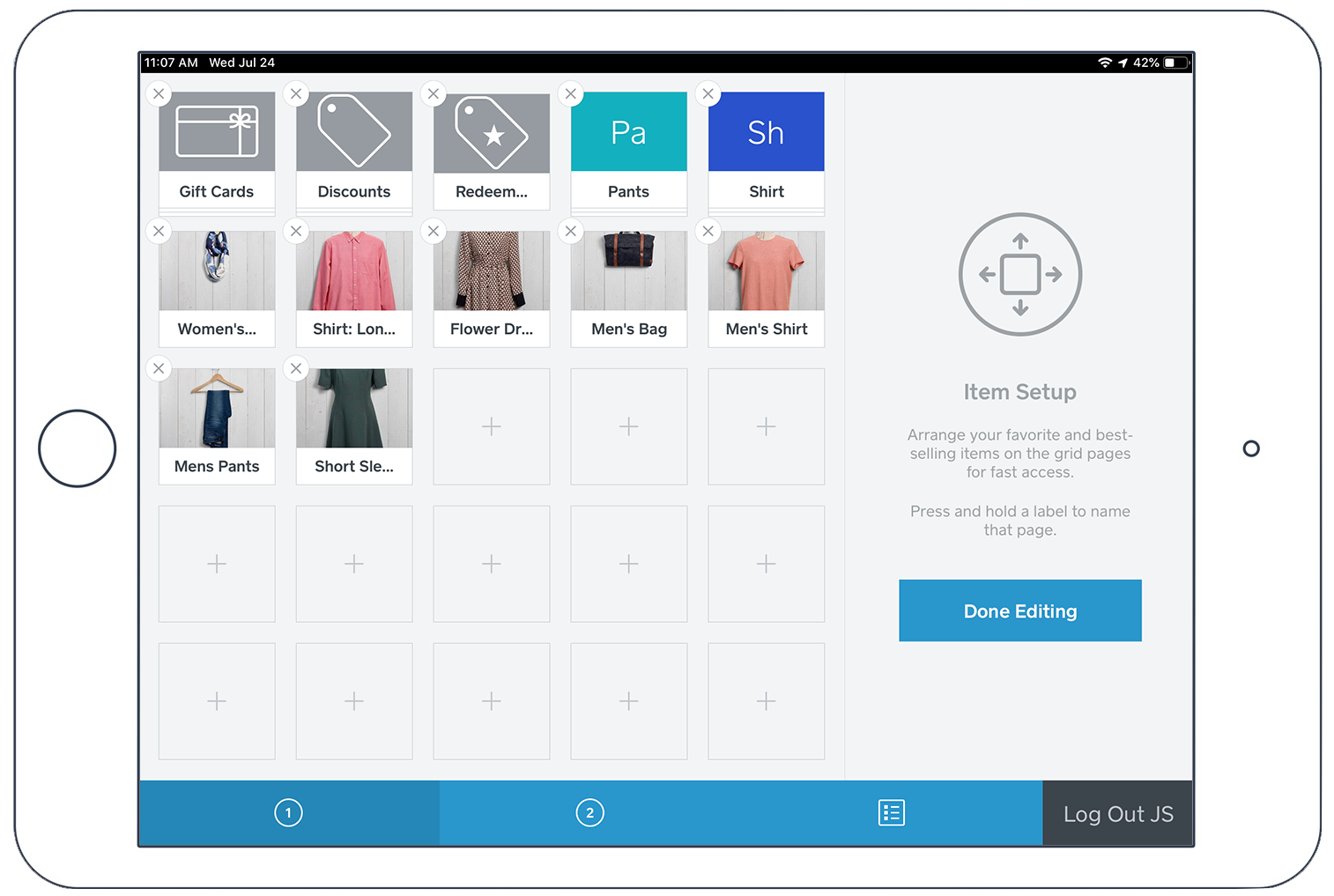
Check out this article to learn more.
Community Moderator, Square
Sign in and click Mark as Best Answer if my reply answers your question.
- Mark as New
- Subscribe to RSS Feed
- Permalink
- Report
- Subscribe to RSS Feed
- Mark Thread as New
- Mark Thread as Read
- Float this Thread for Current User
- Printer Friendly Page
I believe I've updated both my Apple and Android devices to Square 5.40. Is this the latest version for both? I completed the updates in the first week of June.
Please advise.
Thanks,
Tom
- Mark as New
- Subscribe to RSS Feed
- Permalink
- Report



- Subscribe to RSS Feed
- Mark Thread as New
- Mark Thread as Read
- Float this Thread for Current User
- Printer Friendly Page
Hi @Tomtheturner I'm stepping in for Justin while he is away today. Can you please try to upload the photos to your items from the Square Dashboard, not on the app, and see if they appear that way? If not, can you please provide a screenshot of what you are seeing? Thank you!
Community Moderator, Square
Sign in and click Mark as Best Answer if my reply answers your question.
- Mark as New
- Subscribe to RSS Feed
- Permalink
- Report

Square Community