
- Home
- >
- Community Archive
- >
- Public Archive
- >
- Archived Discussions (Read Only)
- >
- How do you move a transaction to the customers acc...

- Subscribe to RSS Feed
- Mark Thread as New
- Mark Thread as Read
- Float this Thread for Current User
- Printer Friendly Page
How do you move a transaction to the customers account.
I made a transaction with a customer that did not have an account made yet. When I finished the transaction, there was the option to add a customer to that, which I did. Later, I went to look up the customer, they were not there, but the transaction was still under the transaction key. So I made a customer account for them and tried to move the transaction over to their new account, but I cannot find instructions on how to do this. I even tried merging thinking that acct with the transaction would show up but it didn’t. The only way I can see the transaction is to click on transactions and it’s there under the date. I can open it and it shows the purchase but I cannot find a way to move it to the customers acct. I would just delete it but I want the transaction under their acct. anyone know what to do!
Thanks,
kim Longbottom
- Mark as New
- Subscribe to RSS Feed
- Permalink
- Report



- Subscribe to RSS Feed
- Mark Thread as New
- Mark Thread as Read
- Float this Thread for Current User
- Printer Friendly Page
Hey there @KKL1
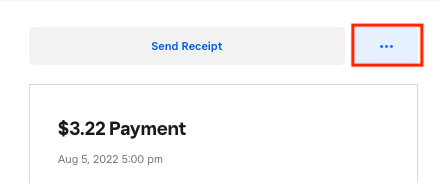
The best way to link a sale to a particular customer will be by locating the transaction on the Square Dashboard. Once there you will want to select the transaction and click on the 3 dots and Select either Add Customer (if a customer isn't yet assigned) or Edit Customer (if the sale has been attributed to a previous customer)
I hope this information is helpful!
Community Moderator, Square
Sign in and click Mark as Best Answer if my reply answers your question.

Square Community