
- Home
- >
- Community Archive
- >
- Public Archive
- >
- Archived Discussions (Read Only)
- >
- How can I add a bank account to my second location...

- Subscribe to RSS Feed
- Mark Thread as New
- Mark Thread as Read
- Float this Thread for Current User
- Printer Friendly Page
How can I add a bank account to my second location?
The title of this post has been edited from the original: II cannot find how to "ADD" bank account for my second location, Please advise.
I have read many of your messages and cannot find a step by step instruction on how to ADD a bank account for my second location. Please advise. Thank you
- Labels:
-
Accounting and Finance
- Mark as New
- Subscribe to RSS Feed
- Permalink
- Report



- Subscribe to RSS Feed
- Mark Thread as New
- Mark Thread as Read
- Float this Thread for Current User
- Printer Friendly Page
Hi there @kkovar 👋
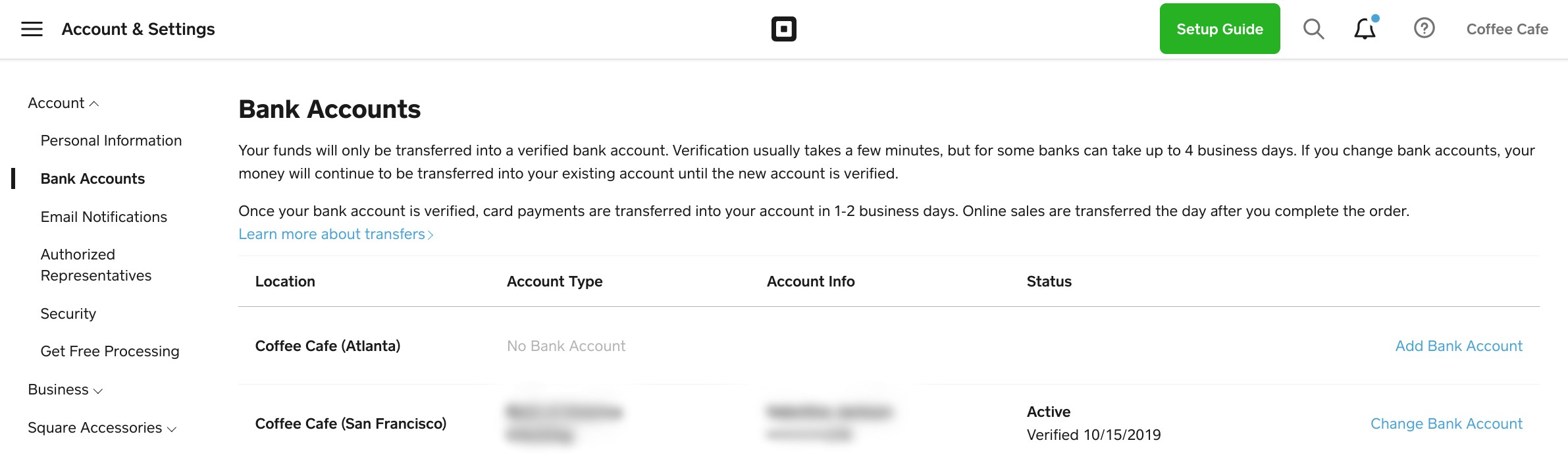
You'll want to head to this page of your Square Dashboard to get started with this. Once here, you'll see both of your locations listed, and to the far right of the page, you'll see a link Add bank account. Click this to add a bank account to the location.
Community Moderator, Square
Sign in and click Mark as Best Answer if my reply answers your question.
- Mark as New
- Subscribe to RSS Feed
- Permalink
- Report
- Subscribe to RSS Feed
- Mark Thread as New
- Mark Thread as Read
- Float this Thread for Current User
- Printer Friendly Page
This reply was created from merging an existing thread: Re: Can you have 2+ bank accounts from 1 business linked to the same Square account?
I am reading this thread about trying to have two separate bank accounts. I tried to add a Location to do so, but it's not letting me add another bank account. Under Bank Information, the "Transfer Account" has our current account in there and gives no option to add another account. How can I do so?
- Mark as New
- Subscribe to RSS Feed
- Permalink
- Report
- Subscribe to RSS Feed
- Mark Thread as New
- Mark Thread as Read
- Float this Thread for Current User
- Printer Friendly Page
I've moved your post to this thread where I included steps you can follow to add a bank account to your second location, @EEBANancy. If you're running into any difficulties while following these steps, please be sure to get in touch directly so our team can take a closer look with you.
Community Moderator, Square
Sign in and click Mark as Best Answer if my reply answers your question.
- Mark as New
- Subscribe to RSS Feed
- Permalink
- Report

Square Community