
- Home
- >
- Community Archive
- >
- Public Archive
- >
- Archived Discussions (Read Only)
- >
- Re: Appointments: How do i change the map location...

- Subscribe to RSS Feed
- Mark Thread as New
- Mark Thread as Read
- Float this Thread for Current User
- Printer Friendly Page
We provide services at customer residences and businesses. We would like to display a map that shows the geographic point of the transaction.



- Subscribe to RSS Feed
- Mark Thread as New
- Mark Thread as Read
- Float this Thread for Current User
- Printer Friendly Page
Hello @plamy! Welcome to the Seller Community, we're excited to you joined. 😃
So you can have the transaction location be displayed as a map. The first step is to make your business a mobile location:
- We will navigate to our Square Dashboard.
- Then select Account & Settings on the left side of your screen.
- Under the Business Tab choose Locations.
- Then mark your business as a mobile location, like the screen below.

Next we will edit our receipt options:
- From the Account & Settings page select Receipt.
- Then scroll down until you see Business location on the bottom right.
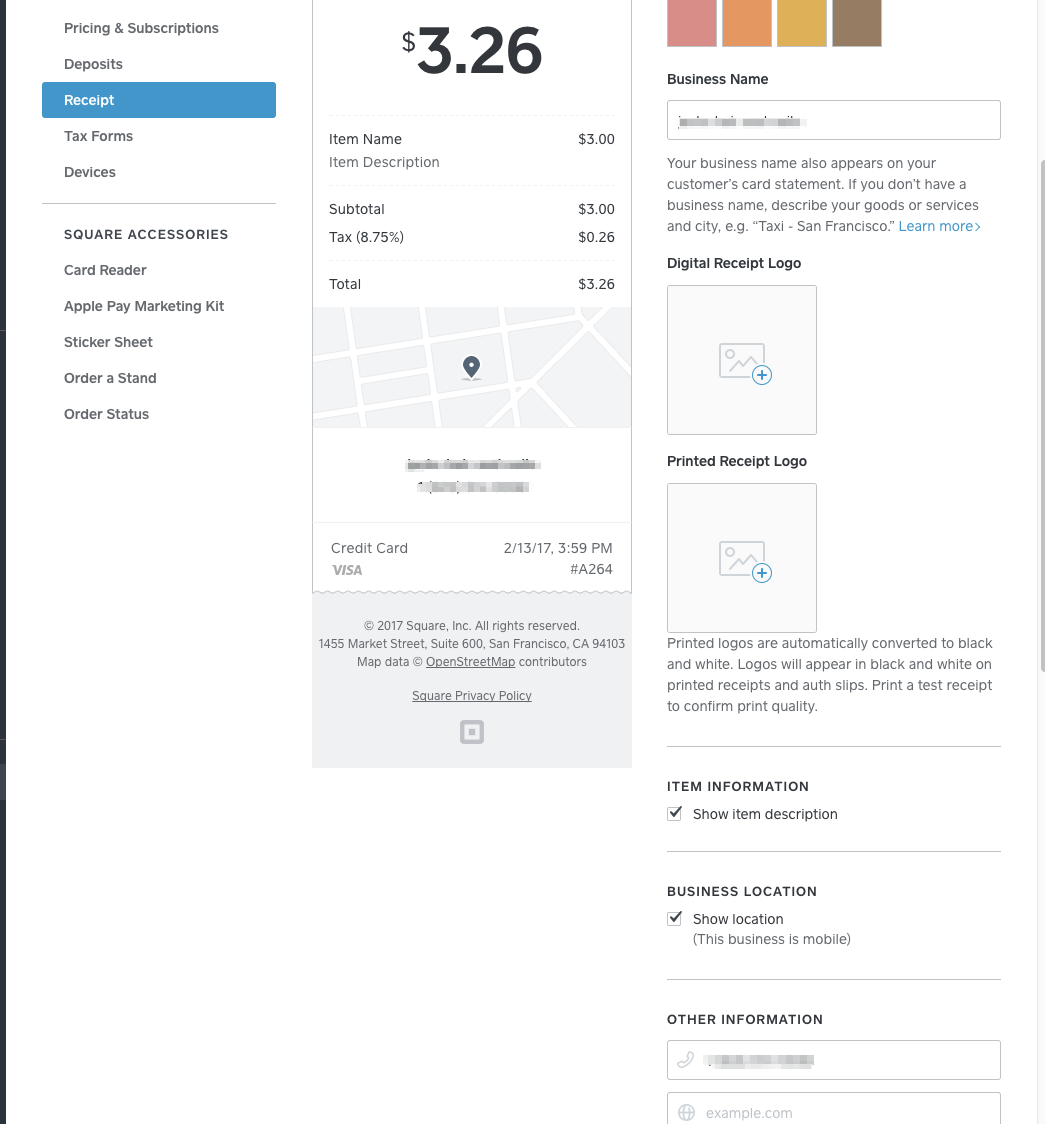
Your receipt should look similar to the image above. If you still need help please let me know! 😃
- Subscribe to RSS Feed
- Mark Thread as New
- Mark Thread as Read
- Float this Thread for Current User
- Printer Friendly Page
Hello @plamy! Welcome to the Seller Community, we're excited to you joined. 😃
So you can have the transaction location be displayed as a map. The first step is to make your business a mobile location:
- We will navigate to our Square Dashboard.
- Then select Account & Settings on the left side of your screen.
- Under the Business Tab choose Locations.
- Then mark your business as a mobile location, like the screen below.
Next we will edit our receipt options:
- From the Account & Settings page select Receipt.
- Then scroll down until you see Business location on the bottom right.
Your receipt should look similar to the image above. If you still need help please let me know! 😃

- Subscribe to RSS Feed
- Mark Thread as New
- Mark Thread as Read
- Float this Thread for Current User
- Printer Friendly Page
How do I get the map to match the address of my business?
- Mark as New
- Subscribe to RSS Feed
- Permalink
- Report

- Subscribe to RSS Feed
- Mark Thread as New
- Mark Thread as Read
- Float this Thread for Current User
- Printer Friendly Page
How do I change the map location that is displayed on my online booking? i put in the wrong address to start off and when i changed the address to the correct one it still displays the old location on the map.

- Subscribe to RSS Feed
- Mark Thread as New
- Mark Thread as Read
- Float this Thread for Current User
- Printer Friendly Page
Hi @heatherstiles! Take a look at this post where Chad provided the steps to update your business location. When you follow these steps your new locations will show on your receipt (if you choose to show your location) and your online Appointments booking site.
Seller Community Manager
- Mark as New
- Subscribe to RSS Feed
- Permalink
- Report

- Subscribe to RSS Feed
- Mark Thread as New
- Mark Thread as Read
- Float this Thread for Current User
- Printer Friendly Page
This reply was created from merging an existing thread: How do I adjust the maps location buuble?
My adress is correct, I've even tried using the building address instead of the Suite address, but for some reason the square map location bubble pin shows up a few blocks away from the correct location. Is there any way to adjust it? My google map shows it correctly. Only my square map has it showing the wrong location.
- Mark as New
- Subscribe to RSS Feed
- Permalink
- Report
- Subscribe to RSS Feed
- Mark Thread as New
- Mark Thread as Read
- Float this Thread for Current User
- Printer Friendly Page
Hi @CrimsonMoon! The steps to update your location are in this thread, I've just moved your post here so you can read the steps. If you're still having trouble please let me know!
Seller Community Manager
- Mark as New
- Subscribe to RSS Feed
- Permalink
- Report

Square Community