
- Home
- >
- Community Archive
- >
- Public Archive
- >
- Archived Discussions (Read Only)
- >
- Re: Appointments: How can I set time blocks for a ...

- Subscribe to RSS Feed
- Mark Thread as New
- Mark Thread as Read
- Float this Thread for Current User
- Printer Friendly Page
Appointments: How do I make sure that my clients book every twenty minutes so my hour is full?
How do I make sure that my clients book every twenty minutes so that my hour is full and doesnt have gaps if they choose a random time instead of every 20?
- Mark as New
- Subscribe to RSS Feed
- Permalink
- Report



- Subscribe to RSS Feed
- Mark Thread as New
- Mark Thread as Read
- Float this Thread for Current User
- Printer Friendly Page
Hello @Blessedmoments! You can set up your appointments so that there are no gaps in between by following these steps:
- From the Services section of your Appointments Dashboard click on the service > set the duration to 20 minutes.
- Toggle Block Extra Time off.

- Then navigate to the Settings section of your Appointments Dashboard > click Calendar & Booking.
- Scroll down to Online Scheduling > click the dropdown below Appointments are scheduled > select According to Service Duration.
- Click Save.
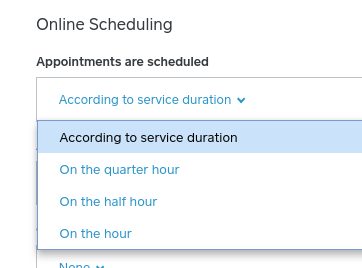
After you've saved your settings your clients will see a list of available appointments every 20 minutes.
Seller Community Manager
- Mark as New
- Subscribe to RSS Feed
- Permalink
- Report

- Subscribe to RSS Feed
- Mark Thread as New
- Mark Thread as Read
- Float this Thread for Current User
- Printer Friendly Page
I’m on safari on my iPhone and on the appointment preferences I make my changes and there isn’t a button to save so I’m not able to save anything I changed
- Mark as New
- Subscribe to RSS Feed
- Permalink
- Report



- Subscribe to RSS Feed
- Mark Thread as New
- Mark Thread as Read
- Float this Thread for Current User
- Printer Friendly Page
Hey @Karinaglamz,
Are you doing this from the app or the Dashboard online? Some settings need to be changed from the Online Dashboard instead of the app but we were also experiencing some issues/outages with the Dashboard yesterday so this could explain that.
They've since been resolved if you want to try it again!
Community Moderator, Square
Sign in and click Mark as Best Answer if my reply answers your question.
- Mark as New
- Subscribe to RSS Feed
- Permalink
- Report

Square Community