

Square
🔄 Pickup and delivery settings in Dashboard

Hi sellers! 👋


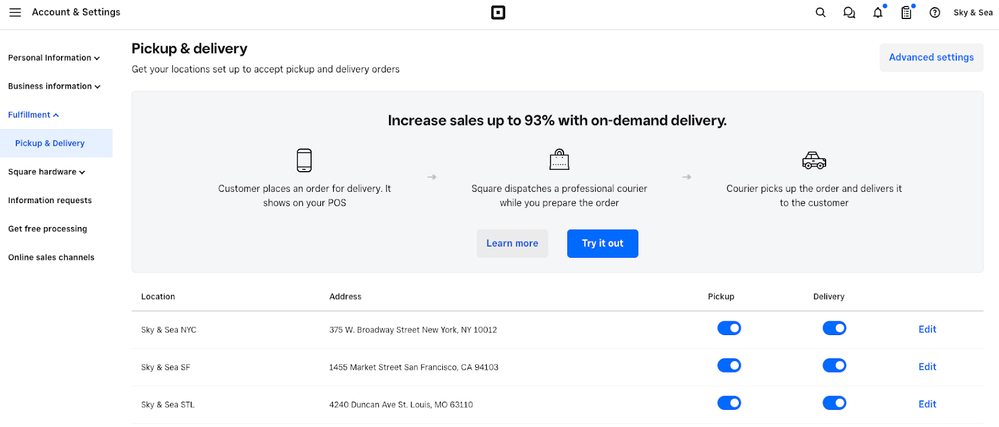
We recently made an update to the pickup and delivery fulfillment settings for your Square account. All of the existing pickup and delivery settings from Square Online were moved to its new location in the Account and Settings page within Square Dashboard. Any updates to the pickup and delivery preferences will now be automatically updated for both in-store and online orders.


pickup-and-delivery-settings-dashboard.png


Do I need to make any settings changes if I already configured my pickup and delivery settings in Square Online?

  • No, all of your settings have already moved to the new location and are the exact same settings that were available in Square Online
  • Feel free to double check your settings in the new location to make sure everything looks correct


Let us know if you have any questions or feedback in the comments below. Check out the Square Support article as well for more information.

4 Replies
Square Champion

Hi @mkochanowski can you confirm is delivery in the dashboard is the same as shipping found on the online dashboard, and local shipping the same as delivery found on the online dashboard? Just want yo check I have the correct terminology.


Also we set up a new item on our Square Register, we set the visibility to visible online, but the item is not showing on the online item catalogue and not on the website either. Can you confirm this is working as it is supposed to?


Many thanks

Square

Hi @doc_choc - thanks for your post. 


Just taking a look for you. Essentially the only thing that happened here is that the fulfilment Dashboard for Square Online moved out of the Square Online overview and into the regular Dashboard's Account & Settings - but all settings are still the same as they were - the functions just have a new home. 


For the item not appearing - can you unpublish and republish your site to see if that resolves the issue? Thanks! 

I am unable to access my Pickup and Delivery  settings for my location. It keeps telling me:


Oh no, something went wrong.

It looks like we are experiencing some problems on our end.


I need to update some information for pickup as we are closed for certain days/times

Alumni

Hey @nyb — thanks for flagging this and sorry to hear about the trouble. These troubleshooting tips might help — be sure to check out the "Enable location services and other permissions" section.

If that doesn't resolve, please get in touch with the Support team for immediate help at 1-855-700-6000 or
 squ.re/contactsqsupport. They'll be able to take a closer look behind the scenes.

Similar Threads
🆕 Improved checkout accuracy with sound feedback
🆕 Reconciliation Report CSV export now available
🆕 Search and sell faster with a connected keyboard
🇨🇦 Fresh off the line: Square’s latest features to transform your restaurant operations