

- Subscribe to RSS Feed
- Mark Thread as New
- Mark Thread as Read
- Float this Thread for Current User
- Bookmark
- Subscribe
- Printer Friendly Page
Has anyone else discovered all their online items becoming "prepared food and beverage"?
I went to update some photos yesterday and have noticed that my new items default to prepared food and beverage online, despite being physical items in the main item library.
Is anyone else having the problem? I have a number of ourstanding issues with the service desk, it would be good to know if this is just me before I go and have the discussion.
- Mark as New
- Bookmark
- Subscribe
- Subscribe to RSS Feed
- Permalink
- Report



- Subscribe to RSS Feed
- Mark Thread as New
- Mark Thread as Read
- Float this Thread for Current User
- Bookmark
- Subscribe
- Printer Friendly Page
Hi @mhweft,
I haven't heard of anything like this happening before - are you able to post a screenshot so I can get a bit more context? Feel free to block out any personal info, and if you're happy to share a link to your website where it shows this I can take a further look from that angle as well!
Square, Australia
Sign in and click Mark as Best Answer if my reply answers your question.
- Mark as New
- Bookmark
- Subscribe
- Subscribe to RSS Feed
- Permalink
- Report
- Subscribe to RSS Feed
- Mark Thread as New
- Mark Thread as Read
- Float this Thread for Current User
- Bookmark
- Subscribe
- Printer Friendly Page
Sure. I can't see any specific impact in the store itself, just a completely different "type". I always load into the items in the main console first and then update the online store which is when i discovered it.

- Mark as New
- Bookmark
- Subscribe
- Subscribe to RSS Feed
- Permalink
- Report
- Subscribe to RSS Feed
- Mark Thread as New
- Mark Thread as Read
- Float this Thread for Current User
- Bookmark
- Subscribe
- Printer Friendly Page
@mhweft I'm wondering if maybe the default "Item type" value via Square Online (the value doesn't exist within your main Square inventory) is dependent on the website template you're using. I checked my test account and they have all been assigned the "physical" value by default. I'm using the Shop All (Retail features), the alternative is Order Online (Restaurant features). Are you able to confirm which one you're currently using?
To check, go to the website editor, then scroll down to Category Pages - you'll see either Shop All or Order Online and can click the "..." button to switch.
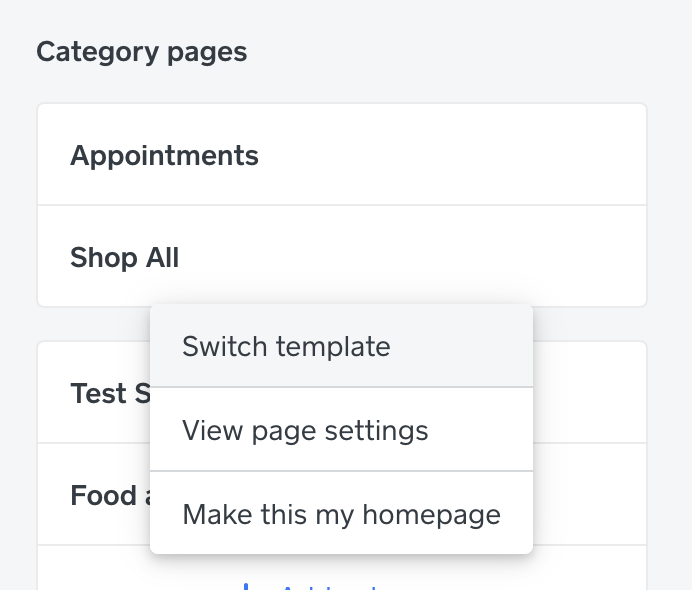
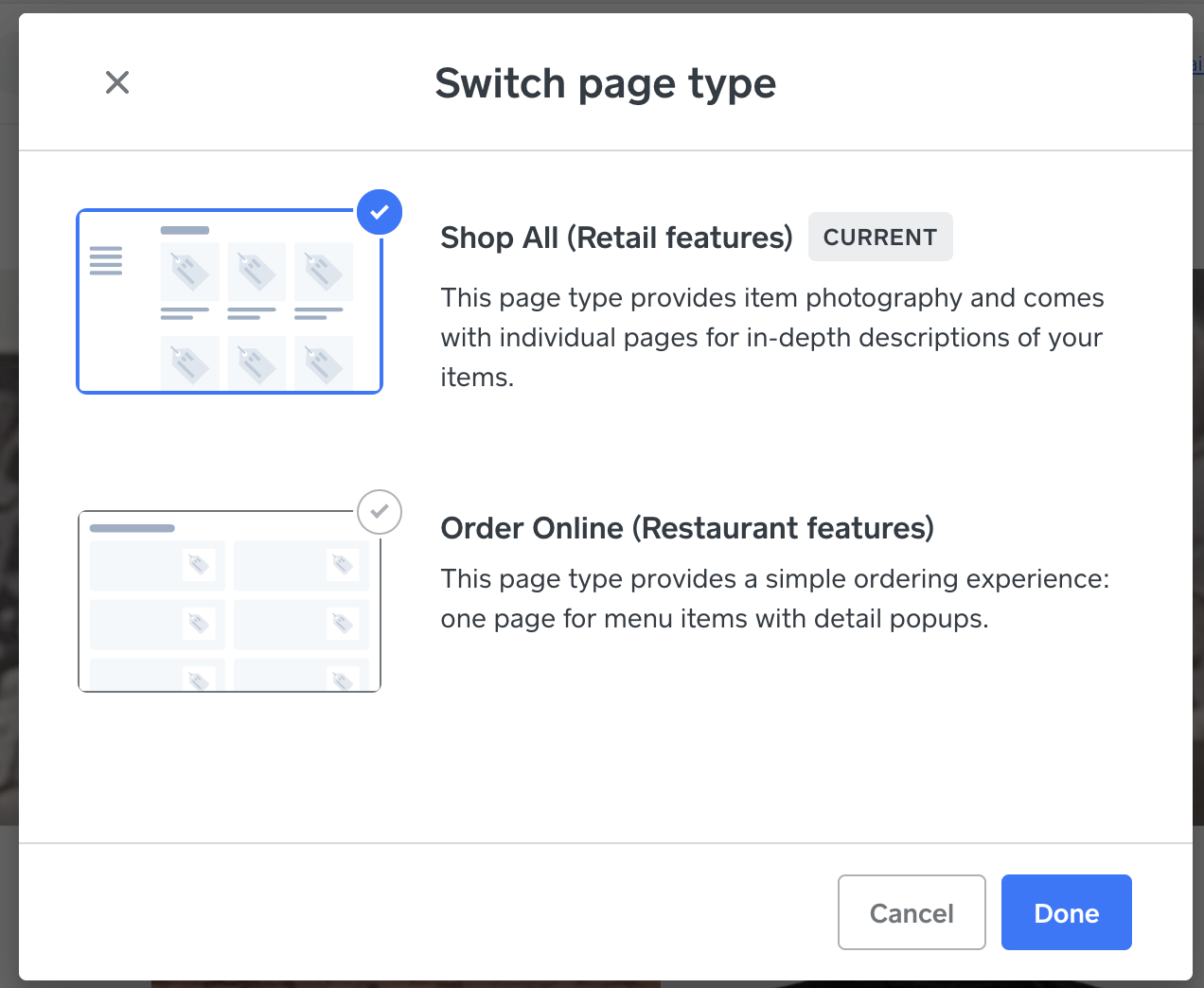
If you're already on Order Online, I'm thinking maybe this is what determines a different default item type?
Square, Australia
Sign in and click Mark as Best Answer if my reply answers your question.
- Mark as New
- Bookmark
- Subscribe
- Subscribe to RSS Feed
- Permalink
- Report
- Subscribe to RSS Feed
- Mark Thread as New
- Mark Thread as Read
- Float this Thread for Current User
- Bookmark
- Subscribe
- Printer Friendly Page
Hi Seamus.
Confirm I am already on "Shop All" (see photo).

- Mark as New
- Bookmark
- Subscribe
- Subscribe to RSS Feed
- Permalink
- Report
- Subscribe to RSS Feed
- Mark Thread as New
- Mark Thread as Read
- Float this Thread for Current User
- Bookmark
- Subscribe
- Printer Friendly Page
@mhweft In this case I'm not sure what you'll need to do to change the default. Support might be able to help further - give them a call on 1800 760 137 (Mon-Fri, 9am-5pm Melbourne time), or contact us via online chat or email:
1. Sign in to your Square account
2. Head to our contact page https://squareup.com/help/au/en/contact
3. Click on any topic, then "I don't see my issue"
4. Click "Message us" or "Email us"
Or, if you see the new chatbot help flow, type "support" to bring up a list of contact methods.
What sort of impact are you seeing as a result of this - is this something that is causing issues running your business, or more just something that would be convenient to have set to another item type as default? I can find reference to how to change an item type, but unfortunately no mention of how to change what it defaults to!
Square, Australia
Sign in and click Mark as Best Answer if my reply answers your question.
- Mark as New
- Bookmark
- Subscribe
- Subscribe to RSS Feed
- Permalink
- Report
- Subscribe to RSS Feed
- Mark Thread as New
- Mark Thread as Read
- Float this Thread for Current User
- Bookmark
- Subscribe
- Printer Friendly Page
Hi Seamus,
There is no change and helpdesk although lovely were unable to fix.
The problem appears to be more complex:
- no default settings work. I am defaulting to things being hidden - they are published immediately
- starting as food and beverage appears to have an impact on whether variations ever work in the future
I am having some significant synchronisation issues between settings and my site. I had to get help desk to break the link between open hours in the system and on the website - the website just wasn't looking at the location information.
Is there a known issue with the total number of items on a site or system. These problems shouldn't happen as regularly as they do.
Thanks
- Mark as New
- Bookmark
- Subscribe
- Subscribe to RSS Feed
- Permalink
- Report
- Subscribe to RSS Feed
- Mark Thread as New
- Mark Thread as Read
- Float this Thread for Current User
- Bookmark
- Subscribe
- Printer Friendly Page
@mhweft I'm not aware of any issues of this nature, other than sometimes syncing between your Square Item library and Square Online library can have a short delay.
While I don't have insight into your case with support, if something seem obviously broken, they should be able to escalate your case or file a bug report - is this something they offered to do?
Square, Australia
Sign in and click Mark as Best Answer if my reply answers your question.
- Mark as New
- Bookmark
- Subscribe
- Subscribe to RSS Feed
- Permalink
- Report
- Subscribe to RSS Feed
- Mark Thread as New
- Mark Thread as Read
- Float this Thread for Current User
- Bookmark
- Subscribe
- Printer Friendly Page
Its a good thing I told you about the issue then isn't it!
I assume they escalated a case but Square doesn't seem to have a policy of providing a case number to their clients so any follow-up at any time is a lottery.
I can confirm it is still happening and there doesn't seem to be anywhere to default to physical. It feels like square is trying to optimise for F&B and this is a side effect.
- Mark as New
- Bookmark
- Subscribe
- Subscribe to RSS Feed
- Permalink
- Report
- Subscribe to RSS Feed
- Mark Thread as New
- Mark Thread as Read
- Float this Thread for Current User
- Bookmark
- Subscribe
- Printer Friendly Page
Yes I've noticed this has just started happening also with newly created items. The default is now prepared food and beverage
- Subscribe to RSS Feed
- Mark Thread as New
- Mark Thread as Read
- Float this Thread for Current User
- Bookmark
- Subscribe
- Printer Friendly Page
Thankyou! I was starting to think I was mad.
The best part is because things no longer seem to be able to default to hidden, its easy to search search recent items and hide them.
Appreciate you answering



- Subscribe to RSS Feed
- Mark Thread as New
- Mark Thread as Read
- Float this Thread for Current User
- Bookmark
- Subscribe
- Printer Friendly Page
Thanks for bringing this to our attention again, @mhweft @AnswerS33k3r. Like Sheamus, I've done some testing on my Square Online site to try and replicate what you're seeing as well. Both on the Shop All (Retail), and the Order Online (Restaurant) option, new items are still set up as Physical by default from my end. Unfortunately I can't follow up on your case with support, but you can request your case number via email here.
- Mark as New
- Bookmark
- Subscribe
- Subscribe to RSS Feed
- Permalink
- Report

Square Community
Square Products