
- Home
- >
- Help
- >
- Online Store
- >
- Efficiently adding items to square online categori...

- Subscribe to RSS Feed
- Mark Thread as New
- Mark Thread as Read
- Float this Thread for Current User
- Bookmark
- Subscribe
- Printer Friendly Page
Why don't the categories sync from Square Online to the Square point of sale app? All the items have synced but not the categories.



- Subscribe to RSS Feed
- Mark Thread as New
- Mark Thread as Read
- Float this Thread for Current User
- Bookmark
- Subscribe
- Printer Friendly Page
Hey @rmstudio ✨
Good to see you around the Seller Community 🤓
This is a feature request that our Product Teams are aware of. As you can see in this thread, I'm not entirely sure why this setting hasn't already been created - however, I imagine it has something to do with wanting sellers to be able to customize their site and have it differ from their in-store settings if they want.
While I don't think we will ever 'force' sellers to sync their categories automatically, we are working on being able to provide sellers with the option to sync categories.
I don't have a timeline to share though, sorry about that. I'll make sure to update this thread when I hear something.


- Subscribe to RSS Feed
- Mark Thread as New
- Mark Thread as Read
- Float this Thread for Current User
- Bookmark
- Subscribe
- Printer Friendly Page
Aloha! We are a brick and mortar with multiple vendors and inventory. Due to COVID we are trying to get online and are currently setting up our online site. Our categories and vendors in the POS donʻt sync to our online store. We have to go through and recreate the categories and populate them with the product. Is there a fix or automation for this? Our Online store is completely synced (buttons toggled on). Mahalo
- Subscribe to RSS Feed
- Mark Thread as New
- Mark Thread as Read
- Float this Thread for Current User
- Bookmark
- Subscribe
- Printer Friendly Page
Hi,
I recently added a good amount of new items to my library, using the bulk import method. As far a the POS library is concerned, this worked fine. I added these items to suqare online (btw, why is this not automatic? Will I always have to add new items twice, once in the POS and then in my online shop??).
Now I need to put these articles in categories. They are already categorized in my POS. Isn't there a way to sync that? I read that you can sync once but then... then what? Why can it only be sync once?? I see that one can add items to categories in the online item list, but I can't filter the items according to the POS categories. Am I missing something? It feels like the POS and the online shop are two completely separate things! How do I EFFICIENTLY categorize new items in my online shop? That is, not by scrolling down my item list and checking ONE BY ONE items to be added to a given category.
I've been loosing a lot of time with this issue, thanks for your lights!



- Subscribe to RSS Feed
- Mark Thread as New
- Mark Thread as Read
- Float this Thread for Current User
- Bookmark
- Subscribe
- Printer Friendly Page
Do you have Mark newly imported items as "Unavailable" online toggled ON or OFF, @Sophie1?
You can find this setting by going to your Square Online overview page > Settings / Shared Settings > Item Sync
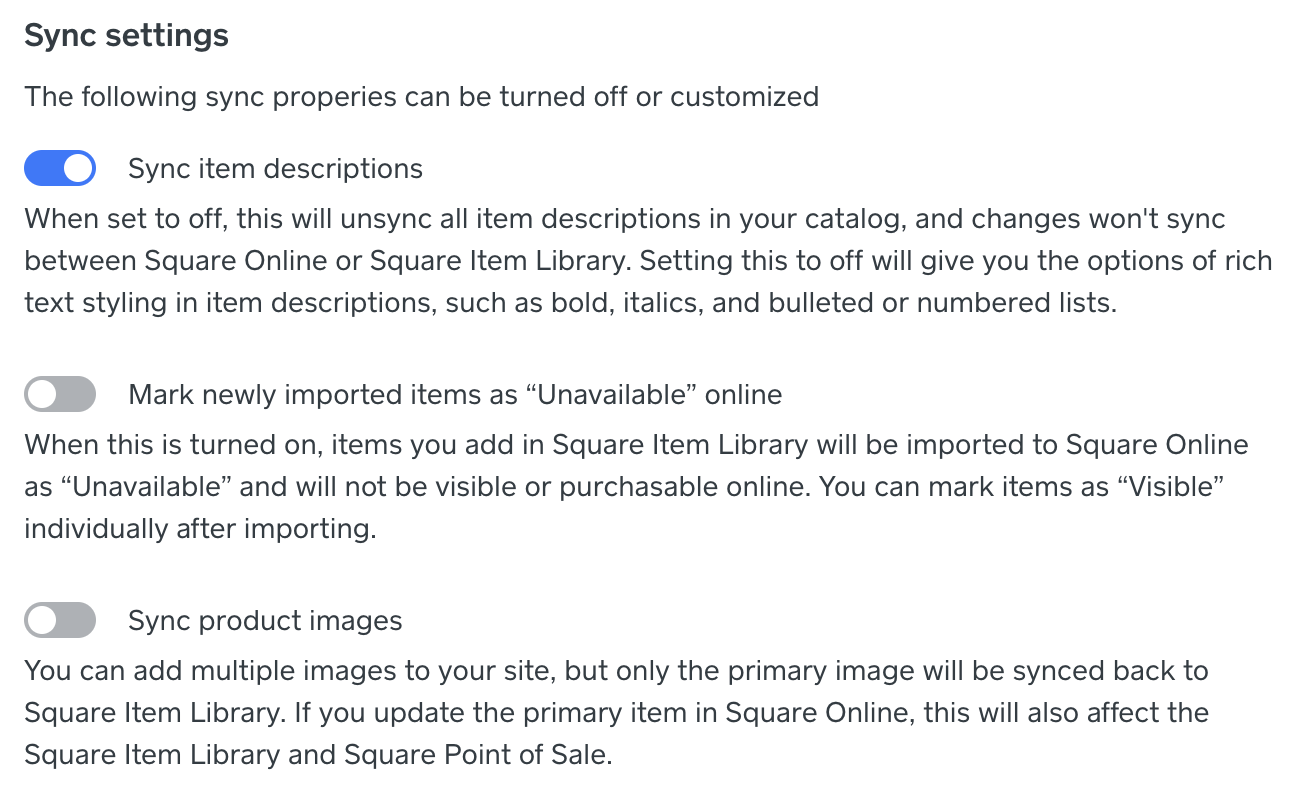
Let us know what you see here!
I've gone ahead and moved your post to this thread where I outlined some other reasons you may not see certain items on your site.
P.S. Welcome to the Seller Community ✨
Community Moderator, Square
Sign in and click Mark as Best Answer if my reply answers your question.
- Subscribe to RSS Feed
- Mark Thread as New
- Mark Thread as Read
- Float this Thread for Current User
- Bookmark
- Subscribe
- Printer Friendly Page
Hi Valentina,
Thanks for your reply.
Image sync is on, description sync and mark newly imported as unavailable are both off.
Actually, This thread is not answering my question. I know how to add items to my online store and they appear on my website. I am wondering if there is a better way to add items to my online store than selecting them individually in a fairly long list that I can't filter according to my POS categories (online > items > website items [or somethinig similar, my square is in french] >add from library). I added a bunch of new items in my POS using the bulk import method but although they are available in the sales locations linked to my online store they were not automatically added to it.
Thanks again!
- Subscribe to RSS Feed
- Mark Thread as New
- Mark Thread as Read
- Float this Thread for Current User
- Bookmark
- Subscribe
- Printer Friendly Page
Without being able to take a look at your account with you, it will be difficult to shine a light here, @Sophie1.
It sounds like you're importing items into your Square Item Library via your Square Dashboard, then adding them to your website afterwards. Our team should be able to dig in with you to align on what your current process is, and provide some advice going forward so that you run into fewer difficulties. I would like to confirm that categories created via your Square Item Library do not currently sync automatically with the categories within your website - this is a feature request that we are tracking interest in here.
Community Moderator, Square
Sign in and click Mark as Best Answer if my reply answers your question.
- Subscribe to RSS Feed
- Mark Thread as New
- Mark Thread as Read
- Float this Thread for Current User
- Bookmark
- Subscribe
- Printer Friendly Page
Here's another reason I may be pushed away from Square for my business. It's ridiculous that we don't have the option to sync categories. Otherwise, I have to remember to set the category in the online store EVERY TIME I input a new item. Already, my customers have complained that they cannot see items correctly in my categories. We should have this as an option at the very least.

- Subscribe to RSS Feed
- Mark Thread as New
- Mark Thread as Read
- Float this Thread for Current User
- Bookmark
- Subscribe
- Printer Friendly Page
I agree, we need this feature especially for large inventories. Our POS categories from catalog that i can add to items in bulk should be synced with square online store categories so that we don't have to make double work especially if we have thousands of items in inventory. Plus we should have an option to add multiple categories and not only one. Why we can add multiple categories to items online manually but can't do that in catalog for POS. I vote for catalog POS categories to sync automatically with Square Online Store and be able to add in catalog more than one categories for each item. I do not understand why it is all available on Shopify and can not be done on Square. Please do not force us to live to your competitors.
- Mark as New
- Bookmark
- Subscribe
- Subscribe to RSS Feed
- Permalink
- Report

- « Previous
- Next »
Square Community
Square Products