
- Home
- >
- Community Hub
- >
- Community Corner
- >
- where on the home screen can I see the notes from ...

- Subscribe to RSS Feed
- Mark Thread as New
- Mark Thread as Read
- Float this Thread for Current User
- Bookmark
- Subscribe
- Printer Friendly Page
where on the home screen can I see the notes from payments on the virtual desktop
Hi there. New to square and I'm having trouble locating the notes from payments made on the virtual desktop?
- Mark as New
- Bookmark
- Subscribe
- Subscribe to RSS Feed
- Permalink
- Report



- Subscribe to RSS Feed
- Mark Thread as New
- Mark Thread as Read
- Float this Thread for Current User
- Bookmark
- Subscribe
- Printer Friendly Page
Hi @Leemar thanks for reaching out to us!
Whether you've entered notes into a transaction via Virtual Terminal or the Square POS app, you will be able to view the notes when locating the payment in your Transaction history.
To view individual transaction details:
1. From your online Dashboard navigate to your Transactions.
2. You can search by date range in the top-left corner, or by the last four numbers of the credit card used.
3. Select the transaction to view any notes you've entered.
Let me know if you have any further questions here!
P.S. Welcome to the Seller Community!
Community Moderator, Australia, Square
Sign in and click Mark as Best Answer if my reply answers your question.
- Mark as New
- Bookmark
- Subscribe
- Subscribe to RSS Feed
- Permalink
- Report
- Subscribe to RSS Feed
- Mark Thread as New
- Mark Thread as Read
- Float this Thread for Current User
- Bookmark
- Subscribe
- Printer Friendly Page
Thanks for that Laurie. When I click on the payment there are no notes showing.
Notes were added in the Add Note Box but they don't show up?
Notes can be seen on all other payments using square reader?
- Mark as New
- Bookmark
- Subscribe
- Subscribe to RSS Feed
- Permalink
- Report
- Subscribe to RSS Feed
- Mark Thread as New
- Mark Thread as Read
- Float this Thread for Current User
- Bookmark
- Subscribe
- Printer Friendly Page
Hmm, thanks for letting me know @Leemar!
I've just tested this on my Dashboard and found that the notes are showing as 'Description' on the transaction details page, rather than 'Notes' as they appear when entering the payment information.
Apart from that, the notes feature seems to be working as normal when added to a Virtual Terminal transaction.
See below a screenshot of where I added my note.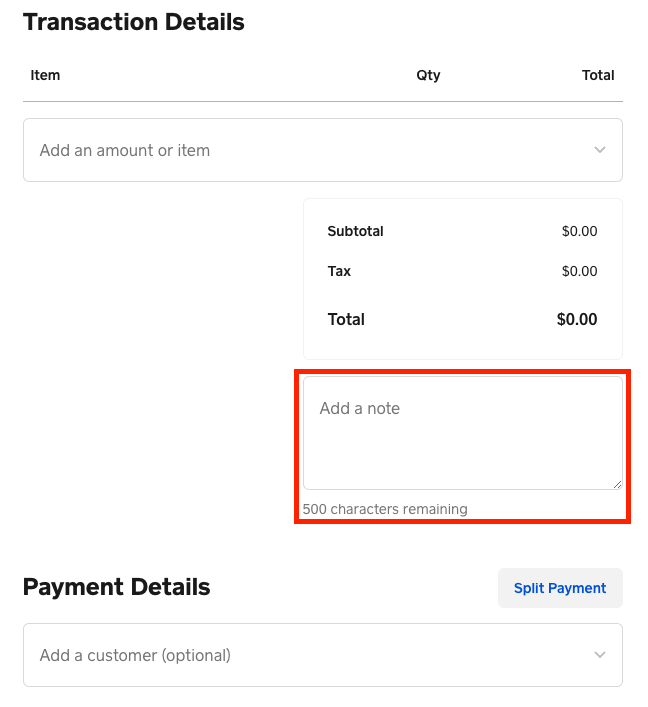
See another screenshot below of what the note from the Virtual Terminal payment looks like.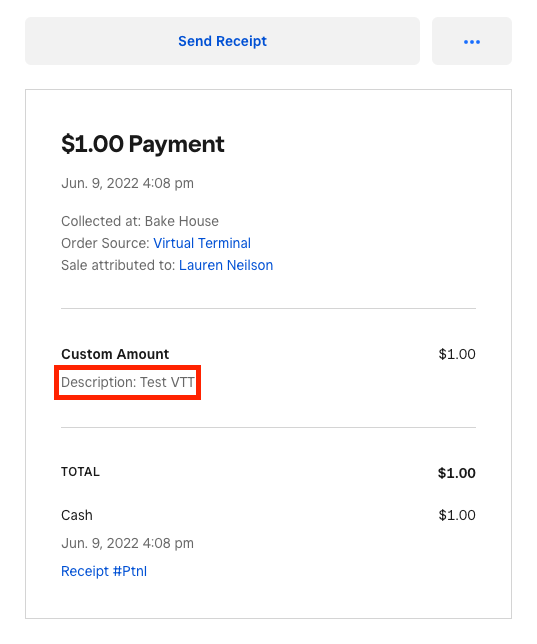
Community Moderator, Australia, Square
Sign in and click Mark as Best Answer if my reply answers your question.
- Mark as New
- Bookmark
- Subscribe
- Subscribe to RSS Feed
- Permalink
- Report

Square Community