
- Home
- >
- Community Hub
- >
- Community Corner
- >
- Re: setting up screen items such as a coffee

- Subscribe to RSS Feed
- Mark Thread as New
- Mark Thread as Read
- Float this Thread for Current User
- Bookmark
- Subscribe
- Printer Friendly Page
setting up screen items such as a coffee
When setting up items such as a coffee, using modifiers like size and milk type etc, is there a way to add sugar and actually put how many? I can only figure out how to add just 'sugar' meaning 1. What if I want to add 4?
- Mark as New
- Bookmark
- Subscribe
- Subscribe to RSS Feed
- Permalink
- Report



- Subscribe to RSS Feed
- Mark Thread as New
- Mark Thread as Read
- Float this Thread for Current User
- Bookmark
- Subscribe
- Printer Friendly Page
Hi @Bel13b, thanks for reaching out with your question and welcome to the Seller Community!
Firstly, you can certainly create a new Modifier Set called 'Sugar' and include the option to add four sugars to the item order.
I'll include the steps to set this up via the online Square Dashboard and add some screenshots below. But this can also be done via the Square Point of Sale app too.
1. Navigate to your Item Library > select Modifiers.
2. Select Create a Modifier Set.
3. Enter the name of the Modifier Set, followed by each individual modifier (e.g. 1 Sugar in the first line, 2 Sugar in the second line).
4. Ensure the modifier is applied to all relevant locations.
4. When finished, click Save.
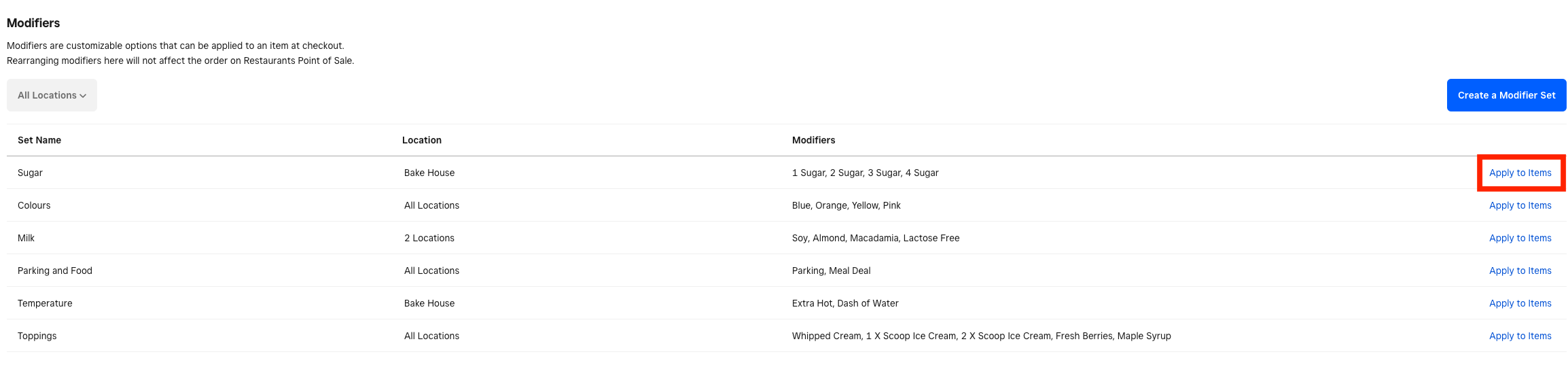
5. You will now see your new Modifier Set 'Sugar' in your list, to apply this to your items, select Apply to items.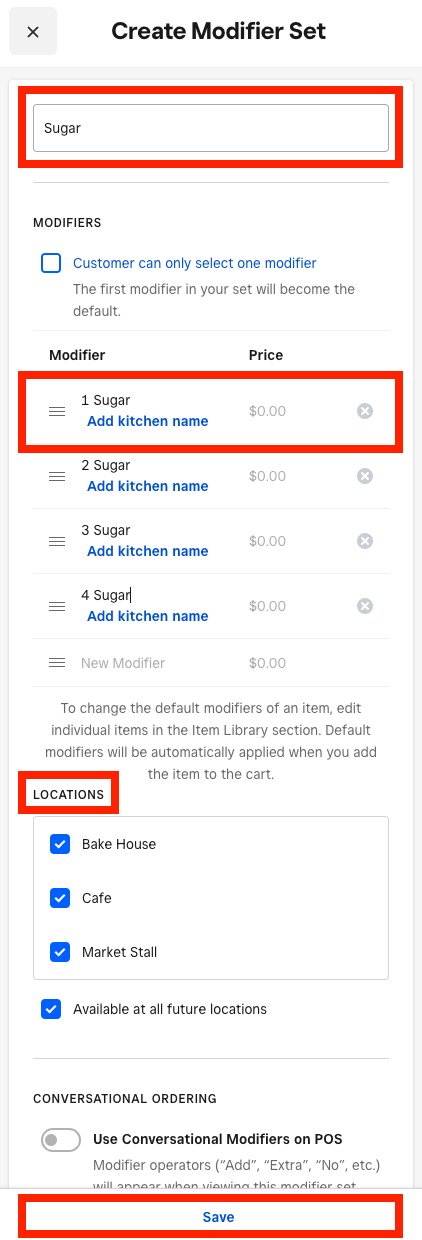
Test this on your point of sale to ensure the option is displaying when those items are selected.
Hopefully, this helps to answer your question. Let us know how you go here on your end!
Community Moderator, Australia, Square
Sign in and click Mark as Best Answer if my reply answers your question.
- Mark as New
- Bookmark
- Subscribe
- Subscribe to RSS Feed
- Permalink
- Report
- Subscribe to RSS Feed
- Mark Thread as New
- Mark Thread as Read
- Float this Thread for Current User
- Bookmark
- Subscribe
- Printer Friendly Page
Hi @Bel13b, thanks for reaching out with your question and welcome to the Seller Community!
Firstly, you can certainly create a new Modifier Set called 'Sugar' and include the option to add four sugars to the item order.
I'll include the steps to set this up via the online Square Dashboard and add some screenshots below. But this can also be done via the Square Point of Sale app too.
1. Navigate to your Item Library > select Modifiers.
2. Select Create a Modifier Set.
3. Enter the name of the Modifier Set, followed by each individual modifier (e.g. 1 Sugar in the first line, 2 Sugar in the second line).
4. Ensure the modifier is applied to all relevant locations.
4. When finished, click Save.
5. You will now see your new Modifier Set 'Sugar' in your list, to apply this to your items, select Apply to items.
Test this on your point of sale to ensure the option is displaying when those items are selected.
Hopefully, this helps to answer your question. Let us know how you go here on your end!
Community Moderator, Australia, Square
Sign in and click Mark as Best Answer if my reply answers your question.
- Mark as New
- Bookmark
- Subscribe
- Subscribe to RSS Feed
- Permalink
- Report
- Subscribe to RSS Feed
- Mark Thread as New
- Mark Thread as Read
- Float this Thread for Current User
- Bookmark
- Subscribe
- Printer Friendly Page
Yes thank you Laurie, that answered my question
- Mark as New
- Bookmark
- Subscribe
- Subscribe to RSS Feed
- Permalink
- Report

Square Community