
- Home
- >
- Community Archive
- >
- Public Archive
- >
- Archived Discussions (Read Only)
- >
- How to upload pictures

- Subscribe to RSS Feed
- Mark Thread as New
- Mark Thread as Read
- Float this Thread for Current User
- Printer Friendly Page
How to upload pictures
How can I upload pictures from my phone for my business page
- Mark as New
- Subscribe to RSS Feed
- Permalink
- Report



- Subscribe to RSS Feed
- Mark Thread as New
- Mark Thread as Read
- Float this Thread for Current User
- Printer Friendly Page
Hello @samtastastics! Can you tell me a bit more about what happens when you try to upload a picture to an item?
To add images to the Point of Sale app on your phone:
- Tap the three horizontal lines in the upper left.
- Tap Items > All Items
- Tap Create Item or select and existing item
- You’ll see a grey box with Tap To Edit > tap this box to choose a photo from your phone, or take a new photo of your merchandise.
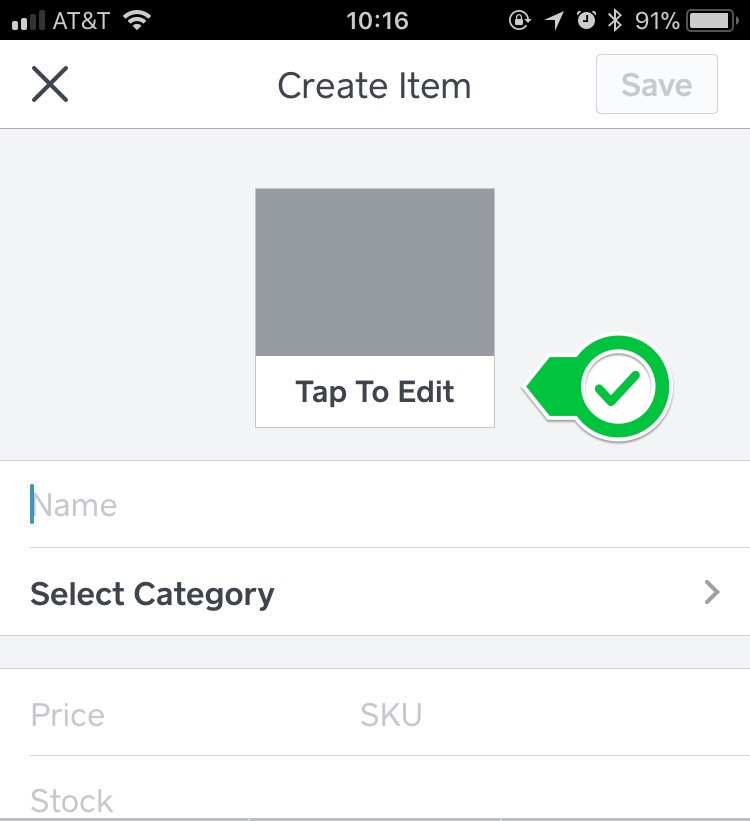
If you're seeing an error or using the Dashboard to upload images please let me know!
Seller Community Manager
- Mark as New
- Subscribe to RSS Feed
- Permalink
- Report

- Subscribe to RSS Feed
- Mark Thread as New
- Mark Thread as Read
- Float this Thread for Current User
- Printer Friendly Page
How did I add photos to my variations? I did it for one item previously and now I can't remember how I did it. For example I have an item BEANIES and it has variations add for all the colors it's available in and I added a photo for each variation showing the color so when they are on the website shopping they select from the drop down menu that shows all the variations. For the life of me I can't remember how to add that photo when creating new variations on other items. Thanks in advance!
- Mark as New
- Subscribe to RSS Feed
- Permalink
- Report

- Subscribe to RSS Feed
- Mark Thread as New
- Mark Thread as Read
- Float this Thread for Current User
- Printer Friendly Page
Hey @SimoniM!
We don't offer the ability to add pictures to variations, so I'm wondering where you had seen it able to be done previously. 🤔 Were you working in your Square Dashboard or in the Online Store when you added pictures?
Community Program Manager, Square
- Mark as New
- Subscribe to RSS Feed
- Permalink
- Report

- Subscribe to RSS Feed
- Mark Thread as New
- Mark Thread as Read
- Float this Thread for Current User
- Printer Friendly Page
Using a scanner can a scan pictures to upload to square
- Mark as New
- Subscribe to RSS Feed
- Permalink
- Report

- Subscribe to RSS Feed
- Mark Thread as New
- Mark Thread as Read
- Float this Thread for Current User
- Printer Friendly Page
@BlingDiva777 Hey !! and Welcome to the Community 🤗
If you're trying to upload images to your Item Library, I'm afraid you cannot do this using a scanner.
You'll need to upload directly from the photos saved on your device/computer.
Check out the best answer on this thread for the steps!
Community Moderator, Square
Sign in and click Mark as Best Answer if my reply answers your question.
- Mark as New
- Subscribe to RSS Feed
- Permalink
- Report

- Subscribe to RSS Feed
- Mark Thread as New
- Mark Thread as Read
- Float this Thread for Current User
- Printer Friendly Page
I WOULD LIKE TO ADD IMAGES OF PRODUCTS FOR EASY RING UP AT OUR CONCESSION, HOW CAN I DO THIS?
- Mark as New
- Subscribe to RSS Feed
- Permalink
- Report



- Subscribe to RSS Feed
- Mark Thread as New
- Mark Thread as Read
- Float this Thread for Current User
- Printer Friendly Page
Hi @Coop and welcome to the Community,
I moved your post to a thread where this question has been answered already.
Check out the Best Answer above for details.
In the future, don't hesitate to search your question first here or on the Support Center for your quickest answer too!
Community Moderator, Square
Sign in and click Mark as Best Answer if my reply answers your question.
- Mark as New
- Subscribe to RSS Feed
- Permalink
- Report
- Subscribe to RSS Feed
- Mark Thread as New
- Mark Thread as Read
- Float this Thread for Current User
- Printer Friendly Page
I thought I uploaded an image to customizing my receipt but I can't find it. What did I do wrong?
Dena V
- Mark as New
- Subscribe to RSS Feed
- Permalink
- Report

- « Previous
-
- 1
- 2
- Next »
Square Community