
- Home
- >
- Community Archive
- >
- Public Archive
- >
- Archived Discussions (Read Only)
- >
- Appointments: How do I add a service provider if t...

- Subscribe to RSS Feed
- Mark Thread as New
- Mark Thread as Read
- Float this Thread for Current User
- Printer Friendly Page
Appointments: How do I add a service provider if that person isn't the owner?
The title of this thread has been edited from the original: Appointments - one owner but one service provider
Hello,
I have a square account for the retail side of our business, but wanted to add an appointment account. We have three members of the retail account, but only one person that does services ( makeup and hair)- this is infrequent and does not make up the bulk of our business.
Becuase I am the OWNER of the account, square appts automatically designates me as a service provider. I have added our ONE service person, but now Square wants to charge us 50 dollars a month ( for 2-5 service providers). Since we only have one provider, is there a way to get rid of this fee?
Thanks
k
- Labels:
-
Appointments
-
General Setup



- Subscribe to RSS Feed
- Mark Thread as New
- Mark Thread as Read
- Float this Thread for Current User
- Printer Friendly Page
Im not completely familiar with the apppintments app but when they redesigned the pricing on appointments they added the free tier for a person that is the owner and only employee. So in your case it would be free if you were doing the appointments but costs because you are having employee(s) doing the services.
What i think you could do is just have the free appointment version and have them book appointments with you but the other person renders the service when they arrive. I think that would work. Only thing I can think of is your name would appear on the appointment to the customer. It’s a work around but I think would work.



- Subscribe to RSS Feed
- Mark Thread as New
- Mark Thread as Read
- Float this Thread for Current User
- Printer Friendly Page
Welcome to the Comunity @kk117! I have one thing to add to the workaround shared by @VanKalkerFarms (thank you!) — you can change the name that is shown to customers for any member of staff, you can even change the owner's display name.
To get started, sign in to your Appointments Dashboard:
- Navigate to the Staff section.
- Click on your name.
- A new window will appear on the right - scroll down and enter the name of the person performing the serviecs under Display Name.
- Click Save.
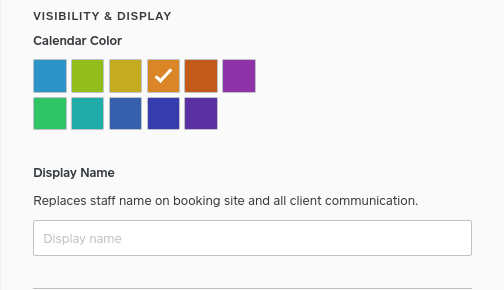
I'll also share this use case with the Appointments team so we can highlight this option when you're first setting up Square Appointments.
Seller Community Manager
- Subscribe to RSS Feed
- Mark Thread as New
- Mark Thread as Read
- Float this Thread for Current User
- Printer Friendly Page
Thank you for responding! I will try it out

Square Community