
- Home
- >
- Help
- >
- Appointments
- >
- Re: How do I remove the scheduling window from my ...

- Subscribe to RSS Feed
- Mark Thread as New
- Mark Thread as Read
- Float this Thread for Current User
- Bookmark
- Subscribe
- Printer Friendly Page
How do I remove the scheduling window from my a appointment page?
Is there a way to remove this line from my appointment scheduler page? “You can schedule an appointment between 2 hours and 60 days ahead of time.” It is causing confusion and problems with my customers and I’m about to switch to another appointment scheduler because of it.
For example, if they want to come in at 3pm on a Tuesday they think they have until 1pm on Tuesday to book so they wait until the last minute. But if I don’t have any appointments that day then I remove it from the scheduler because I live an hour away and don’t want to be on call all day. Then they message me upset because the scheduler said they can book up to two hours in advanced.
But at the same time I need to leave it at two hours because if it’s a day that I do have multiple appointments then I want people to be able to book the same day.
The problem could easily be solved if that line didn’t appear on the page but I can’t figure out how to remove it.
Please help!
- Mark as New
- Bookmark
- Subscribe
- Subscribe to RSS Feed
- Permalink
- Report



- Subscribe to RSS Feed
- Mark Thread as New
- Mark Thread as Read
- Float this Thread for Current User
- Bookmark
- Subscribe
- Printer Friendly Page
Hey there, @patinacreek -
What do the settings look like on your Dashboard under Appointments > Calendar & Booking?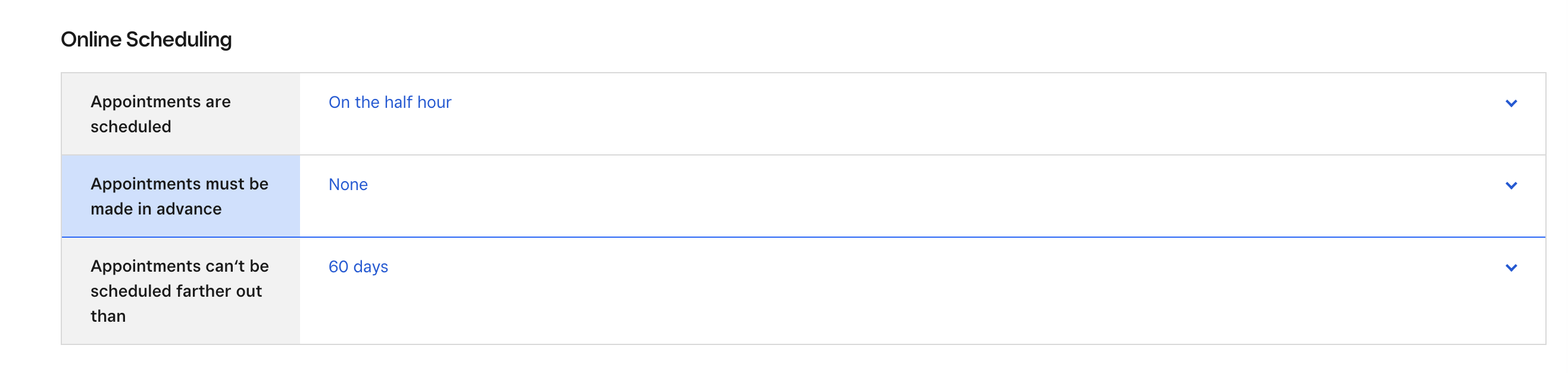
I would recommend making some changes here. Also, I changing the settings to only have your approval for making appointments would help with this too.
Give these a try and let me know if you're still looking for something different. Thank you!
Community Moderator, Square
Sign in and click Mark as Best Answer if my reply answers your question.
- Mark as New
- Bookmark
- Subscribe
- Subscribe to RSS Feed
- Permalink
- Report
- Subscribe to RSS Feed
- Mark Thread as New
- Mark Thread as Read
- Float this Thread for Current User
- Bookmark
- Subscribe
- Printer Friendly Page
Thank you. The settings are exactly how I want them. I want people to be able to book up to two hours in advance however I do not want them to know that. That line on the appointment scheduler page leads customers to believe that they can wait until the very last minute to schedule. That is not the case because I adjust my availability closer to the date based on when appointments are booked. Then when customers can’t book the same day they get upset.
And I accept 100% of the appointments so changing the setting to approval would only create an additional work for me and not solve any problems.
In the meantime I’ve added this line to all my service descriptions “Availability is subject to change, book early to ensure your desired appointment time is secured. Same day appointments are sometimes available but not guaranteed.” It looks tacky but so far it seems to be helping.
- Mark as New
- Bookmark
- Subscribe
- Subscribe to RSS Feed
- Permalink
- Report
- Subscribe to RSS Feed
- Mark Thread as New
- Mark Thread as Read
- Float this Thread for Current User
- Bookmark
- Subscribe
- Printer Friendly Page
Thank you for confirming, @patinacreek.
I reached out to one of our Appointments experts to get to the bottom of this one for you. It looks like having any timeframe schedule will have that message show and it cannot be removed.
Being able to remove it would be a Feature Request. If that's something you'd like to submit on our Ideate Board, you definitely can.
In the meantime, maybe adjust the timeframe a little more to fit the restrictions you'd like to implement for your customers.
Community Moderator, Square
Sign in and click Mark as Best Answer if my reply answers your question.
- Mark as New
- Bookmark
- Subscribe
- Subscribe to RSS Feed
- Permalink
- Report

Square Community
Square Products