
- Home
- >
- Help
- >
- Orders & Catalog
- >
- Deleting a Custom Attribute

- Subscribe to RSS Feed
- Mark Thread as New
- Mark Thread as Read
- Float this Thread for Current User
- Bookmark
- Subscribe
- Printer Friendly Page
Deleting a Custom Attribute
There are several custom attributes in my item library, but there is no way to delete them. I think they were automatically set up when I connected to Google Shopping, which I've since removed.
Is there any way to delete them? I have zero use for them and they take up a huge amount of space on the item editing screen.

- Mark as New
- Bookmark
- Subscribe
- Subscribe to RSS Feed
- Permalink
- Report



- Subscribe to RSS Feed
- Mark Thread as New
- Mark Thread as Read
- Float this Thread for Current User
- Bookmark
- Subscribe
- Printer Friendly Page
Hi @londontea,
Thanks for reaching out. Happy to help.
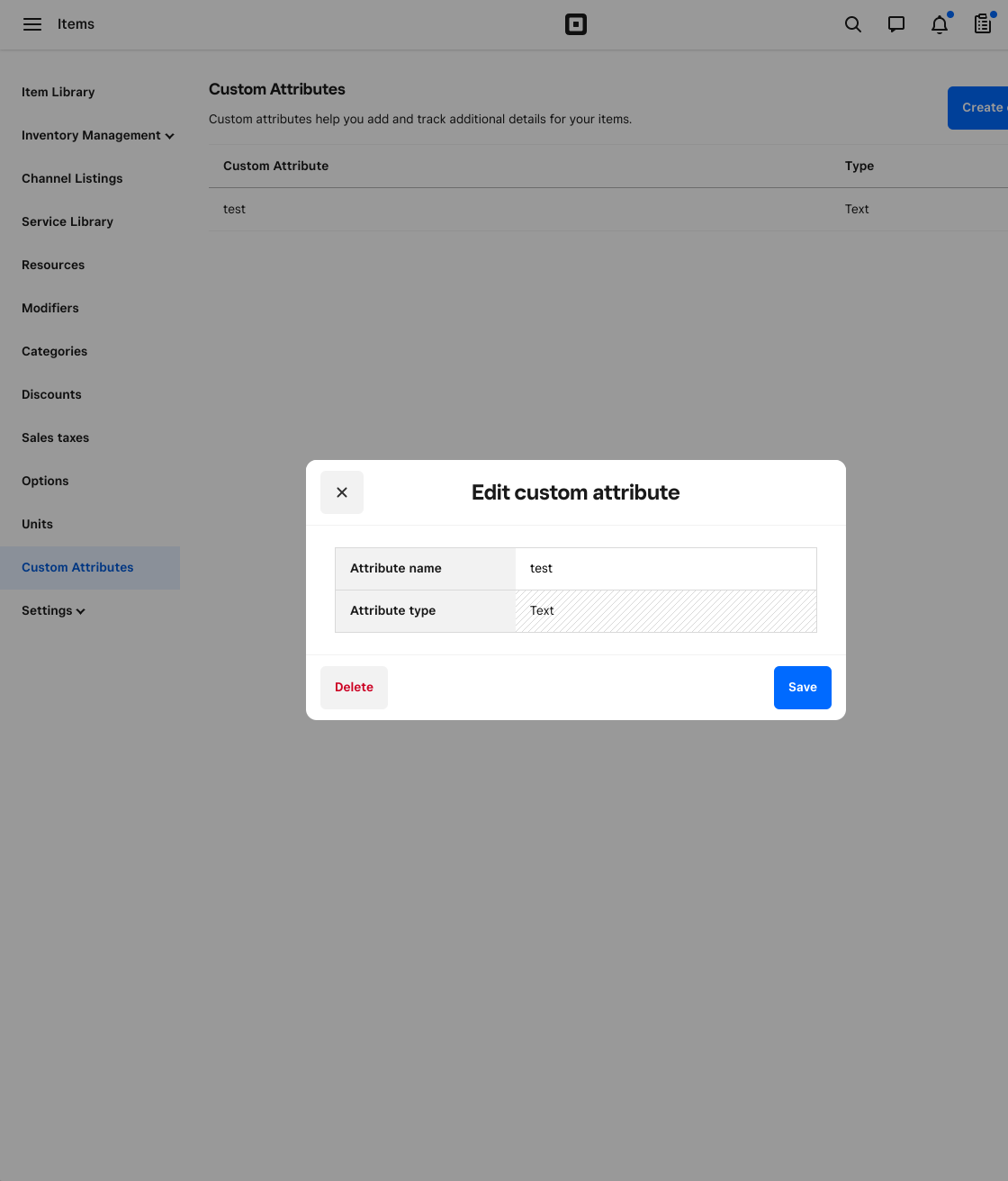
When I go into my Dashboard > Items > Custom Attributes. When I click on an attribute in the bottom right hand corner I see the delete option.
So weird that you are not. Let me look more at this and will follow up.
Thank you!
Square Community Moderator
Sign in and click Mark as Best Answer if my reply answers your question ✨
- Subscribe to RSS Feed
- Mark Thread as New
- Mark Thread as Read
- Float this Thread for Current User
- Bookmark
- Subscribe
- Printer Friendly Page
Thanks @MayaP! I also thought this was very strange because I'm able to delete custom attributes that I created, just not the ones that were automatically made when I tried using the Google Shopping channel.
- Mark as New
- Bookmark
- Subscribe
- Subscribe to RSS Feed
- Permalink
- Report
- Subscribe to RSS Feed
- Mark Thread as New
- Mark Thread as Read
- Float this Thread for Current User
- Bookmark
- Subscribe
- Printer Friendly Page
Hi @londontea,
Just checking in, still looking into this.
Can you speak a little of your statement, they were automatically made when you used Google Shopping?
And when you refer to Google Shopping Channel, you are referring to this right?
Square Community Moderator
Sign in and click Mark as Best Answer if my reply answers your question ✨
- Mark as New
- Bookmark
- Subscribe
- Subscribe to RSS Feed
- Permalink
- Report

- Subscribe to RSS Feed
- Mark Thread as New
- Mark Thread as Read
- Float this Thread for Current User
- Bookmark
- Subscribe
- Printer Friendly Page
I am also having issues with Custom Atttributes. They are not able to be deleted when set up by a sales channel. Square does not seem to have any answers. This is very annoying. I have over 2500 items that all have the list of custom attributes that do not in any way pertain to my business. I have tried to change my Google Product Category, but cannot figure out where to do this. Any help would be so greatly appreciated.
- Subscribe to RSS Feed
- Mark Thread as New
- Mark Thread as Read
- Float this Thread for Current User
- Bookmark
- Subscribe
- Printer Friendly Page
I'm having the same issue. Removed Google from my sales channels but I'm stuck with all the attributes that I don't need.



- Subscribe to RSS Feed
- Mark Thread as New
- Mark Thread as Read
- Float this Thread for Current User
- Bookmark
- Subscribe
- Printer Friendly Page
@katiefinn , @JALS ;
I am not sure if this is new but I just checked and I can Delete Custom Attributes.
Log in to your Square Dashboard on a Computer
From the Home Screen go to Items > Custom Attributes --- then double click the attribute you want to delete and I now get this screen. I created mine through Square so I am not sure if this is the reason I have the Delete button

Owner
Pocono Candle
Mark as Best Answer if this Helped you solve an issue or give it a thumbs up if you like the answer.
Square Support Number 855-700-6000.
Make Sure App and OS is up to date on your Device.

Square Community
Square Products