
- Home
- >
- Groups & Events
- >
- Groups
- >
- Interest & Identity Groups
- >
- Pride in Business: LGBTQ+
- >
- Forum
- >
- Re: Where is my online store? Checkout & Subscript...

- Subscribe to RSS Feed
- Mark Thread as New
- Mark Thread as Read
- Float this Thread for Current User
- Bookmark
- Subscribe
- Printer Friendly Page
Where is my online store?
Has anyone else suffered extreme frustration since our online stores were destroyed by Weebly? I am at the end of my rope. I maintain multiple stores that rarely have changes. Having to hunt for basic functionality has me shopping for a new provider.
Just last night our board approved a fundraiser event. I added the item to my catalog, again, with extreme frustration since it demands information that isn't relevant to the item only to generate errors, but after 3 or 4 edits, when I wanted to see what the final item looked like online, I discovered there is no longer a link to our online store in the dashboard.
Since we are a nonprofit ORGANIZATION and not a retail/wholesale store, I REALLY, REALLY do not need, and cannot use, an online store to run the organization. I just need a place for someone to pay their dues or occasionally buy a ticket to an event.
I have had, for years, a link to our "online store" directly from our real website. But, that is no longer updating as it should.
Is this just some fluke, or is Square/Weebly trying to force me to use their website hosting service?



- Subscribe to RSS Feed
- Mark Thread as New
- Mark Thread as Read
- Float this Thread for Current User
- Bookmark
- Subscribe
- Printer Friendly Page
I don't think it looks horrible @AndySNJ!
For #1, if you want to delete categories or items, scroll down on this Support Center article. It goes over in significant detail how to delete current categories, but also how to organize your categories.
If you're more concerned about page organization (item appearance) please take a look at this article, which goes over how to Customize Category Pages in Square Online.
For #2, you can add a donation section to any page on your website to help increase visibility for potential donors. I think this may be eaiser than what you have now. From your dashboard, go to Website > Edit Site to open the editor. Open the page list on the upper left and select a page to use.
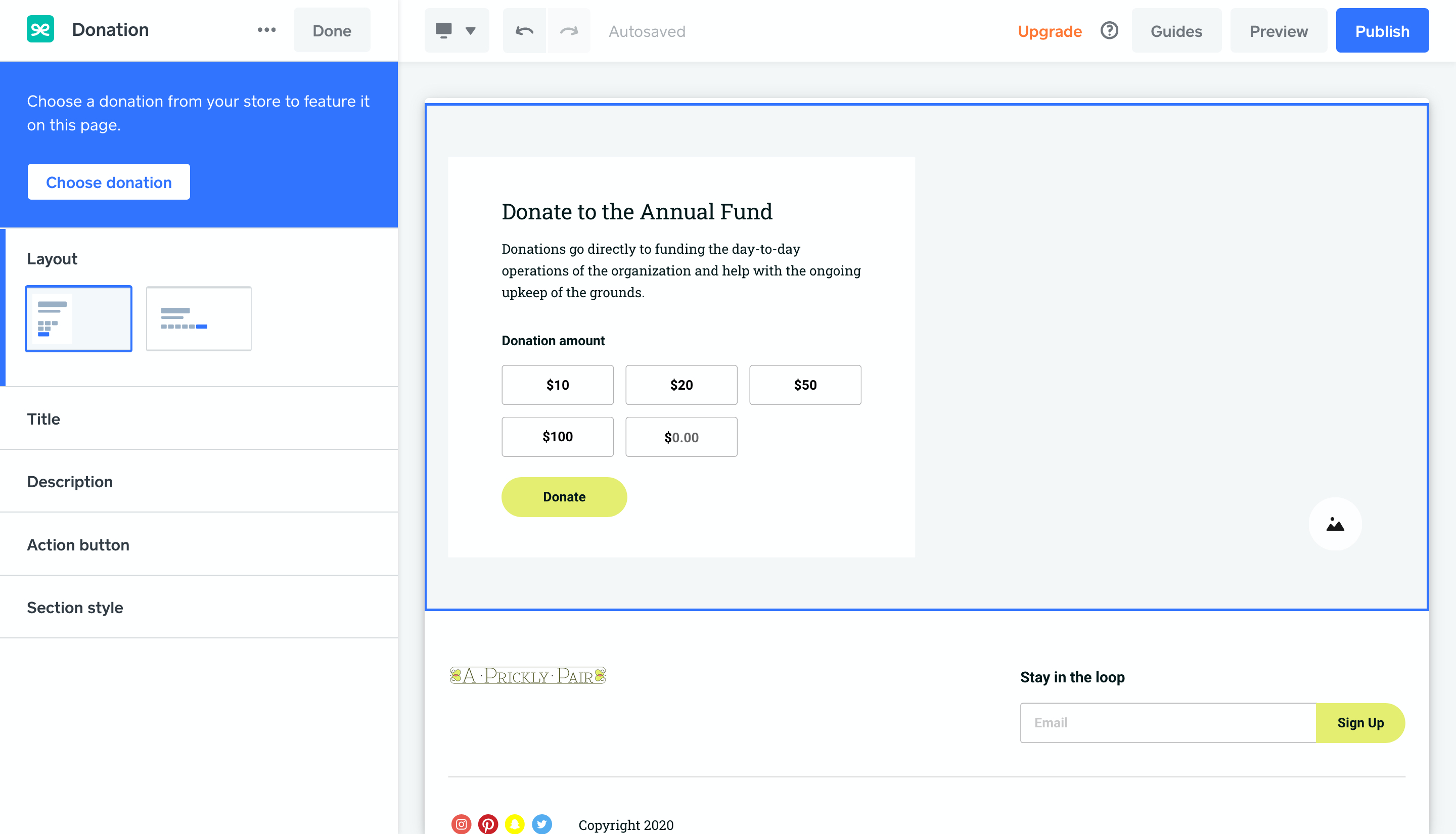
Click the Add section button, select the Donation option and click Add to place it on the page. Use the Choose donation button to connect to a donation item from your store.
Tip: If you haven’t created a donation item yet, you can use the “Add new donation” button to create one without leaving the site editor.
This will hopefully move you away from having the item be donation, and actually just have a donation section. You can read more instruction on this here.
If you're having any trouble with this, please call our Support Team for more step by step information. Thank you for your patience with us! I know web editing isn't easy (or at least for me it isn't!) 😔

- Subscribe to RSS Feed
- Mark Thread as New
- Mark Thread as Read
- Float this Thread for Current User
- Bookmark
- Subscribe
- Printer Friendly Page
Hey @AndySNJ-
So sorry to hear about this experience you've had with our Online Store updates.
I think I have a solution for you. If you're just an organization looking for members to pay dues, I would consider using Checkout Links rather than creating an entire site.
You could create a subscription link or just a payment link. Would either of those options work better than what you have now? Please let me know as I want to make sure we get this figured out.
- Subscribe to RSS Feed
- Mark Thread as New
- Mark Thread as Read
- Float this Thread for Current User
- Bookmark
- Subscribe
- Printer Friendly Page
Thank you, Isabelle. I was thinking of creating a new page on our site and providing checkout/subscription links. I stopped because I am unsure if it is possible for someone using such a link to add multiple items to a cart. The three most common charges are, in order of frequency: Dues, Donations, Event "Tickets."
I can easily create a new page listing those items, with descriptions, etc. But I want to make sure if someone is renewing their membership at the same time they are RSVP'ing for a fundraiser dinner or ordering a ticket for a show, that they don't have to start the process from scratch for each item. It wouldn't kill them, I know, but it would surely confound them as this is so far from normal online behavior.
Thank you!
- Subscribe to RSS Feed
- Mark Thread as New
- Mark Thread as Read
- Float this Thread for Current User
- Bookmark
- Subscribe
- Printer Friendly Page
Hey @AndySNJ!
Just so we're clear, will people pay their monthly dues themselves or do you want them to be charged automatically?
If you just need a place where people can pay dues, make donations, and purchase tickets, I would create a Square Online Store and just have those three 'items'. You can actually create a buy now button and title each of them 'Pay Dues', 'Make a Donation' or 'Buy a Ticket'. I think that would be the best customer/user experience.
You can learn more about checkout options here. I hope this has been helpful 💡
- Subscribe to RSS Feed
- Mark Thread as New
- Mark Thread as Read
- Float this Thread for Current User
- Bookmark
- Subscribe
- Printer Friendly Page
I had a Square online store! I have a Square online store! I just can no longer get to it. That is what is driving me out of my mind. Our website has a tab in our top navigation bar to our Square online store, but it is not updating.
- Subscribe to RSS Feed
- Mark Thread as New
- Mark Thread as Read
- Float this Thread for Current User
- Bookmark
- Subscribe
- Printer Friendly Page
Hey @AndrySNJ!
Thank you for your quick replies. Really sorry about this.
Please either send us a screenshot of what you're seeing on your end, or give us a call for immediate support.
If you do speak to our Support Team and they're able to resolve the issue, please follow up in this thread so other sellers can take a look to see how you resolved the issue in case they come across something similar.
- Subscribe to RSS Feed
- Mark Thread as New
- Mark Thread as Read
- Float this Thread for Current User
- Bookmark
- Subscribe
- Printer Friendly Page
Here is the link to my online store directly off our website: https://gaamc.square.site/
I know it looks horrible, but that is because I have been fighting to gets things to display properly. Here are my issues:
- I added books to a new "Books" category, but could not get the category to display. As a result, books are showing up individually between the Contributions, Unrestricted category header and the Dues header. These books were added to the store for a promotional give-away for an event. No one seems to have claimed any of them as far as I can tell. Even though we are giving the books away, I have not received even one order of the 11 or 12 certificates distributed. At this point, I don't really care about them. The bigger issue is my inability to add or remove items from the page "https://gaamc.square.site"
- On another account, I was able to create a "Donation" item that allows the donor to fill-in their own amount. I attempted to replicate that on this account, but could not. I deleted the item and created a new donation item knowing this was a newer feature and it was perhaps only made active during the new item creation. But, still, I cannot find any setting that allows the customer to fill in an amount. The new Donation item does not appear on this site page.
- I have created a new page on our website, per our prior email exchange, It also looks a mess, but we at least have some functionality to process single "item" transactions, I think. You may visit the new page here: https://www.gaamc.org/onlinestore. At this time, the Donation item is limited to only a $25 donation, though people can increase the quantity. This is less than ideal, for sure. I can tweak the appearance later, once I get functionality as nailed down as I can.
- Subscribe to RSS Feed
- Mark Thread as New
- Mark Thread as Read
- Float this Thread for Current User
- Bookmark
- Subscribe
- Printer Friendly Page
I don't think it looks horrible @AndySNJ!
For #1, if you want to delete categories or items, scroll down on this Support Center article. It goes over in significant detail how to delete current categories, but also how to organize your categories.
If you're more concerned about page organization (item appearance) please take a look at this article, which goes over how to Customize Category Pages in Square Online.
For #2, you can add a donation section to any page on your website to help increase visibility for potential donors. I think this may be eaiser than what you have now. From your dashboard, go to Website > Edit Site to open the editor. Open the page list on the upper left and select a page to use.
Click the Add section button, select the Donation option and click Add to place it on the page. Use the Choose donation button to connect to a donation item from your store.
Tip: If you haven’t created a donation item yet, you can use the “Add new donation” button to create one without leaving the site editor.
This will hopefully move you away from having the item be donation, and actually just have a donation section. You can read more instruction on this here.
If you're having any trouble with this, please call our Support Team for more step by step information. Thank you for your patience with us! I know web editing isn't easy (or at least for me it isn't!) 😔
- Subscribe to RSS Feed
- Mark Thread as New
- Mark Thread as Read
- Float this Thread for Current User
- Bookmark
- Subscribe
- Printer Friendly Page
Thank you, Isabelle. It was extraordinarily frustrating to keep adding items, then not have functionality for those items, and not having control over the page. I finally gave up and recreated several items, deleted whole categories, and finally, I was able to recreate our online store page so that it doesn't suck.
All of this was due to the corruption of the Square environment by Weebly.
But, nonetheless, I persevered and it seems to be functional.
https://gaamc.square.site
- Subscribe to RSS Feed
- Mark Thread as New
- Mark Thread as Read
- Float this Thread for Current User
- Bookmark
- Subscribe
- Printer Friendly Page

Square Community