

- Subscribe to RSS Feed
- Mark Thread as New
- Mark Thread as Read
- Float this Thread for Current User
- Bookmark
- Subscribe
- Printer Friendly Page
ellomy square inventory is not syncing for stock sold
Hello, im new to square inventory. I have a shop now and using it to sell all products in the shop. However when i sell a product its not taking it out the inventory stock. The item is still listed as an item
Does any one know how to rectify this
Thanks
Paula
- Mark as New
- Bookmark
- Subscribe
- Subscribe to RSS Feed
- Permalink
- Report



- Subscribe to RSS Feed
- Mark Thread as New
- Mark Thread as Read
- Float this Thread for Current User
- Bookmark
- Subscribe
- Printer Friendly Page
Hey @HeartAcademy,
Thanks for getting in touch and sorry to hear you're having trouble with your inventory!
Have you taken a look at this guide on setting up inventory and tracking items? This is a handy place to start if you've not yet turned on inventory tracking.
Is the issue that there is no stock tracking at all, or that the item remains on POS once the inventory has hit 0? One thing to keep in mind is that even if you have no stock, the item will still appear in POS and can be sold, and items can go into negatives!
Square, Australia
Sign in and click Mark as Best Answer if my reply answers your question.
- Mark as New
- Bookmark
- Subscribe
- Subscribe to RSS Feed
- Permalink
- Report

- Subscribe to RSS Feed
- Mark Thread as New
- Mark Thread as Read
- Float this Thread for Current User
- Bookmark
- Subscribe
- Printer Friendly Page
You said in the comment above that you can sell stock even if it gets to 0. Is it possible to stop this on the website? I sell food and once it’s gone there isn’t anymore.
- Mark as New
- Bookmark
- Subscribe
- Subscribe to RSS Feed
- Permalink
- Report



- Subscribe to RSS Feed
- Mark Thread as New
- Mark Thread as Read
- Float this Thread for Current User
- Bookmark
- Subscribe
- Printer Friendly Page
Hey @Scef,
Thanks for writing back in 👋
When stock tracking is enabled on your Square Online store, and an item is out of stock, it won't be able to be sold once it reaches zero.
To enable stock tracking, head to your online dashboard and select Items > Site Items > select an item. From there, scroll down to Additional Information to add your stock by turning "Track stock" on. If an item has variations, you can enter stock levels under the Variations field.
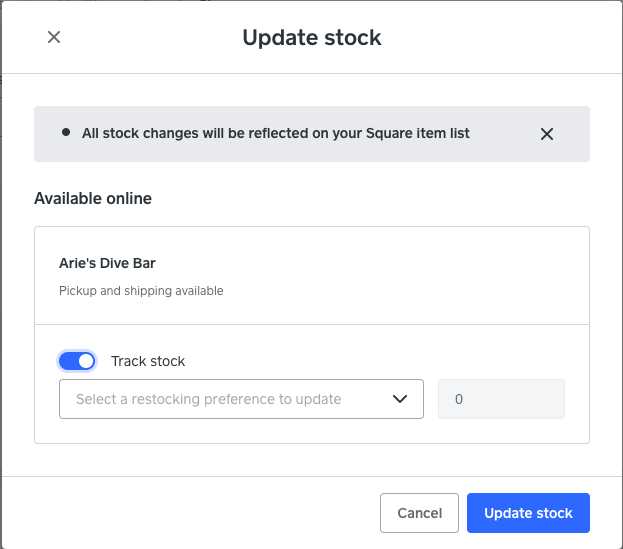
After entering a restocking preference, and your stock levels, hit Update stock to save.
Please let us know how you go!
- Mark as New
- Bookmark
- Subscribe
- Subscribe to RSS Feed
- Permalink
- Report
- Subscribe to RSS Feed
- Mark Thread as New
- Mark Thread as Read
- Float this Thread for Current User
- Bookmark
- Subscribe
- Printer Friendly Page
Thanks Arie
- Mark as New
- Bookmark
- Subscribe
- Subscribe to RSS Feed
- Permalink
- Report

Square Community
Square Products