

- Subscribe to RSS Feed
- Mark Thread as New
- Mark Thread as Read
- Float this Thread for Current User
- Bookmark
- Subscribe
- Printer Friendly Page
edit change amount in checkout before transaction goes through
New to Square. Cannot find information about editing an incorrect amount entered at checkout (before a transaction goes through)?
Thank you
- Mark as New
- Bookmark
- Subscribe
- Subscribe to RSS Feed
- Permalink
- Report



- Subscribe to RSS Feed
- Mark Thread as New
- Mark Thread as Read
- Float this Thread for Current User
- Bookmark
- Subscribe
- Printer Friendly Page
No worries @SweetM - it sounds like you may have been doubling up by adding an item and a custom amount!
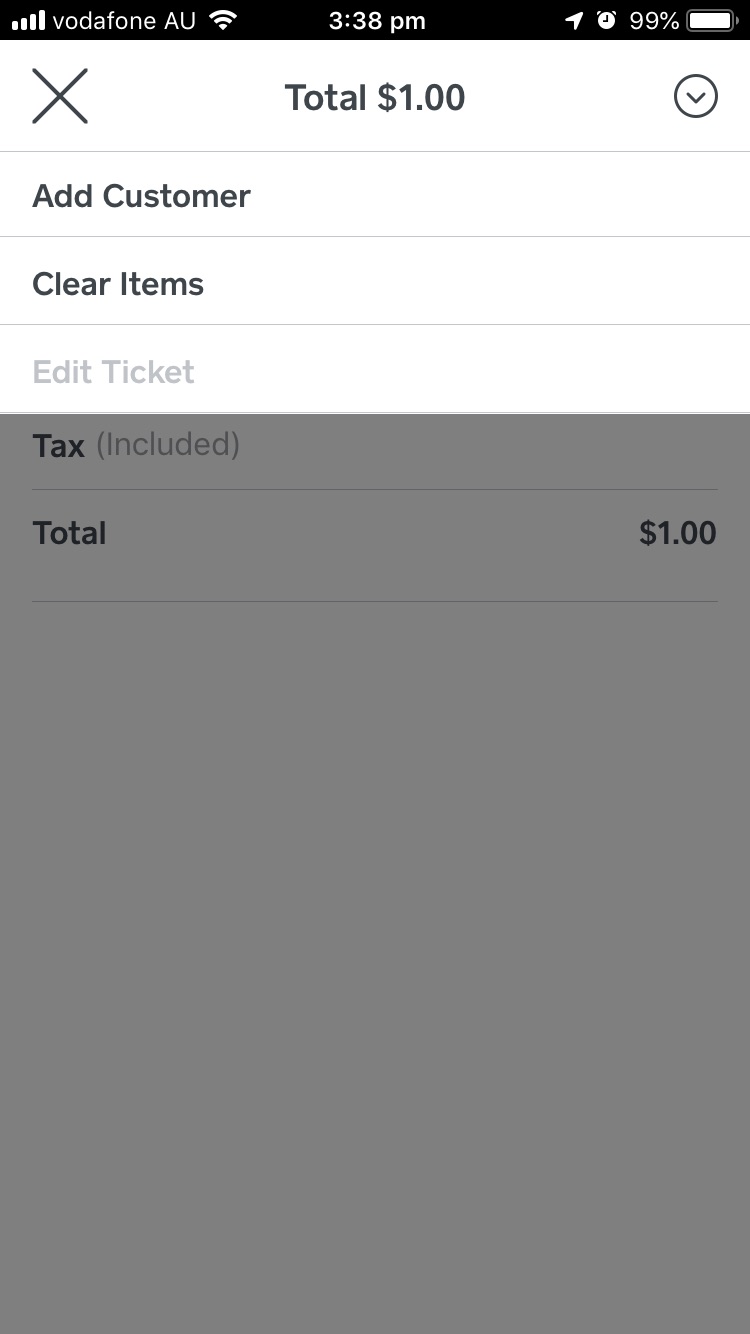
Also, if you ever need to remove items or clear an entire sale from the checkout screen, you can click where it says "current sale" then tap the Down arrow in the circle and press "Clear Items".
Hope this helps!
Square, Australia
Sign in and click Mark as Best Answer if my reply answers your question.
- Mark as New
- Bookmark
- Subscribe
- Subscribe to RSS Feed
- Permalink
- Report
- Subscribe to RSS Feed
- Mark Thread as New
- Mark Thread as Read
- Float this Thread for Current User
- Bookmark
- Subscribe
- Printer Friendly Page
Hey @SweetM,
Thanks for getting in touch.
You can edit an amount you've entered at checkout via the keypad by pressing the "C" button on the keypad via iOS, or the backwards pointing arrow on the keypad via Android.
Hope this helps - if you're still having trouble let me know what mobile device you're using and we can take some screenshots of how it should appear for you 👍
Square, Australia
Sign in and click Mark as Best Answer if my reply answers your question.
- Mark as New
- Bookmark
- Subscribe
- Subscribe to RSS Feed
- Permalink
- Report
- Subscribe to RSS Feed
- Mark Thread as New
- Mark Thread as Read
- Float this Thread for Current User
- Bookmark
- Subscribe
- Printer Friendly Page
Oh thank you. Think I’m getting mixed up by putting in a pre- set ‘item’ and then wanting to change the amount in the checkout page.
I’ve organised a ‘discount item’ for a fixed amount now- that should work to solve the problem.
I ‘ve created a second discount with no dollars attached. I presume that will let me take an amount down by a variable amount.
I’ll look again at the page that shows the keyboard. I feel a bit of a dill not noticing the ‘C’!
Thank you
- Mark as New
- Bookmark
- Subscribe
- Subscribe to RSS Feed
- Permalink
- Report
- Subscribe to RSS Feed
- Mark Thread as New
- Mark Thread as Read
- Float this Thread for Current User
- Bookmark
- Subscribe
- Printer Friendly Page
No worries @SweetM - it sounds like you may have been doubling up by adding an item and a custom amount!
Also, if you ever need to remove items or clear an entire sale from the checkout screen, you can click where it says "current sale" then tap the Down arrow in the circle and press "Clear Items".
Hope this helps!
Square, Australia
Sign in and click Mark as Best Answer if my reply answers your question.
- Mark as New
- Bookmark
- Subscribe
- Subscribe to RSS Feed
- Permalink
- Report
- Subscribe to RSS Feed
- Mark Thread as New
- Mark Thread as Read
- Float this Thread for Current User
- Bookmark
- Subscribe
- Printer Friendly Page
Yes, that helps. Thanks again
- Mark as New
- Bookmark
- Subscribe
- Subscribe to RSS Feed
- Permalink
- Report

Square Community
Square Products