

- Subscribe to RSS Feed
- Mark Thread as New
- Mark Thread as Read
- Float this Thread for Current User
- Bookmark
- Subscribe
- Printer Friendly Page
cancellation policy
I've noticed that in my online booking setup the 'required cancellation policy' field is uneditable and says "We ask that you please reschedule or cancel at least 12 hours before the beginning of your appointment or you may be charged a cancellation fee."
However on all of my client email communications the cancellation policy only says "We ask that you please reschedule or cancel at least 12 hours before the beginning of your appointment" (ie no mention of being charged a cancellation fee.) I'm concerned I'll get backlash from a client who will argue they were not aware of a fee being payable.
Are the email communications pulling the cancellation policy wording from somewhere else?
- Mark as New
- Bookmark
- Subscribe
- Subscribe to RSS Feed
- Permalink
- Report



- Subscribe to RSS Feed
- Mark Thread as New
- Mark Thread as Read
- Float this Thread for Current User
- Bookmark
- Subscribe
- Printer Friendly Page
Hey @Khobbis,
Thanks for reaching out!
You should be able to change the cancellation policy from your Appointments settings on your online dashboard.
Hope this helps! Let me know if this doesn't fix the discrepancy you're seeing in messaging.
Square, Australia
Sign in and click Mark as Best Answer if my reply answers your question.
- Mark as New
- Bookmark
- Subscribe
- Subscribe to RSS Feed
- Permalink
- Report
- Subscribe to RSS Feed
- Mark Thread as New
- Mark Thread as Read
- Float this Thread for Current User
- Bookmark
- Subscribe
- Printer Friendly Page
That’s where I have been trying to change it but the ‘required cancellation policy’ is correct (and greyed out so I couldn’t change it anyway), but it is not filtering through correctly to my messaging.
- Mark as New
- Bookmark
- Subscribe
- Subscribe to RSS Feed
- Permalink
- Report
- Subscribe to RSS Feed
- Mark Thread as New
- Mark Thread as Read
- Float this Thread for Current User
- Bookmark
- Subscribe
- Printer Friendly Page
@Khobbis if you toggle the "Cancellation Policy" switch from grey to blue, then make some edits (say, just delete a word or two then type it back to how you want it) then press "Save" I'm wondering if this may kick things into action.
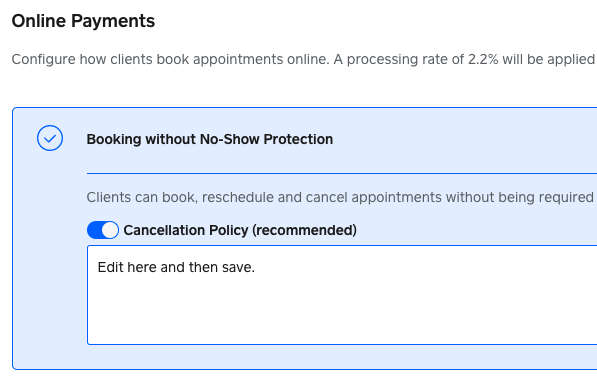
If that doesn't work you may need to reach out to support for further help here.
You can call support on 1800 760 137 (Mon-Fri, 9am-5pm Melbourne time), or contact us via online chat or email:
1. Sign in to your Square account
2. Head to our contact page https://squareup.com/help/au/en/contact
3. Go to "Other"" then "I don't see my issue"
4. Click "Message us" or "Email us"
Square, Australia
Sign in and click Mark as Best Answer if my reply answers your question.
- Mark as New
- Bookmark
- Subscribe
- Subscribe to RSS Feed
- Permalink
- Report
- Subscribe to RSS Feed
- Mark Thread as New
- Mark Thread as Read
- Float this Thread for Current User
- Bookmark
- Subscribe
- Printer Friendly Page
My ‘Booking without No-Show Protection’ section looks different to yours. I can’t toggle on and off a cancellation policy. I’ll contact support.
- Mark as New
- Bookmark
- Subscribe
- Subscribe to RSS Feed
- Permalink
- Report
- Subscribe to RSS Feed
- Mark Thread as New
- Mark Thread as Read
- Float this Thread for Current User
- Bookmark
- Subscribe
- Printer Friendly Page
Hi Knobbis, I'm having the same issue. Were you able to get help from the support?
- Mark as New
- Bookmark
- Subscribe
- Subscribe to RSS Feed
- Permalink
- Report
- Subscribe to RSS Feed
- Mark Thread as New
- Mark Thread as Read
- Float this Thread for Current User
- Bookmark
- Subscribe
- Printer Friendly Page
None. Never heard back from them. Hopefully you have more luck.
- Mark as New
- Bookmark
- Subscribe
- Subscribe to RSS Feed
- Permalink
- Report
- Subscribe to RSS Feed
- Mark Thread as New
- Mark Thread as Read
- Float this Thread for Current User
- Bookmark
- Subscribe
- Printer Friendly Page
Hey @Khobbis,
Thanks for letting us know!
I followed this up with support for you - it looks like they sent you an email on August 20 with further advice, it looks like you might have missed this! If you didn't see the email arrive in your inbox, I recommend either checking junk mail, searching for emails from a squareup.com domain, or getting back in touch via the previous details - if email cases don't see response within few weeks they will automatically close, so you may not be able to reply to that email now if you do find it and it doesn't solve the issue.
@pat_vanasse I'd also recommend getting in touch - calling would be the quickest way to get to the bottom of things, and our team are able to look into how your account has been set up on the back end.
Let me know if you're able to get any help here too!
Square, Australia
Sign in and click Mark as Best Answer if my reply answers your question.
- Mark as New
- Bookmark
- Subscribe
- Subscribe to RSS Feed
- Permalink
- Report
- Subscribe to RSS Feed
- Mark Thread as New
- Mark Thread as Read
- Float this Thread for Current User
- Bookmark
- Subscribe
- Printer Friendly Page
The message I received in 20 August was to do with a seperate issue of iPad incompatibility.
- Mark as New
- Bookmark
- Subscribe
- Subscribe to RSS Feed
- Permalink
- Report
- Subscribe to RSS Feed
- Mark Thread as New
- Mark Thread as Read
- Float this Thread for Current User
- Bookmark
- Subscribe
- Printer Friendly Page
@Khobbis Sorry for the confusion! I'm getting back in touch with support to follow up once more.
Square, Australia
Sign in and click Mark as Best Answer if my reply answers your question.
- Mark as New
- Bookmark
- Subscribe
- Subscribe to RSS Feed
- Permalink
- Report
- Subscribe to RSS Feed
- Mark Thread as New
- Mark Thread as Read
- Float this Thread for Current User
- Bookmark
- Subscribe
- Printer Friendly Page
Thank you, Khobbis for your reply. I just got off the phone with support. There is no way to edit or remove the wordings in 'required cancellation policy'. However, you can add your additional policies, such as cancellation fee, in 'Add to your Cancellation Policy (optional)' and it will show up in the email communication to clients. I tested this and it works for me. However, you can't switch the order of wording displayed on the email. It will display the custom policy first then the required policy. Hope this information is somehow useful for you. Good luck!
- Mark as New
- Bookmark
- Subscribe
- Subscribe to RSS Feed
- Permalink
- Report
- Subscribe to RSS Feed
- Mark Thread as New
- Mark Thread as Read
- Float this Thread for Current User
- Bookmark
- Subscribe
- Printer Friendly Page
Thanks for checking back in @pat_vanasse!
Square, Australia
Sign in and click Mark as Best Answer if my reply answers your question.
- Mark as New
- Bookmark
- Subscribe
- Subscribe to RSS Feed
- Permalink
- Report

Square Community
Square Products