
Turn on suggestions
Auto-suggest helps you quickly narrow down your search results by suggesting possible matches as you type.
Showing results for

VitalityCaz
08-21-2021
01:46 AM
Thread Options
- Subscribe to RSS Feed
- Mark Thread as New
- Mark Thread as Read
- Float this Thread for Current User
- Bookmark
- Subscribe
- Printer Friendly Page
Text messages when changing booking
Hi!
Im trying to input my appts from another software system onto Square and everytime I adjust them, the staff member receives a text and an email t tell them! Gah!!Ive got over 200 appts I need to put in and my staff do NOT want a text msg with each one!
Any ideas?
-Thanks!
Caz
Reply
- Mark as New
- Bookmark
- Subscribe
- Subscribe to RSS Feed
- Permalink
- Report
1 REPLY 1


Arie

08-21-2021
11:43 PM
Thread Options
- Subscribe to RSS Feed
- Mark Thread as New
- Mark Thread as Read
- Float this Thread for Current User
- Bookmark
- Subscribe
- Printer Friendly Page
Hey @VitalityCaz,
thanks for writing back in! You can disable notifications for your staff members. Here's how:
1. Go to Appointments > Staff.
2. Select a Staff member and scroll down to > Notifications.
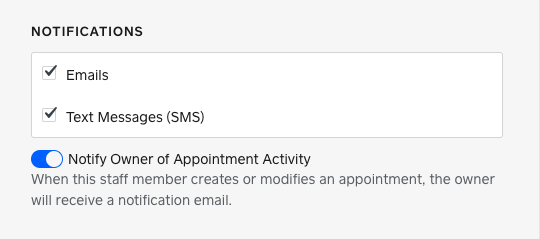
3. Untick the notification boxes and click Save.
Like this your team won't get 200+ messages about their appointments 😊
Reply
- Mark as New
- Bookmark
- Subscribe
- Subscribe to RSS Feed
- Permalink
- Report

Square Community
Square Products
© 2026 Square, Inc.