

- Subscribe to RSS Feed
- Mark Thread as New
- Mark Thread as Read
- Float this Thread for Current User
- Bookmark
- Subscribe
- Printer Friendly Page
Square Stand: Suggestions to improve "Use as Display" option
The title of this thread has been edited from the original: Accidental "Use as Display" button tap wreaks havoc!!
I use the Square POS on an iPad with the Square stand. We have a separate iPad Mini that we use for a customer display screen.
In recent months, the Square POS was updated to enable users to make an iPad into a display, or to connect it to a display. Which is handy. However, the two buttons are RIGHT NEXT to each other in the interface, which has resulted in a lot of headaches when my staff accidentally hits "Use as Display" when they're trying to connect the other iPad.
What happens when you hit that? It turns your main POS terminal into a customer display! And the only way out of it is to uninstall and reinstall the Square POS application. That means also duplicating all of the setup steps - adding printers, turning Remote orders back on, turning on tickets etc. MAJOR PAIN IN THE ASS. This has happened 4 times between my 2 Square locations. You can't even just kill the app and reopen it - the "Use as Display" mode is permanent until you uninstall.
While I recognize this is HUMAN error on our side, I beg Square to consider putting some safeguards in place to ensure this cannot happen easily. My suggestions:
1) When a user taps "Use as Display", ask them to confirm it, or even double confirm it. A warning overlay that says something like
"Are you sure you want to turn this device into a customer display? You will no longer be able to take orders on this device."
[Yes, Use as a Display] [CANCEL]
OR
2) Move that "Use as Display" option into its own setting section
Something, please! If I have to reinstall Square one more time when there are customers backed up in line, I'm gonna lose it! Thank you for hearing my plea.

- Mark as New
- Bookmark
- Subscribe
- Subscribe to RSS Feed
- Permalink
- Report



- Subscribe to RSS Feed
- Mark Thread as New
- Mark Thread as Read
- Float this Thread for Current User
- Bookmark
- Subscribe
- Printer Friendly Page
Hi there, @NourishSF. Thanks so, so much for taking the time to bring this to the forefront.
Your post is about as thorough of a post that I've seen here on the Community, and I am so grateful that you took the time to add context. Your feedback goes a long way into making our product better, and I want you to know your plea is heard. Your improvement suggestions are solid - and I'm passing them to our Product Team as we speak.
I wasn't sure if what you were experiencing was expected behavior from the Display Mode, so I tested it out. As soon as I selected to use my decide as a buyer display, I was presented with this warning:
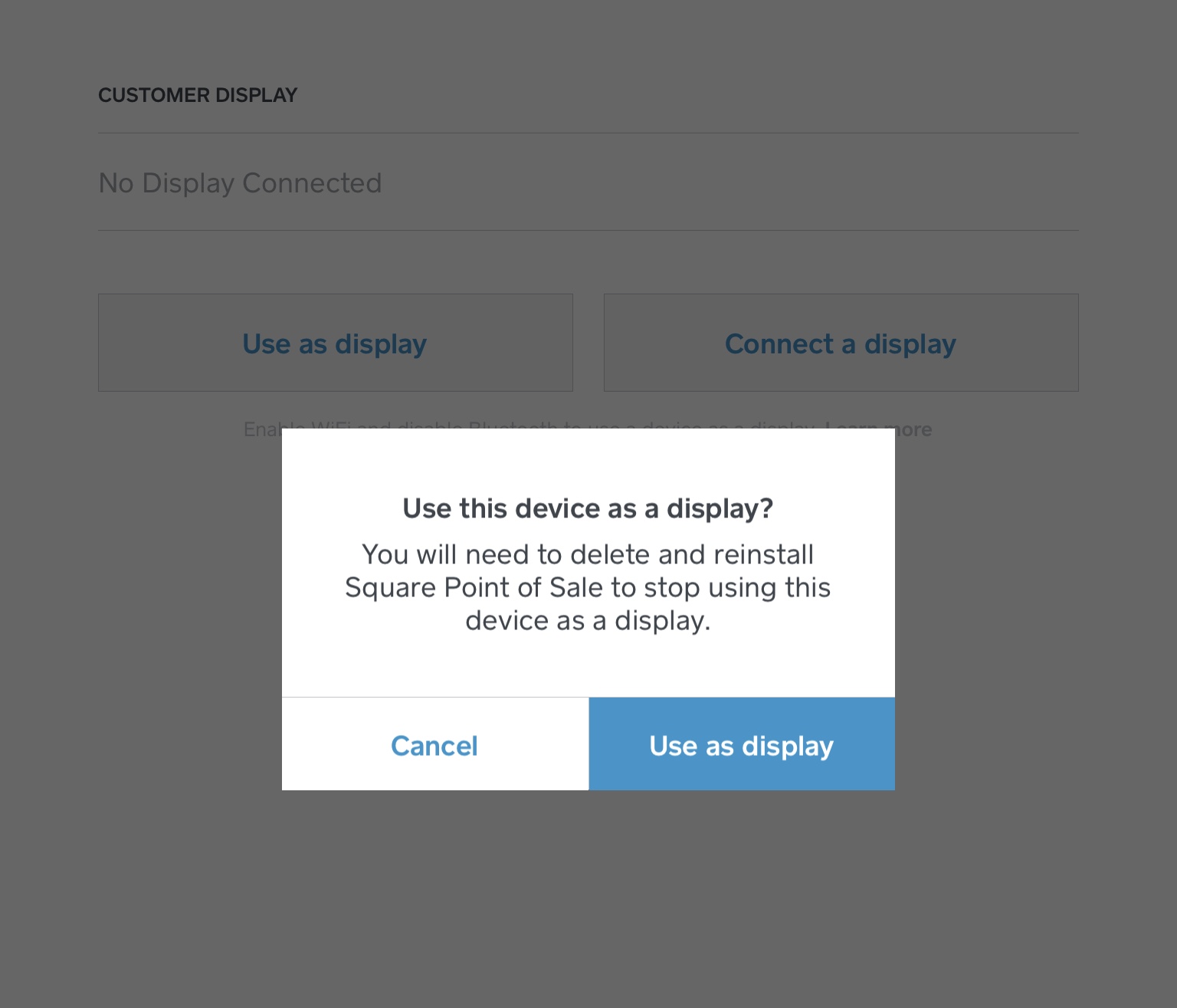
Sure enough, it seems like the uninstall is the only way to exit the display mode. Are you being presented this warning before entering display mode? If not, there may be a pending software update available for your device or application - but the application should be defaulting to the most current version when you reinstall.
While I'm not sure why our engineers decided to opt into a full uninstall to exit the Display Mode, I do agree that there is room to improve the terminology and verbiage used here in these two options. I can definitely see how adding either a more descriptive explanation, or (as you suggested) separating the two options in different settings tabs altogether, would be helpful to reduce confusion here.
All of this to say, I think your suggestions are great - and I will personally pass them along to those who need to see them. Again, thanks for hanging tough with us here. As soon as I have any news to share, I will be sure to post an update here.
Thanks, again!
Community Moderator, Square
Sign in and click Mark as Best Answer if my reply answers your question.
- Mark as New
- Bookmark
- Subscribe
- Subscribe to RSS Feed
- Permalink
- Report
- Subscribe to RSS Feed
- Mark Thread as New
- Mark Thread as Read
- Float this Thread for Current User
- Bookmark
- Subscribe
- Printer Friendly Page
Thanks for the response and clarification. I believe we are on the latest version and I would not doubt that even when presented with that double confirmation, my staff blustered through it and still opted to use it as a display and created their self-made havoc 😉 Here's hoping it's less cumbersome in the future if you do get stuck in that mode (eg no uninstall required) and that my staff pays better attention!!!

Square Community
Square Products