

- Subscribe to RSS Feed
- Mark Thread as New
- Mark Thread as Read
- Float this Thread for Current User
- Bookmark
- Subscribe
- Printer Friendly Page
Spilt payment?
when I try and accept a payment and press the ‘charge’ button on my device it shows me a split payment screen rather then processes the payment. Can anyone tell me what I am doing wrong? Why is it going to this screen rather than just processing the payment?
- Mark as New
- Bookmark
- Subscribe
- Subscribe to RSS Feed
- Permalink
- Report



- Subscribe to RSS Feed
- Mark Thread as New
- Mark Thread as Read
- Float this Thread for Current User
- Bookmark
- Subscribe
- Printer Friendly Page
Hey @Dolwyre,
Thanks for reaching out!
The "Split Payment" you see at the top of the screen should actually be an option you can tap to make a split payment.
Are you referring to this option here?
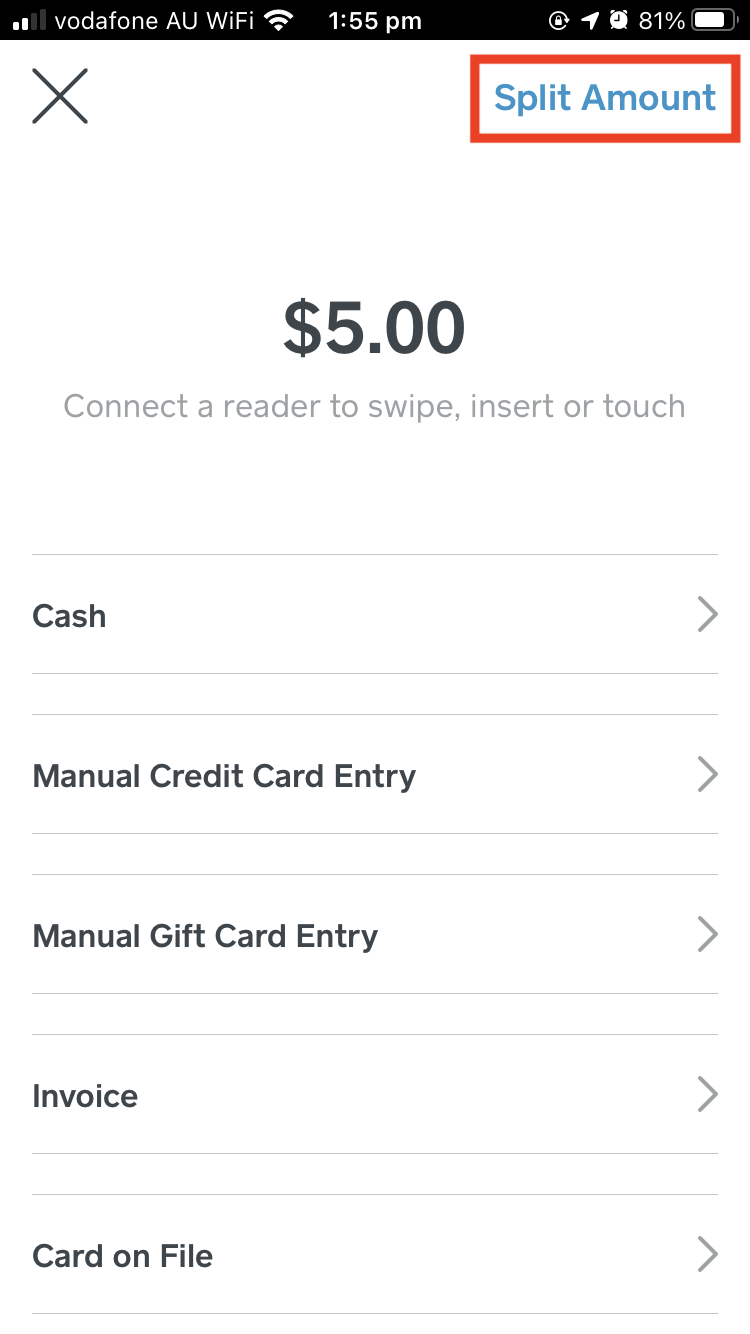
This isn't telling you that the screen you're on is taking a split payment, it's a button you can click on to perform a split payment!
If you just want to process the payment from that screen, simply select the payment type to move forward and process the payment.
Hope this helps, please let me know if I've misunderstood 🙂
Square, Australia
Sign in and click Mark as Best Answer if my reply answers your question.
- Mark as New
- Bookmark
- Subscribe
- Subscribe to RSS Feed
- Permalink
- Report

Square Community
Square Products