

- Subscribe to RSS Feed
- Mark Thread as New
- Mark Thread as Read
- Float this Thread for Current User
- Bookmark
- Subscribe
- Printer Friendly Page
How to create a multibuy discount
- Mark as New
- Bookmark
- Subscribe
- Subscribe to RSS Feed
- Permalink
- Report



- Subscribe to RSS Feed
- Mark Thread as New
- Mark Thread as Read
- Float this Thread for Current User
- Bookmark
- Subscribe
- Printer Friendly Page
Hey @F45_vasse,
You could create this as an automatic or manual discount. For ease of use I recommend automatic in this scenario. Read more about setting up discounts here.
I went ahead and made an example of how this would look when setting up the discount in the online dashboard as an automatic discount. For a $7 item you'd apply a $2 discount
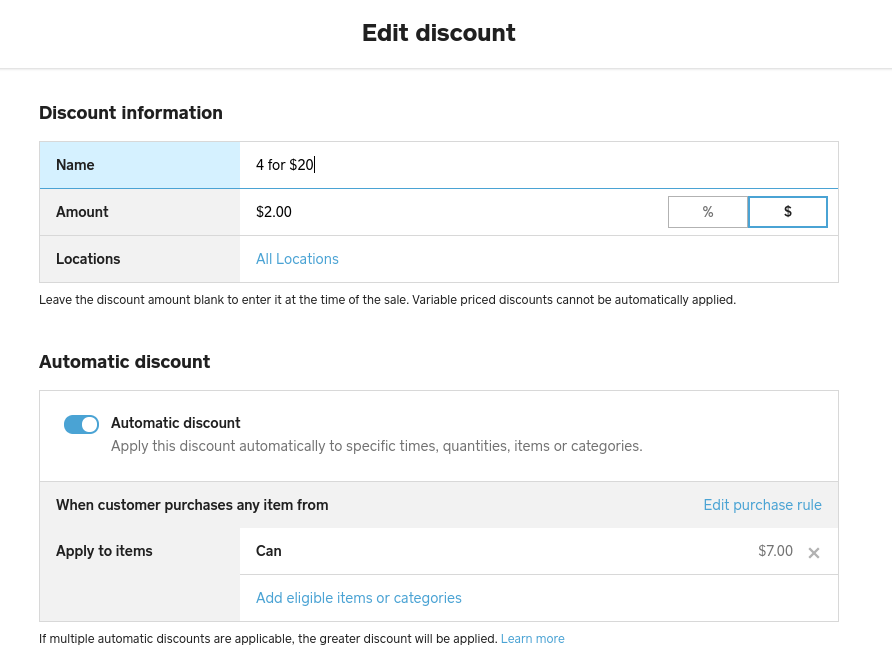
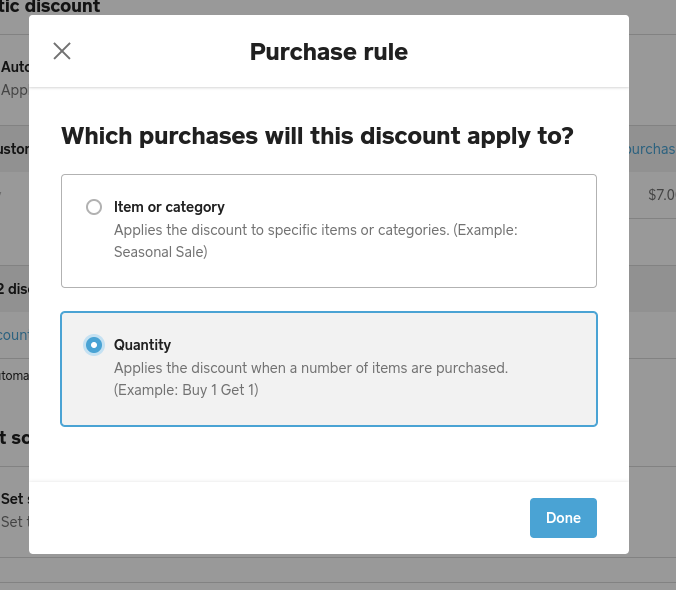
Then go to Edit Purchase Rule and set the discount to apply when a set number of the items are added to a transaction:
Square, Australia
Sign in and click Mark as Best Answer if my reply answers your question.
- Mark as New
- Bookmark
- Subscribe
- Subscribe to RSS Feed
- Permalink
- Report
- Subscribe to RSS Feed
- Mark Thread as New
- Mark Thread as Read
- Float this Thread for Current User
- Bookmark
- Subscribe
- Printer Friendly Page
Hey @F45_vasse,
You could create this as an automatic or manual discount. For ease of use I recommend automatic in this scenario. Read more about setting up discounts here.
I went ahead and made an example of how this would look when setting up the discount in the online dashboard as an automatic discount. For a $7 item you'd apply a $2 discount
Then go to Edit Purchase Rule and set the discount to apply when a set number of the items are added to a transaction:
Square, Australia
Sign in and click Mark as Best Answer if my reply answers your question.
- Mark as New
- Bookmark
- Subscribe
- Subscribe to RSS Feed
- Permalink
- Report

- Subscribe to RSS Feed
- Mark Thread as New
- Mark Thread as Read
- Float this Thread for Current User
- Bookmark
- Subscribe
- Printer Friendly Page
Hi Seamus,
I worked through the above process but can't find where to put in the number of items to apply the discount.
I select the quantity button but it then lists the discount as applying when one item is purchased.
Regards
Steve
- Mark as New
- Bookmark
- Subscribe
- Subscribe to RSS Feed
- Permalink
- Report



- Subscribe to RSS Feed
- Mark Thread as New
- Mark Thread as Read
- Float this Thread for Current User
- Bookmark
- Subscribe
- Printer Friendly Page
I'd be happy to point you in the right direction, @Ian6!
Once you've selected a quantity-based discount, you can enter the number of items that need to be purchased to qualify here:
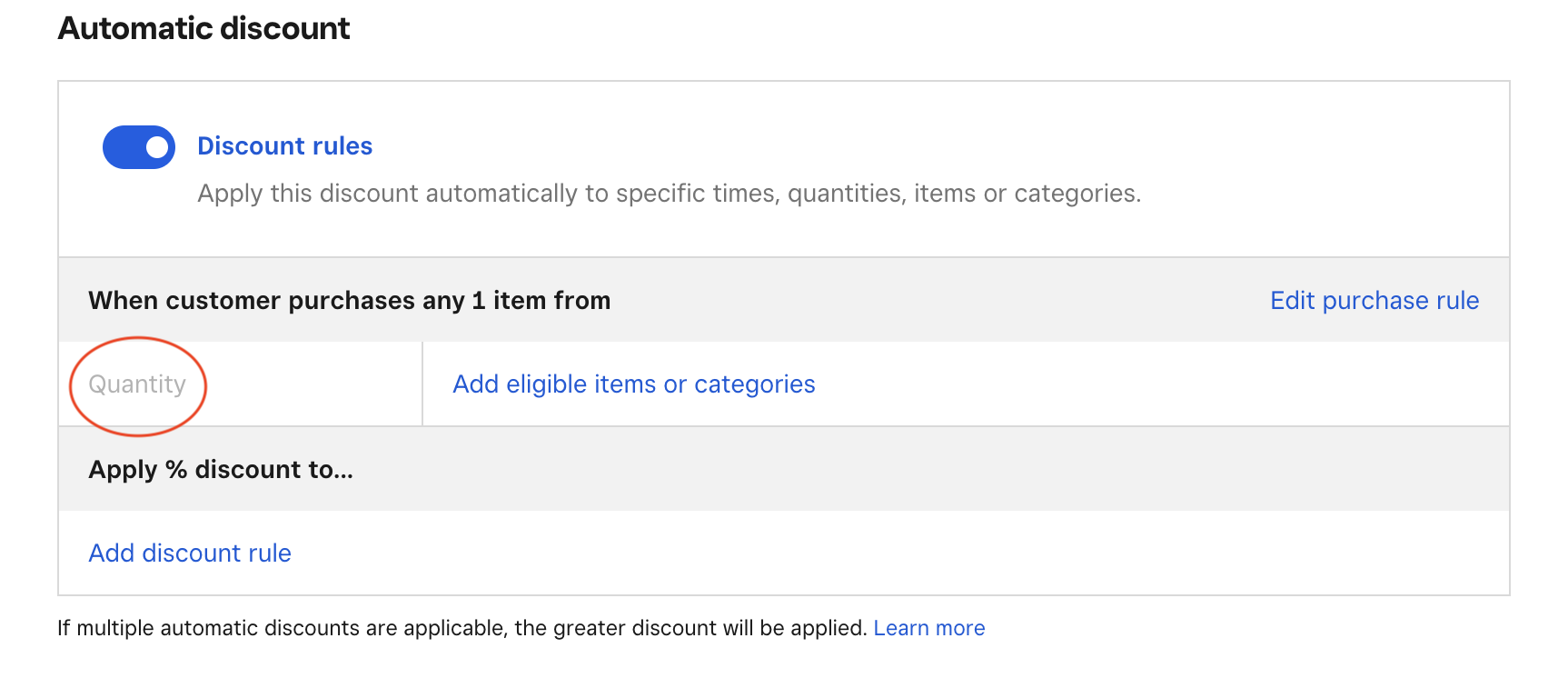
I hope this helps, please let us know how you go!
- Mark as New
- Bookmark
- Subscribe
- Subscribe to RSS Feed
- Permalink
- Report
- Subscribe to RSS Feed
- Mark Thread as New
- Mark Thread as Read
- Float this Thread for Current User
- Bookmark
- Subscribe
- Printer Friendly Page
Thanks, I was looking at the Quantity as a label not a variable field. I have now created this but it doesn't seem to be applying it. I attempted to purchase multiples of the item in question and it is still charging full price (up to the checkout page at least)
- Mark as New
- Bookmark
- Subscribe
- Subscribe to RSS Feed
- Permalink
- Report
- Subscribe to RSS Feed
- Mark Thread as New
- Mark Thread as Read
- Float this Thread for Current User
- Bookmark
- Subscribe
- Printer Friendly Page
Are you going through the checkout on your website, or in your app, @Ian6?
The discounts you create in this part of your app only apply to the point of sale. For online discounts, take a look at discount vouchers here.
- Mark as New
- Bookmark
- Subscribe
- Subscribe to RSS Feed
- Permalink
- Report
- Subscribe to RSS Feed
- Mark Thread as New
- Mark Thread as Read
- Float this Thread for Current User
- Bookmark
- Subscribe
- Printer Friendly Page
I am going through checkout on website
- Mark as New
- Bookmark
- Subscribe
- Subscribe to RSS Feed
- Permalink
- Report
- Subscribe to RSS Feed
- Mark Thread as New
- Mark Thread as Read
- Float this Thread for Current User
- Bookmark
- Subscribe
- Printer Friendly Page
@Ian6 you'll need to go with discount vouchers per Arie's post - click on the link in her post to find out more about creating vouchers.
Square, Australia
Sign in and click Mark as Best Answer if my reply answers your question.
- Mark as New
- Bookmark
- Subscribe
- Subscribe to RSS Feed
- Permalink
- Report

Square Community
Square Products