
Turn on suggestions
Auto-suggest helps you quickly narrow down your search results by suggesting possible matches as you type.
Showing results for

Sals_boards
08-17-2021
01:03 AM
Thread Options
- Subscribe to RSS Feed
- Mark Thread as New
- Mark Thread as Read
- Float this Thread for Current User
- Bookmark
- Subscribe
- Printer Friendly Page
HOW DO I CANCEL THE OVERDUE AMOUNT ON MY DASHBOARD
My Dashboard keeps showing an overdue amount even though I have received payment, how can I cancel this amount it drives my crazy , even though I know the invoice has been paid
Reply
- Mark as New
- Bookmark
- Subscribe
- Subscribe to RSS Feed
- Permalink
- Report
1 REPLY 1


Arie

08-17-2021
09:53 PM
Thread Options
- Subscribe to RSS Feed
- Mark Thread as New
- Mark Thread as Read
- Float this Thread for Current User
- Bookmark
- Subscribe
- Printer Friendly Page
Hi @Sals_boards,
Thanks for writing in- I noticed this is your first post, welcome to the community 👋
It sounds like there might be an outstanding invoice in your Dashboard, which you can filter out from your Invoices Dashboard by clicking on the tab next to the search bar:
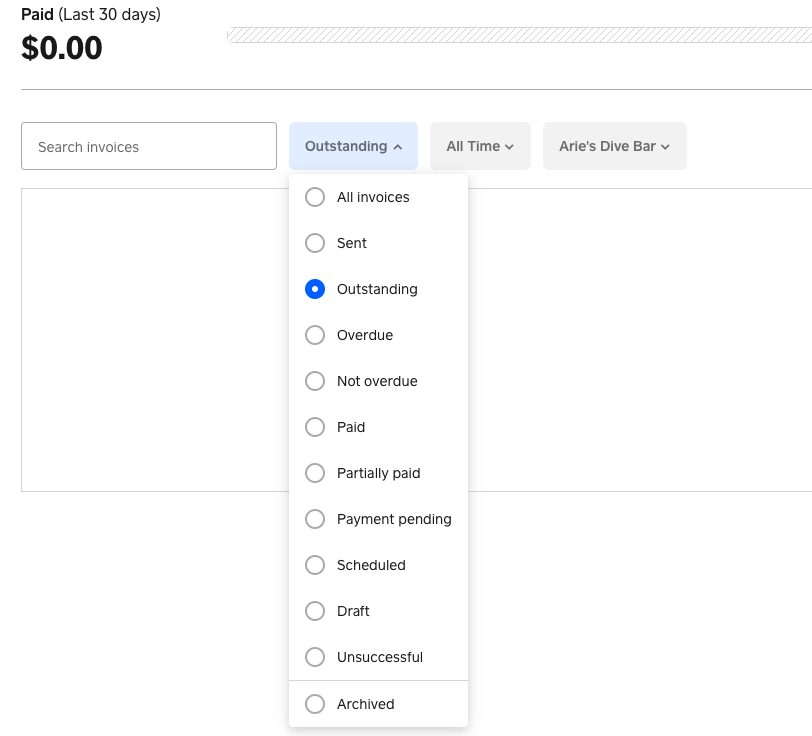
If the outstanding invoice has already been paid, you can mark it as paid by following these steps:
1. Click on the three dots next to the invoice.
2. Select Add payment > Record Payment.
3. Choose a payment type > Save.
Please let us know how you go!
Reply
- Mark as New
- Bookmark
- Subscribe
- Subscribe to RSS Feed
- Permalink
- Report

Square Community
Square Products
© 2026 Square, Inc.