

- Subscribe to RSS Feed
- Mark Thread as New
- Mark Thread as Read
- Float this Thread for Current User
- Bookmark
- Subscribe
- Printer Friendly Page
Feature request - more options to edit existing text in emails for online store
I would love some help please! I want to edit the exisiting text in the order confirmation, but I can't change any of it. I can get into the editing and I can add new text, but I can't make changes to existing text.
In particular, I really want to change the text for download information that says
|
Downloads Information |
|
|
Your downloadable file will be sent to you soon in a separate email. If you have any questions, please contact us. |
|



- Subscribe to RSS Feed
- Mark Thread as New
- Mark Thread as Read
- Float this Thread for Current User
- Bookmark
- Subscribe
- Printer Friendly Page
Hey @GabKrist,
Thanks for getting in touch!
Have you created a Sender Profile yet? You'll need to do this prior to being able to edit emails. If you go to Settings > Store Emails, first create and verify your sender profile. Once done, you can edit emails by clicking on the "..." next the the email in questions and selecting "Edit Email".

Hope this helps, let me know if you have any questions 🙂
Square, Australia
Sign in and click Mark as Best Answer if my reply answers your question.
- Mark as New
- Bookmark
- Subscribe
- Subscribe to RSS Feed
- Permalink
- Report
- Subscribe to RSS Feed
- Mark Thread as New
- Mark Thread as Read
- Float this Thread for Current User
- Bookmark
- Subscribe
- Printer Friendly Page
Hi Seamus. Thank you for your reply, but no, this does not help. I already said I can get into the editing option just fine, so I have a sender profile. When I click edit, it opens up the section for me to make edits. But I can't actually edit any of the existing text that is in there. I can change colors, I can add a new section with text, but I cannot change the text that is already there. How do I change the text in the body of the email that talks about the order that the customer has placed?
- Subscribe to RSS Feed
- Mark Thread as New
- Mark Thread as Read
- Float this Thread for Current User
- Bookmark
- Subscribe
- Printer Friendly Page
Hey @GabKrist,
Sorry for the confusion!
I initially tested the feature on my own account before posting, and followed the steps above - however it looks like I tested editing a header rather than the base text content, which seems doable, where the base content does not appear editable.
I've reached out to Weebly to clarify how this works, I'll be back in touch once I hear from them.
Square, Australia
Sign in and click Mark as Best Answer if my reply answers your question.
- Mark as New
- Bookmark
- Subscribe
- Subscribe to RSS Feed
- Permalink
- Report
- Subscribe to RSS Feed
- Mark Thread as New
- Mark Thread as Read
- Float this Thread for Current User
- Bookmark
- Subscribe
- Printer Friendly Page
Hey again @GabKrist,
I spoke with one of the eCommerce team and it looks like unfortunately this particular part of the email is not editable. Their suggestion was to add additional text with the information you wanted convey, sorry I wasn't able to get the exact answer you were looking for - your feedback was passed on to that team though.
Square, Australia
Sign in and click Mark as Best Answer if my reply answers your question.

- Subscribe to RSS Feed
- Mark Thread as New
- Mark Thread as Read
- Float this Thread for Current User
- Bookmark
- Subscribe
- Printer Friendly Page
Hi Seamus, any update on this? We're letting customer order drinks for pick up and confirmation emails state they have 5 days to pick up after the order is made, is there an option to change this pick up window?
- Mark as New
- Bookmark
- Subscribe
- Subscribe to RSS Feed
- Permalink
- Report
- Subscribe to RSS Feed
- Mark Thread as New
- Mark Thread as Read
- Float this Thread for Current User
- Bookmark
- Subscribe
- Printer Friendly Page
Hey @khanhncao,
I don't have any further updates to share on the editability of these emails unfortunately.
It does look like the main messaging at the top of the email indicates "your order will be ready from x time" so the expectation would be that a customer would be in to pickup their order according to this time frame.
I think the intention behind the "You have 5 days from the day you place your order to pick it up..." is to prevent pickup orders sitting around without being picked up indefinitely, and to prompt the customer into getting in touch if there are any delays on being able to make the pickup. I don't think orders that met this criteria will actually refund by themselves. I can see how this could be confusing for customers though, I'll pass this feedback onto the ecommerce team!
Square, Australia
Sign in and click Mark as Best Answer if my reply answers your question.
- Mark as New
- Bookmark
- Subscribe
- Subscribe to RSS Feed
- Permalink
- Report

- Subscribe to RSS Feed
- Mark Thread as New
- Mark Thread as Read
- Float this Thread for Current User
- Bookmark
- Subscribe
- Printer Friendly Page
I would really like this feature to be added. Currently I am running a home business and a lot of the text included in the standard pickup instruction email is incorrect (about going to the register and talking to a sales associate!) and i want to be able to edit it. Seems like an easy enough request and something I would expect for the premium I am paying for this service.
- Mark as New
- Bookmark
- Subscribe
- Subscribe to RSS Feed
- Permalink
- Report

- Subscribe to RSS Feed
- Mark Thread as New
- Mark Thread as Read
- Float this Thread for Current User
- Bookmark
- Subscribe
- Printer Friendly Page
Is there any update on editing these emails? I really need to delete the section that states "Your Order will be ready for pickup ..." I want to make the preparation time optional not preset and have it clear to customers that pickups are available by arrangement only.
GRIPE: My customers do not adhere to my business hours and stated pickup times.
- Mark as New
- Bookmark
- Subscribe
- Subscribe to RSS Feed
- Permalink
- Report
- Subscribe to RSS Feed
- Mark Thread as New
- Mark Thread as Read
- Float this Thread for Current User
- Bookmark
- Subscribe
- Printer Friendly Page
Hey @cambridge,
Thanks for reaching out.
I've go no news on these emails becoming further editable unfortunately. It's understandably frustrating if your customers are not paying attention to or adhering to the pickup times and business hours on the website and via SMS/email notifications!
If you're looking for additional messaging to try and make things clearer to customers, you could try adding a pop up or banner with messaging or a disclaimer - it's not necessarily a fail proof way to make customers adhere to the correct times, but is another avenue you can use to draw attention to them.
Do you currently have other methods of fulfilment available? If shipping or delivery are options you use, you may want to turn off pickup altogether and ask customers to call you or leave a note at checkout indicating if they would like to arrange pickup. It's not an elegant solution, however the pickup system does rely on customers reading the instructions and paying attention to their allocated pickup windows!
Square, Australia
Sign in and click Mark as Best Answer if my reply answers your question.
- Mark as New
- Bookmark
- Subscribe
- Subscribe to RSS Feed
- Permalink
- Report
- Subscribe to RSS Feed
- Mark Thread as New
- Mark Thread as Read
- Float this Thread for Current User
- Bookmark
- Subscribe
- Printer Friendly Page
Hey @melthekidd,
Totally understandable!
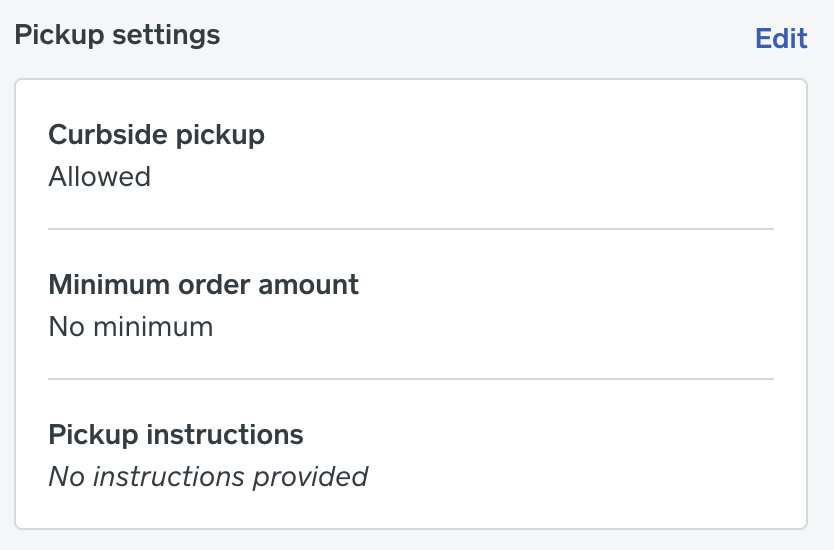
Looking at this again, this section might actually be able to be overwritten via Pickup settings. Head to your Online overview > Settings > Pickup & Delivery > select location to view side menu > scroll down to Pickup settings > click the Edit button:
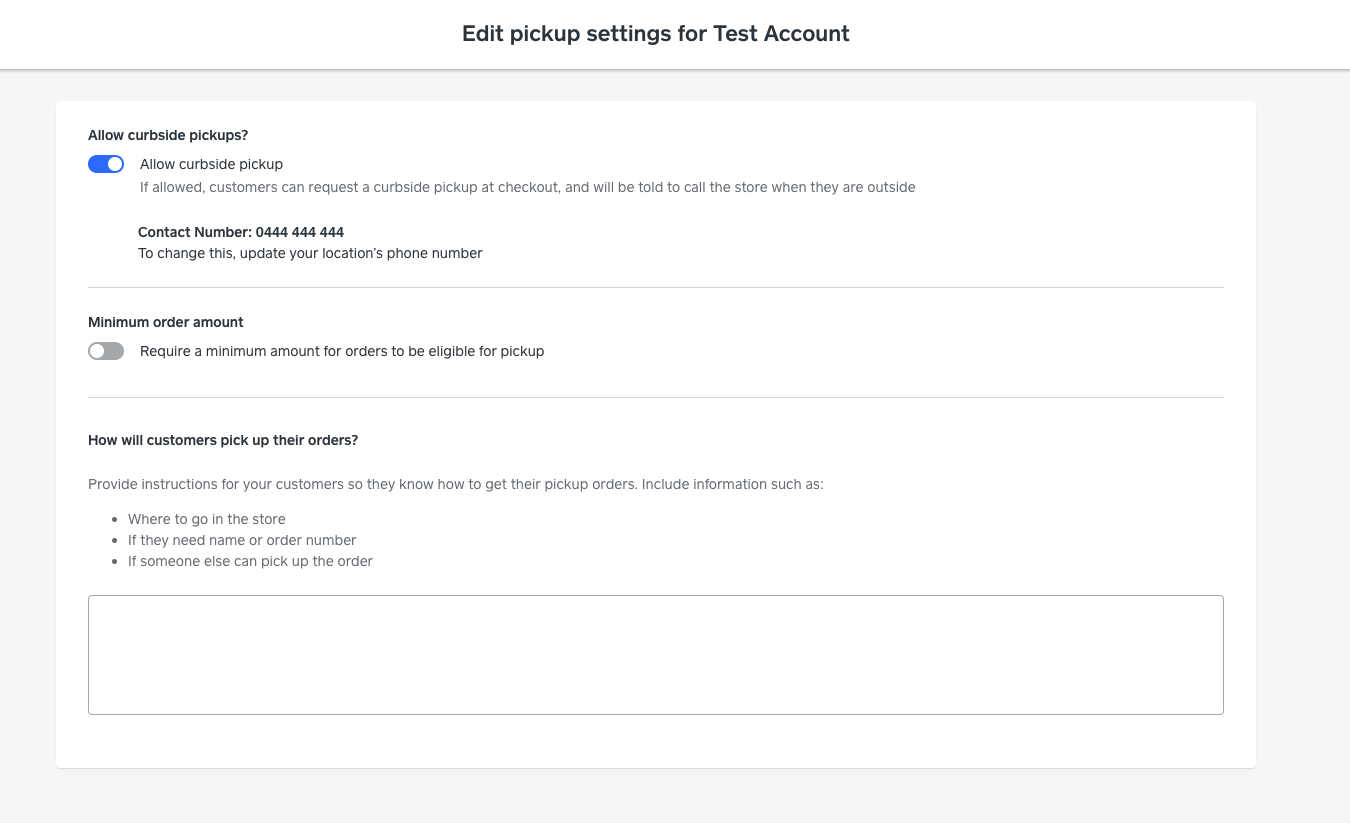
Then you can enter a custom pickup message and hit "Save".
@cambridge I'm not sure if this will help the issue you had, but may be worth checking out.
Square, Australia
Sign in and click Mark as Best Answer if my reply answers your question.
- Mark as New
- Bookmark
- Subscribe
- Subscribe to RSS Feed
- Permalink
- Report
- Subscribe to RSS Feed
- Mark Thread as New
- Mark Thread as Read
- Float this Thread for Current User
- Bookmark
- Subscribe
- Printer Friendly Page
Nope sorry Seamus this didn't alter the text in the default email I'm afraid - also seems to be an issue sending test emails. I never receive them!
- Mark as New
- Bookmark
- Subscribe
- Subscribe to RSS Feed
- Permalink
- Report
- Subscribe to RSS Feed
- Mark Thread as New
- Mark Thread as Read
- Float this Thread for Current User
- Bookmark
- Subscribe
- Printer Friendly Page
Hey @melthekidd,
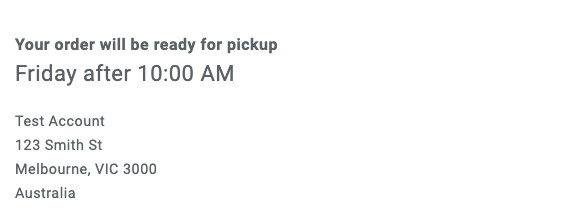
Sorry to hear that didn't help! I ran a test to see what the difference was by using this feature, and got this:
Testing without custom pickup messaging:
Testing with customer pickup messaging:
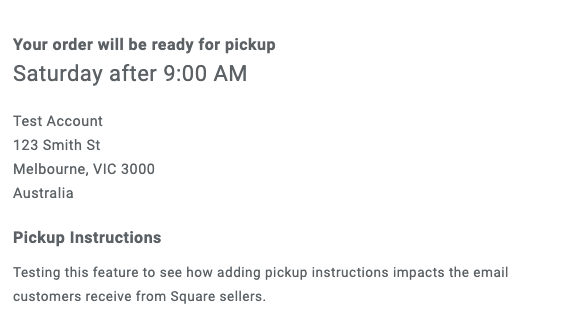
I was not actually able to reproduce the message you initially posted at all!
At this point I'd be getting in touch with our support team to see if they are able to work out what's going on and why that messaging is appearing to customers! You call support on 1800 760 137 (Mon-Fri, 9am-5pm Melbourne time) or email via this form, or try online chat via:
1. Sign in to your Square account
2. Head to our contact page https://squareup.com/help/au/en/contact
3. Go to "Other"" then "I don't see my issue"
4. Click "Message Us"
Please let me know if you are able to find a solution for this with the help of support!
Square, Australia
Sign in and click Mark as Best Answer if my reply answers your question.
- Mark as New
- Bookmark
- Subscribe
- Subscribe to RSS Feed
- Permalink
- Report
- Subscribe to RSS Feed
- Mark Thread as New
- Mark Thread as Read
- Float this Thread for Current User
- Bookmark
- Subscribe
- Printer Friendly Page
I really need to be able to edit the text in these pickup instruction emails - is there a solution yet??. It seems ridiculous to not be able to edit these basic instructions to suit our individual businesses and policies given the premium fees we are paying for these features. I can add text but I cannot edit pickup instructions. This is very confusing to my customers and requires double the work for me because I have to send a different email with my specific instructions. Why can this default text not be changed!?
- Mark as New
- Bookmark
- Subscribe
- Subscribe to RSS Feed
- Permalink
- Report
- Subscribe to RSS Feed
- Mark Thread as New
- Mark Thread as Read
- Float this Thread for Current User
- Bookmark
- Subscribe
- Printer Friendly Page
Hey @melthekidd,
Sorry to hear this is a major point of frustration for you!
While I'm not able to provide specific reasoning as to why a requested feature is not currently a part of Square Online, thank you for adding your voice to this thread - we pass on feedback from Seller Community to product teams so they can get a better idea of how our sellers use our platforms and where demand is for new features.
If you'd like, please provide more info about the issues you're seeing with pickup confusion and I'll let you know if I can think of any potential workarounds that may help in the meantime.
Square, Australia
Sign in and click Mark as Best Answer if my reply answers your question.
- Mark as New
- Bookmark
- Subscribe
- Subscribe to RSS Feed
- Permalink
- Report
- Subscribe to RSS Feed
- Mark Thread as New
- Mark Thread as Read
- Float this Thread for Current User
- Bookmark
- Subscribe
- Printer Friendly Page
Hi Seamus - in my example - the default text is:
"You will receive an email once your order is ready for pickup. You can pick it up any time during business hours. Go to the register, give your name and order number, and the sales associate will locate your order.
You have 5 days from the day you place your order to pick it up. After that, the order will be canceled and your payment refunded. If you are unable to pick your order up within 5 days, call us and we will work something out."
First of all - I'm a home business so I don't have a register or sales associate. And I don't want them to be able to pick it up at "any time during business hours". I also do not want the text about having to collect it within 5 days. That's not a policy of mine.
Sorry for my frustration - it just seems like such a simple request
- Mark as New
- Bookmark
- Subscribe
- Subscribe to RSS Feed
- Permalink
- Report

- Subscribe to RSS Feed
- Mark Thread as New
- Mark Thread as Read
- Float this Thread for Current User
- Bookmark
- Subscribe
- Printer Friendly Page
Hi - I have two websites and only yesterday upgraded the second one to allow for product reviews. Reviews is enabled in ITEMS so I should be able to edit the email but I can't. I'm pretty sure I have been able to edit the email content on the first website or at lease send a test - I can't do that on either site now! Same with abandoned cart. Are these standard and not editable and have our business details in them???? The emails are shaded and not clickable. HELP!
- Mark as New
- Bookmark
- Subscribe
- Subscribe to RSS Feed
- Permalink
- Report
- Subscribe to RSS Feed
- Mark Thread as New
- Mark Thread as Read
- Float this Thread for Current User
- Bookmark
- Subscribe
- Printer Friendly Page
Hey @Artisan-Maker,
Thanks for reaching out! I've moved your post to this existing feature request thread so we can compile all similar feedback in the one place.
If the email is shaded out generally it means it's not editable unfortunately. We're tracking requests for email customisation options within Square Online and it's something I hope we're able to improve in the future, but for now I'd say this email is unfortunately not editable.
You could possibly check with support as well, who will be able to look into the back end of your account setup - but I think this just might not be an editable email unfortunately.
Sending test emails is something I've not heard of as being available with Square Online and that I've not seen in the past - though in my own testing I'll often make an order for a small amount (eg a $1 test item) then refund it - this is the best way I'd suggest to see how the email appears from a customer's perspective.
If you did want to check in with support you can call on 1800 760 137 (lines are open Mon-Fri, 9am-5pm Melbourne time), or contact us via online chat or email:
1. Sign in to your Square account
2. Head to our contact page https://squareup.com/help/au/en/contact
3. Go to "Other"" then "I don't see my issue"
4. Click "Message us" or "Email us"
Sorry I can't be of more help here! If we do launch more options here in the future I'll comment in this thread and tag anyone who has posted as way of notification of any changes.
Square, Australia
Sign in and click Mark as Best Answer if my reply answers your question.
- Mark as New
- Bookmark
- Subscribe
- Subscribe to RSS Feed
- Permalink
- Report
- Subscribe to RSS Feed
- Mark Thread as New
- Mark Thread as Read
- Float this Thread for Current User
- Bookmark
- Subscribe
- Printer Friendly Page
Do we have a solution to this?
I dont sell physical items, only books that i email across myself so the pick up section is completely irrelevant to me. I also cant seem to get rid of the download section. How can i get around this? If those sections cant be removed, i cant use that email at all. is there a way to switch it off? I also dont need shipped, delivered etc emails as i sell one book which i send myself. I only need order confirmation with simple thank you message, amount, date, my logo and text to say that they will receive the book soon...How can i create that? If i cant, does that mean i cant sell my book via square at all? I simply cant have automated emails with non existent pick ups confusing clients. Thanks
- Mark as New
- Bookmark
- Subscribe
- Subscribe to RSS Feed
- Permalink
- Report
- Subscribe to RSS Feed
- Mark Thread as New
- Mark Thread as Read
- Float this Thread for Current User
- Bookmark
- Subscribe
- Printer Friendly Page
Hey @janiemac,
Thanks for reaching out.
While Square Online doesn't currently have a digital fulfilment option, the suggested workaround here would be to:
1) Turn off pickup and delivery as fulfillment options via your Square Online Settings under Fulfillment > Pickup and Delivery
2) Make sure you don't have any items set as pickup/delivery only (set them to shipping)
3) Have a single free shipping rate for downloads
4) You can edit the shipping confirmation email to contain relevant messaging in the header at the top of the email, eg:
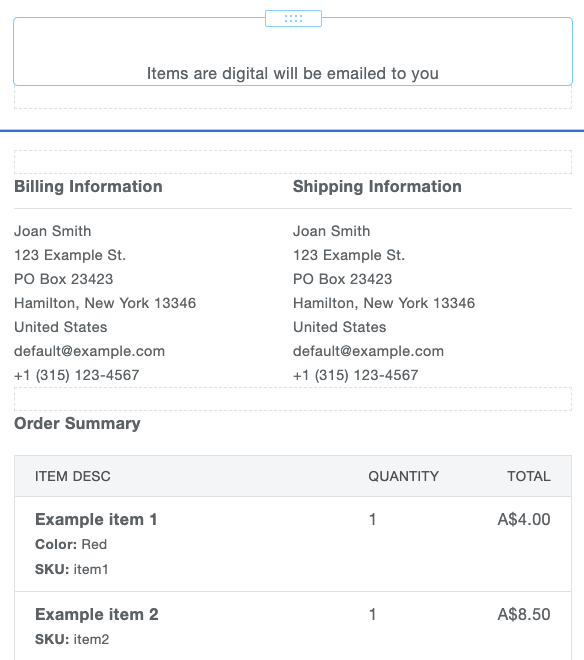
Hope this helps! It should at least avoid some confusion. You can also note that all items are digital downloads within the item descriptions!
Square, Australia
Sign in and click Mark as Best Answer if my reply answers your question.
- Mark as New
- Bookmark
- Subscribe
- Subscribe to RSS Feed
- Permalink
- Report
- Subscribe to RSS Feed
- Mark Thread as New
- Mark Thread as Read
- Float this Thread for Current User
- Bookmark
- Subscribe
- Printer Friendly Page
Hi Seamus, i have tested by buying an item and it removed pick up info but i never sent the email to client. I got an email saying that client will receive the email etc... but client never got one. i read that someone in this thread had the same issue. how do i get it working?
- Mark as New
- Bookmark
- Subscribe
- Subscribe to RSS Feed
- Permalink
- Report

Square Community
Square Products