
Turn on suggestions
Auto-suggest helps you quickly narrow down your search results by suggesting possible matches as you type.
Showing results for

lross
01-09-2023
02:37 AM
Thread Options
- Subscribe to RSS Feed
- Mark Thread as New
- Mark Thread as Read
- Float this Thread for Current User
- Bookmark
- Subscribe
- Printer Friendly Page
Edit a receipt to correct incorrect GST amount
Sorry if this has been asked. I have a receipt that shows a custom amount yet no GST applied to the custom amount. Is there a way that I am able to edit the receipt to provide the customer with an accurate receipt of his purchase? Thanks
Reply
- Mark as New
- Bookmark
- Subscribe
- Subscribe to RSS Feed
- Permalink
- Report
1 REPLY 1


Seamus

01-09-2023
09:05 PM
Thread Options
- Subscribe to RSS Feed
- Mark Thread as New
- Mark Thread as Read
- Float this Thread for Current User
- Bookmark
- Subscribe
- Printer Friendly Page
Hi @Iross,
If you go to your tax settings, you can turn GST on for custom amounts:
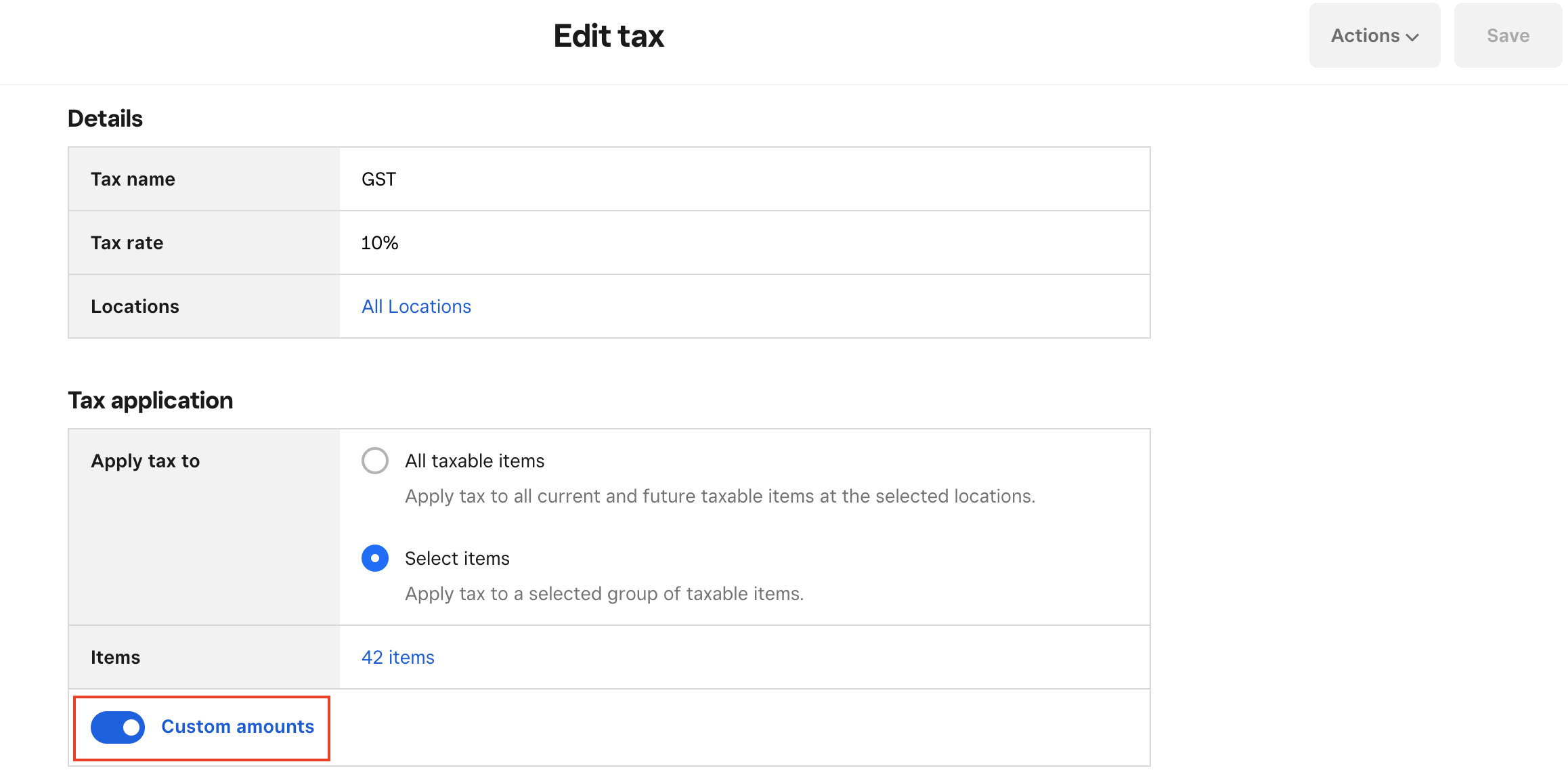
Make sure that switch for custom amounts is on, the press "Save" in the top right corner.
Let me know if this fixed the issue! Note that you won't be able to edit a receipt for a transaction once the transaction has been completed, so the setting will only apply to transactions after the change has been made.
Seamus
Square, Australia
Sign in and click Mark as Best Answer if my reply answers your question.
Square, Australia
Sign in and click Mark as Best Answer if my reply answers your question.
Reply
- Mark as New
- Bookmark
- Subscribe
- Subscribe to RSS Feed
- Permalink
- Report

Square Community
Square Products
© 2026 Square, Inc.