

- Subscribe to RSS Feed
- Mark Thread as New
- Mark Thread as Read
- Float this Thread for Current User
- Bookmark
- Subscribe
- Printer Friendly Page
Discount after a certain amount of items sold
Good Afternoon
I recently opened selling paint.
We sell our paints at $7 each or 6 for $35. We also bought a scanner due to scanning all the different colors to keep track of our stock
Is there a way to scan let's say 7 paints, 6 will automatically get to $35, and on the 7th paint, it only adds an extra $7 because it wasn't bought inside of a 6 pack.
I don't think I have explained this very well.
Any help would be much appreciated.
- Mark as New
- Bookmark
- Subscribe
- Subscribe to RSS Feed
- Permalink
- Report



- Subscribe to RSS Feed
- Mark Thread as New
- Mark Thread as Read
- Float this Thread for Current User
- Bookmark
- Subscribe
- Printer Friendly Page
Hey @StreetFame,
Thanks for getting in touch.
You've explained it well, no worries there! Unfortunately there's no way to automatically apply a discount, however you can manually add a discount that you'd set up on your dashboard.
You could make a $7 discount and call it something like "6 for $35" and then if a sale met that criteria, manually add the discount to the sale from your item list in the POS app.
Square, Australia
Sign in and click Mark as Best Answer if my reply answers your question.
- Mark as New
- Bookmark
- Subscribe
- Subscribe to RSS Feed
- Permalink
- Report
- Subscribe to RSS Feed
- Mark Thread as New
- Mark Thread as Read
- Float this Thread for Current User
- Bookmark
- Subscribe
- Printer Friendly Page
As mentioned in another thread.
I sell cans, $7 each ($42 in total) or 6 can for $35.
When I applied the amount $1.167777777 recurring the total becomes $34.98. how do I get this to a flat $35.
It seems to only allow 2 decimal points throwing out the total amount.
Any help is appreciated
- Mark as New
- Bookmark
- Subscribe
- Subscribe to RSS Feed
- Permalink
- Report
- Subscribe to RSS Feed
- Mark Thread as New
- Mark Thread as Read
- Float this Thread for Current User
- Bookmark
- Subscribe
- Printer Friendly Page
Hey again @StreetFame,
I've moved this question back to the original thread to keep all communications for this issue in the same place.
Looking further into this, it looks like there's no way to apply an automated discount to the total transaction cost - if you wanted the discount to appear are exactly $7 you would need to apply a manual discount to the entire transaction and have the automated feature turned off:
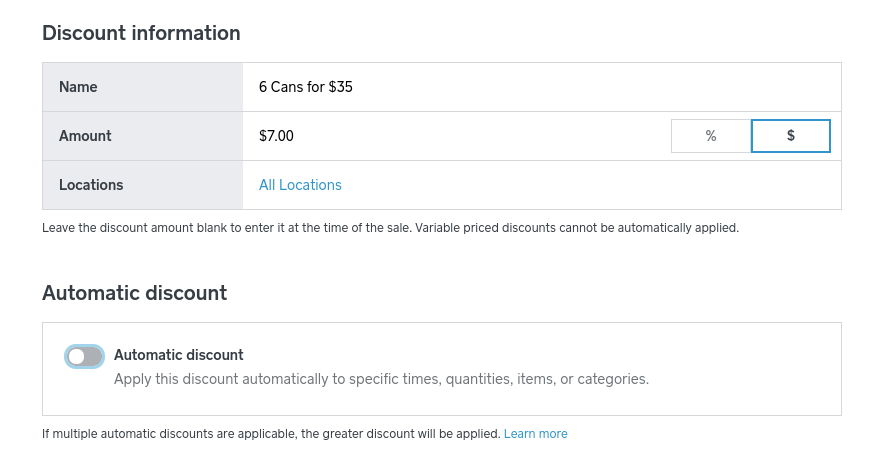
Of course the downside to this is that it's not automated! I'm passing your feedback on to our team, I can see it would be helpful to have the option to apply a single discount amount to the entire transaction (rather than discounting each item individually).
Square, Australia
Sign in and click Mark as Best Answer if my reply answers your question.
- Mark as New
- Bookmark
- Subscribe
- Subscribe to RSS Feed
- Permalink
- Report

Square Community
Square Products