
- Home
- >
- Help
- >
- Orders & Catalog
- >
- Re: Retail iPhone Mobile App v. 5.94: How to Edit ...

- Subscribe to RSS Feed
- Mark Thread as New
- Mark Thread as Read
- Float this Thread for Current User
- Bookmark
- Subscribe
- Printer Friendly Page
Retail iPhone Mobile App v. 5.94: How to Edit Favorites
Hello,
Re: iPhone IOS v. 15.5 Retail App v. 5.94
This app version has been updated with a new UI. Can someone please tell how to edit the Favorites Screen now?
I have to revert back to the old UI in Settings to get back my Favorites. Seems there's no way to edit it in the new UI for vs. 5.94.
Thanks,
Gordon
- Mark as New
- Bookmark
- Subscribe
- Subscribe to RSS Feed
- Permalink
- Report



- Subscribe to RSS Feed
- Mark Thread as New
- Mark Thread as Read
- Float this Thread for Current User
- Bookmark
- Subscribe
- Printer Friendly Page
Would you be able to attach a screenshot, @doukhobor? I'm also using Square for Retail 5.94 on an iPhone but want to make sure we're on the same page.
- Mark as New
- Bookmark
- Subscribe
- Subscribe to RSS Feed
- Permalink
- Report
- Subscribe to RSS Feed
- Mark Thread as New
- Mark Thread as Read
- Float this Thread for Current User
- Bookmark
- Subscribe
- Printer Friendly Page
Hello, it’s difficult to screen shot as it immediately defaults to new checkout screen. I guess a video of the action would be more appreciate.
- Mark as New
- Bookmark
- Subscribe
- Subscribe to RSS Feed
- Permalink
- Report
- Subscribe to RSS Feed
- Mark Thread as New
- Mark Thread as Read
- Float this Thread for Current User
- Bookmark
- Subscribe
- Printer Friendly Page
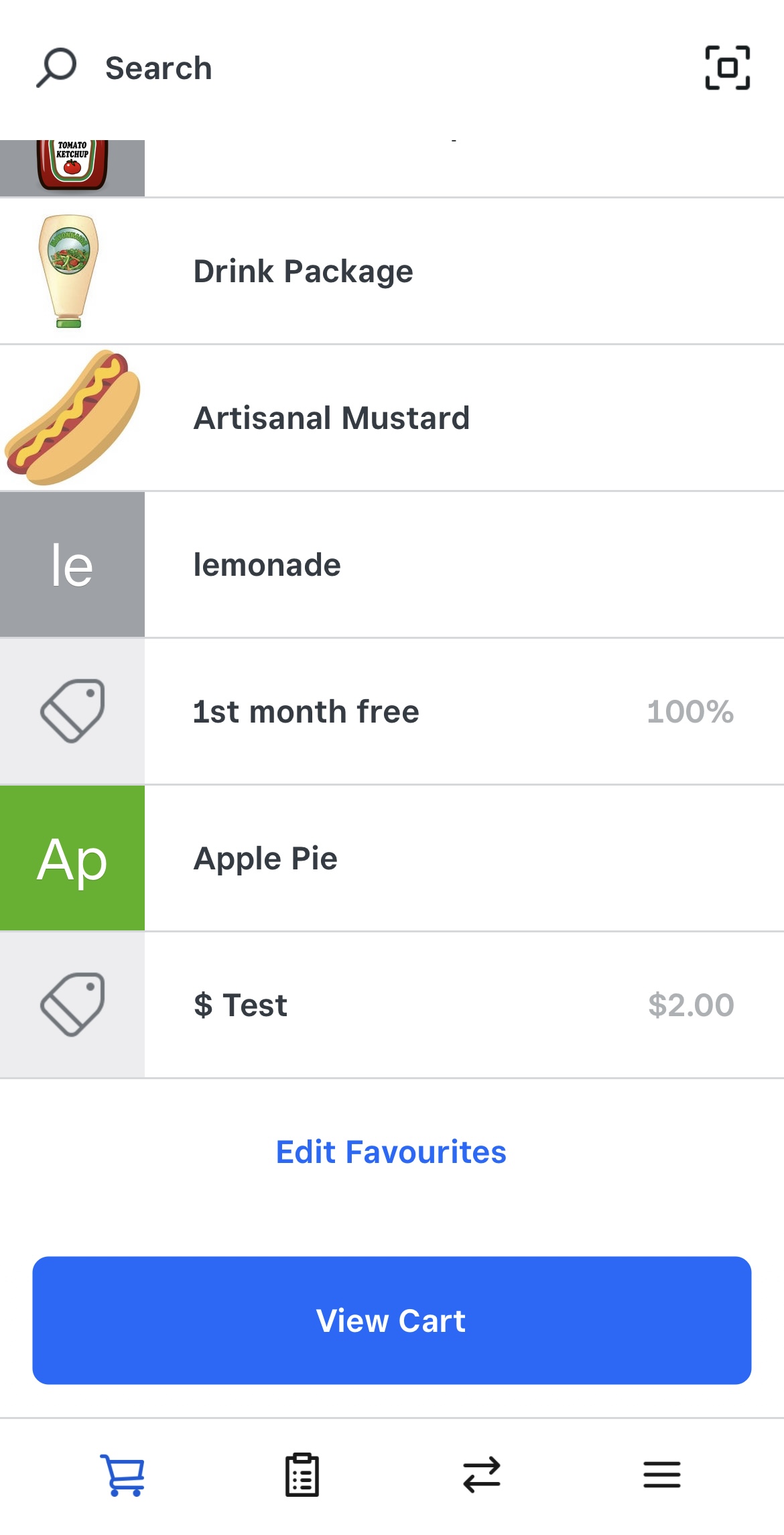
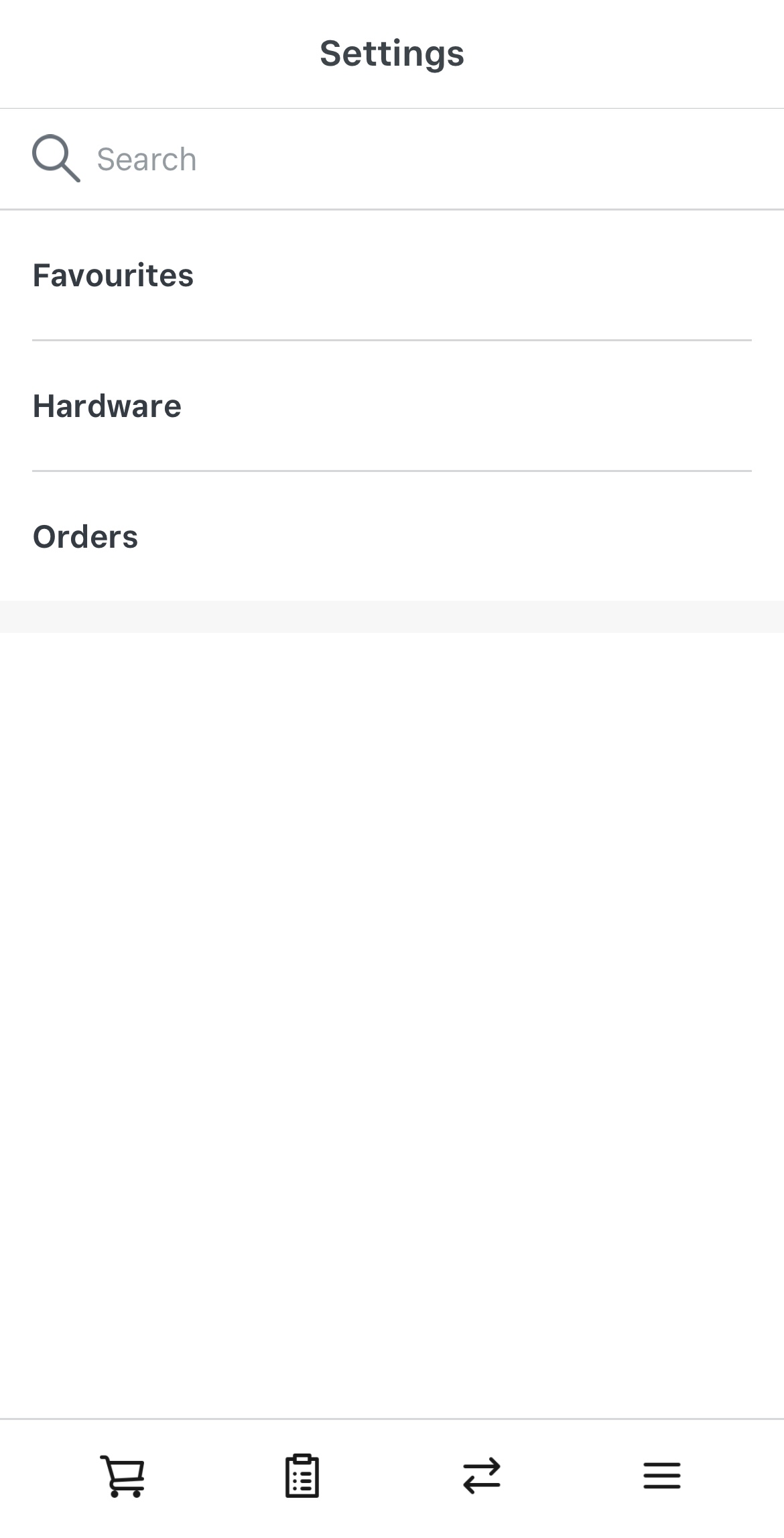
You can attach a video via a link to dropbox, or google drive, for example. Attached is what Square for Retail 5.94 looks like from my end:
- Mark as New
- Bookmark
- Subscribe
- Subscribe to RSS Feed
- Permalink
- Report
- Subscribe to RSS Feed
- Mark Thread as New
- Mark Thread as Read
- Float this Thread for Current User
- Bookmark
- Subscribe
- Printer Friendly Page
This is mine with the new UI enabled.


When I press “Edit Square for Retail Grid”. It just bounces back to the cart.
- Mark as New
- Bookmark
- Subscribe
- Subscribe to RSS Feed
- Permalink
- Report
- Subscribe to RSS Feed
- Mark Thread as New
- Mark Thread as Read
- Float this Thread for Current User
- Bookmark
- Subscribe
- Printer Friendly Page
Hey @doukhobor,
Sory to hear you're having trouble navigating the new Square for Retail App. You can still edit your favourites screen in-app. Here's how:
1. Tap the three lines in the right-hand corner of the Square for Retail app.
2. Tap Settings > Favourites.
Please let us know how you go!
- Mark as New
- Bookmark
- Subscribe
- Subscribe to RSS Feed
- Permalink
- Report
- Subscribe to RSS Feed
- Mark Thread as New
- Mark Thread as Read
- Float this Thread for Current User
- Bookmark
- Subscribe
- Printer Friendly Page
Hey Arie,
That only works if you are using the old checkout. But NOT when you enable the new checkout. Unfortunately.
It bounces you back to the new checkout screen when you press the "Edit Square for Retail Grid" button. And there's no where to edit the "Grid" that I can see from that screen.
Please Advise.
Thank you.
Gordon
- Mark as New
- Bookmark
- Subscribe
- Subscribe to RSS Feed
- Permalink
- Report
- Subscribe to RSS Feed
- Mark Thread as New
- Mark Thread as Read
- Float this Thread for Current User
- Bookmark
- Subscribe
- Printer Friendly Page
Would you be able to attach a screenshot, @doukhobor? I'm also using Square for Retail 5.94 on an iPhone but want to make sure we're on the same page.
- Mark as New
- Bookmark
- Subscribe
- Subscribe to RSS Feed
- Permalink
- Report
- Subscribe to RSS Feed
- Mark Thread as New
- Mark Thread as Read
- Float this Thread for Current User
- Bookmark
- Subscribe
- Printer Friendly Page
Hello, it’s difficult to screen shot as it immediately defaults to new checkout screen. I guess a video of the action would be more appreciate.
- Mark as New
- Bookmark
- Subscribe
- Subscribe to RSS Feed
- Permalink
- Report
- Subscribe to RSS Feed
- Mark Thread as New
- Mark Thread as Read
- Float this Thread for Current User
- Bookmark
- Subscribe
- Printer Friendly Page
You can attach a video via a link to dropbox, or google drive, for example. Attached is what Square for Retail 5.94 looks like from my end:
- Mark as New
- Bookmark
- Subscribe
- Subscribe to RSS Feed
- Permalink
- Report
- Subscribe to RSS Feed
- Mark Thread as New
- Mark Thread as Read
- Float this Thread for Current User
- Bookmark
- Subscribe
- Printer Friendly Page
This is mine with the new UI enabled.
When I press “Edit Square for Retail Grid”. It just bounces back to the cart.
- Mark as New
- Bookmark
- Subscribe
- Subscribe to RSS Feed
- Permalink
- Report
- Subscribe to RSS Feed
- Mark Thread as New
- Mark Thread as Read
- Float this Thread for Current User
- Bookmark
- Subscribe
- Printer Friendly Page
Thank you for sending this through! When you have a moment, reach out to our support team so we can file a ticket with engineering and run some diagnostics: squ.re/contactsupport.
- Mark as New
- Bookmark
- Subscribe
- Subscribe to RSS Feed
- Permalink
- Report
- Subscribe to RSS Feed
- Mark Thread as New
- Mark Thread as Read
- Float this Thread for Current User
- Bookmark
- Subscribe
- Printer Friendly Page
Hello,
That support link you have me (appears to be via bitly) doesn't work.
Gordon
- Mark as New
- Bookmark
- Subscribe
- Subscribe to RSS Feed
- Permalink
- Report

- Subscribe to RSS Feed
- Mark Thread as New
- Mark Thread as Read
- Float this Thread for Current User
- Bookmark
- Subscribe
- Printer Friendly Page
- Mark as New
- Bookmark
- Subscribe
- Subscribe to RSS Feed
- Permalink
- Report

Square Community
Square Products