
- Home
- >
- Help
- >
- Orders & Catalog
- >
- Re: How to run low/sold out stock reports

- Subscribe to RSS Feed
- Mark Thread as New
- Mark Thread as Read
- Float this Thread for Current User
- Bookmark
- Subscribe
- Printer Friendly Page
How to run low/sold out stock reports
Hi there, wondering how do I export this report? I've gone into Items/ticked the appropriate location and selected sold out stock and export library to excel but it is spitting out for all locations and not showing just the sold out or low stock - its showing all size and other items not out of stock. Its not exporting a complete library rather a bit of a mess. Anyway wondered if anyone had any guide to this. Thanks Sacha
- Mark as New
- Bookmark
- Subscribe
- Subscribe to RSS Feed
- Permalink
- Report



- Subscribe to RSS Feed
- Mark Thread as New
- Mark Thread as Read
- Float this Thread for Current User
- Bookmark
- Subscribe
- Printer Friendly Page
Hey @BalmoralPnC,
While you can run a report for items that are low in stock, this report wouldn't be able to be exported. However, if you're comfortable with excel, you can sort the library export so items low in stock show up first. It's actually pretty straight forward, even for excel novices. Here's how:
1. Download your item library.
2. Open the file with spreadsheet software, e.g excel or numbers.
3. Highlight the column showing the stock you have on hand and right click.
4. Select Sort > Ascending.
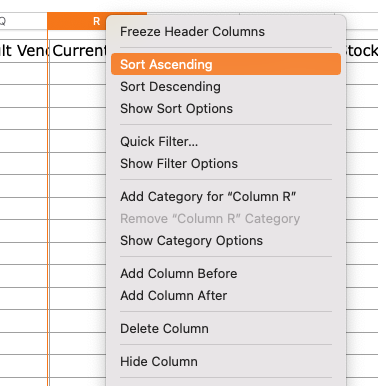
Like this you'll be able to see items that are low, or out of stock first. I hope this helps!
- Mark as New
- Bookmark
- Subscribe
- Subscribe to RSS Feed
- Permalink
- Report

Square Community
Square Products