
- Home
- >
- Help
- >
- Orders & Catalog
- >
- Re: Egift Cards

- Subscribe to RSS Feed
- Mark Thread as New
- Mark Thread as Read
- Float this Thread for Current User
- Bookmark
- Subscribe
- Printer Friendly Page
Egift Cards
I feel like I'm probably just overlooking it...
How do I sell egift cards in my online square store? I have them activated and I have the egift card link. I even have the toggle switched that says Sell Egift Cards In Store. But I don't see them in my store. How can I fix this?
Or are they sold at checkout?

- Subscribe to RSS Feed
- Mark Thread as New
- Mark Thread as Read
- Float this Thread for Current User
- Bookmark
- Subscribe
- Printer Friendly Page
If it's not on your navigation link, can you try adding it manually?
In edit mode, go toy header, then Navigation, Navigation Links. It should give you an option to Add a new nav link:

Click that and you get options, and gift card should be one of them

- Subscribe to RSS Feed
- Mark Thread as New
- Mark Thread as Read
- Float this Thread for Current User
- Bookmark
- Subscribe
- Printer Friendly Page
Hi.
After you have toggled the switch on your square dashboard, just as you did. Then go to your online store, and make sure this box is checked:

Online -> Gift Cards -> "Add link to gift card purchase..." then it shows up on your menu :

Hope that helps!
- Mark as New
- Bookmark
- Subscribe
- Subscribe to RSS Feed
- Permalink
- Report
- Subscribe to RSS Feed
- Mark Thread as New
- Mark Thread as Read
- Float this Thread for Current User
- Bookmark
- Subscribe
- Printer Friendly Page
Thank you! Double checked that and it is checked also. Do you think it could be within the actual layout of the website?
Is it an option to add or remove it after clicking "Edit Website"?
- Mark as New
- Bookmark
- Subscribe
- Subscribe to RSS Feed
- Permalink
- Report
- Subscribe to RSS Feed
- Mark Thread as New
- Mark Thread as Read
- Float this Thread for Current User
- Bookmark
- Subscribe
- Printer Friendly Page
If it's not on your navigation link, can you try adding it manually?
In edit mode, go toy header, then Navigation, Navigation Links. It should give you an option to Add a new nav link:
Click that and you get options, and gift card should be one of them
- Subscribe to RSS Feed
- Mark Thread as New
- Mark Thread as Read
- Float this Thread for Current User
- Bookmark
- Subscribe
- Printer Friendly Page
Got it now!! Wohoo!! Thank you!!
- Subscribe to RSS Feed
- Mark Thread as New
- Mark Thread as Read
- Float this Thread for Current User
- Bookmark
- Subscribe
- Printer Friendly Page
I'm still lost. When I look at my store, i do not have a menu or links across the top like Home, Shop All, Contact Us or Sale. I have the gift card "enabled" and checked the box to have it added to the page. I just cant find an option to have that menu, and the Gift Card option.
- Mark as New
- Bookmark
- Subscribe
- Subscribe to RSS Feed
- Permalink
- Report



- Subscribe to RSS Feed
- Mark Thread as New
- Mark Thread as Read
- Float this Thread for Current User
- Bookmark
- Subscribe
- Printer Friendly Page
Hey there @acarter! Welcome to the Seller Community
In order to see this menu option, you would need to make sure that your Navigation is enabled inside your header section when editing the website.
Here are some images for reference:

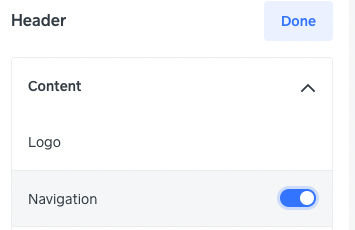
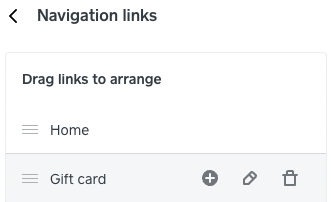
Once enabled you should be able to see the option for Gift Cards in your website's navigation.
Community Moderator, Square
Sign in and click Mark as Best Answer if my reply answers your question.
- Subscribe to RSS Feed
- Mark Thread as New
- Mark Thread as Read
- Float this Thread for Current User
- Bookmark
- Subscribe
- Printer Friendly Page
Thank you. I got it now. Thanks again.
- Mark as New
- Bookmark
- Subscribe
- Subscribe to RSS Feed
- Permalink
- Report

Square Community
Square Products