
- Home
- >
- Help
- >
- Orders & Catalog
- >
- EGift Cards Not Showing Up in Online Store

- Subscribe to RSS Feed
- Mark Thread as New
- Mark Thread as Read
- Float this Thread for Current User
- Bookmark
- Subscribe
- Printer Friendly Page
EGift Cards Not Showing Up in Online Store
I've followed all the threads, instructions for activating EGift Cards. The link works to go directly to webpage for EGift Card and purchase, but I'm needing to be able to sell these on my online store.
How do you get it show up in the online store? When I go to online store menu, then go down to "Gift Cards" menu selection, it says "enabled" but it doesn't show up anywhere on my menu or in the items list.



- Subscribe to RSS Feed
- Mark Thread as New
- Mark Thread as Read
- Float this Thread for Current User
- Bookmark
- Subscribe
- Printer Friendly Page
Welcome back to the Community, @thirdspace -
When you're in that Gift Cards portion of your Weebly site - there is a little box to check. It says "Add link to gift card purchase page to site navigation".
Checking that will add your Gift Cards link to your Navigation bar automatically.
Please let me know if that doesn't work for you!
Community Moderator, Square
Sign in and click Mark as Best Answer if my reply answers your question.
- Mark as New
- Bookmark
- Subscribe
- Subscribe to RSS Feed
- Permalink
- Report

- Subscribe to RSS Feed
- Mark Thread as New
- Mark Thread as Read
- Float this Thread for Current User
- Bookmark
- Subscribe
- Printer Friendly Page
Hi, I clicked that link that you mentioned and mine still does not show up in the online store. What do you recommend. It allows folks to add gift card at checkout, but I need them to be able to purchase egift cards directly from my online store.
thanks for your help.
- Mark as New
- Bookmark
- Subscribe
- Subscribe to RSS Feed
- Permalink
- Report

- Subscribe to RSS Feed
- Mark Thread as New
- Mark Thread as Read
- Float this Thread for Current User
- Bookmark
- Subscribe
- Printer Friendly Page
Hey @BreeAdornments-
Thanks for posting in the Seller Community.
So I can offer the best help here, I want to make it clear whether or not you have a Square Online Store, or your own Online Store? Let me know!

- Mark as New
- Bookmark
- Subscribe
- Subscribe to RSS Feed
- Permalink
- Report
- Subscribe to RSS Feed
- Mark Thread as New
- Mark Thread as Read
- Float this Thread for Current User
- Bookmark
- Subscribe
- Printer Friendly Page
I have a Square Online Store.
- Mark as New
- Bookmark
- Subscribe
- Subscribe to RSS Feed
- Permalink
- Report



- Subscribe to RSS Feed
- Mark Thread as New
- Mark Thread as Read
- Float this Thread for Current User
- Bookmark
- Subscribe
- Printer Friendly Page
@BreeAdornments thanks for letting us know! Make sure you have your navigation bar enabled for your Online Store otherwise the eGift Card options will not be visible. You can enable this under Edit Site > Header > Navigation. See the screenshot below for a reference:
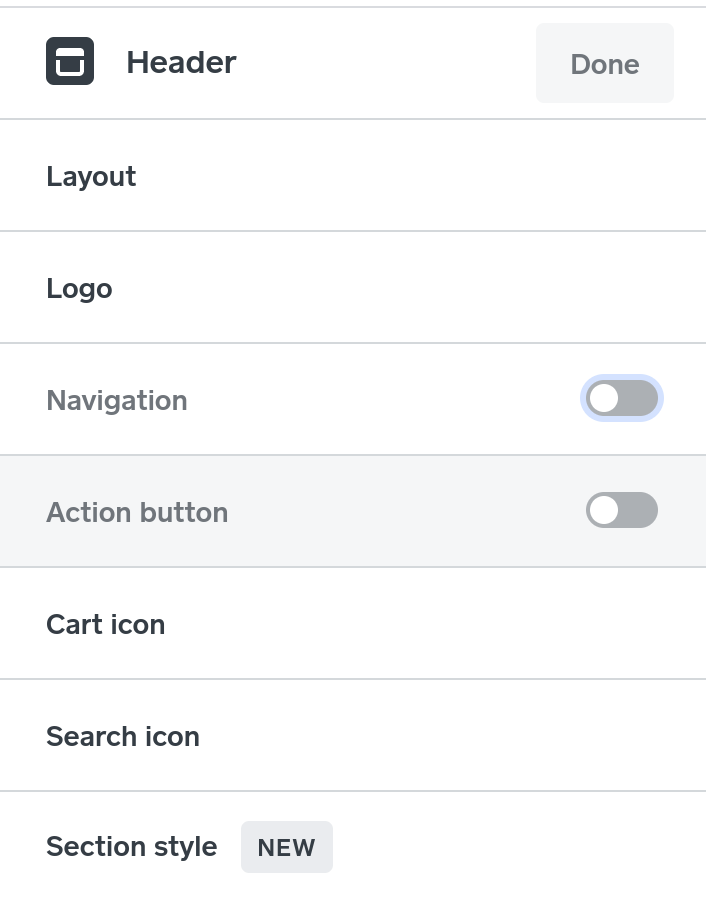
Community Moderator, Square
Sign in and click Mark as Best Answer if my reply answers your question.
- Mark as New
- Bookmark
- Subscribe
- Subscribe to RSS Feed
- Permalink
- Report
- Subscribe to RSS Feed
- Mark Thread as New
- Mark Thread as Read
- Float this Thread for Current User
- Bookmark
- Subscribe
- Printer Friendly Page
Thank you the problem is resolved. I did not have navigarikns on in headers.
- Mark as New
- Bookmark
- Subscribe
- Subscribe to RSS Feed
- Permalink
- Report

- Subscribe to RSS Feed
- Mark Thread as New
- Mark Thread as Read
- Float this Thread for Current User
- Bookmark
- Subscribe
- Printer Friendly Page
Glad you got this one solved, @BreeAdornments! Thanks for hitting us back and letting us know.
Feel free to reach out again is anything else comes up!
Community Moderator, Square
Sign in and click Mark as Best Answer if my reply answers your question.
- Mark as New
- Bookmark
- Subscribe
- Subscribe to RSS Feed
- Permalink
- Report

Square Community
Square Products