
- Home
- >
- Help
- >
- Online Store
- >
- Re: set up items on the app not displaying on the ...

- Subscribe to RSS Feed
- Mark Thread as New
- Mark Thread as Read
- Float this Thread for Current User
- Bookmark
- Subscribe
- Printer Friendly Page
The page doesn't currently have any products. Please try again later.
i have the following on my newly created square online page. how do i get my items to populate on the page? cheers, jamie...
- Mark as New
- Bookmark
- Subscribe
- Subscribe to RSS Feed
- Permalink
- Report



- Subscribe to RSS Feed
- Mark Thread as New
- Mark Thread as Read
- Float this Thread for Current User
- Bookmark
- Subscribe
- Printer Friendly Page
Hey @themalenypieguy,
Assuming you've synced your inventory, can you go to your items from the Square Online dashboard, click on an item and check that the item in question is:
1) Visible under "Visibility"
2) Assigned to at least one Fulfillment method
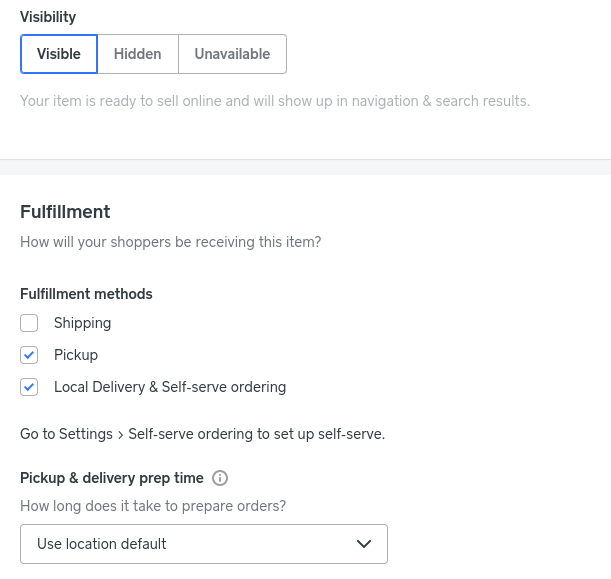
You can also make bulk changes by checking the tick box next to the items from the Item Library page then using the menu that appears at the top to make changes:

Hope this helps, let me know if you have any questions!
Square, Australia
Sign in and click Mark as Best Answer if my reply answers your question.
- Mark as New
- Bookmark
- Subscribe
- Subscribe to RSS Feed
- Permalink
- Report
- Subscribe to RSS Feed
- Mark Thread as New
- Mark Thread as Read
- Float this Thread for Current User
- Bookmark
- Subscribe
- Printer Friendly Page
Hey @themalenypieguy,
Assuming you've synced your inventory, can you go to your items from the Square Online dashboard, click on an item and check that the item in question is:
1) Visible under "Visibility"
2) Assigned to at least one Fulfillment method
You can also make bulk changes by checking the tick box next to the items from the Item Library page then using the menu that appears at the top to make changes:
Hope this helps, let me know if you have any questions!
Square, Australia
Sign in and click Mark as Best Answer if my reply answers your question.
- Mark as New
- Bookmark
- Subscribe
- Subscribe to RSS Feed
- Permalink
- Report
- Subscribe to RSS Feed
- Mark Thread as New
- Mark Thread as Read
- Float this Thread for Current User
- Bookmark
- Subscribe
- Printer Friendly Page
I have set up items on my app via my phone but they are not displaying on my website.
I have selected to make them visible.
Can someone please help?
thx in advance
- Mark as New
- Bookmark
- Subscribe
- Subscribe to RSS Feed
- Permalink
- Report
- Subscribe to RSS Feed
- Mark Thread as New
- Mark Thread as Read
- Float this Thread for Current User
- Bookmark
- Subscribe
- Printer Friendly Page
Hey @Bushtobowl,
Thanks for posting and sorry to hear you're having trouble with items not appearing on your website!
I've moved your post to this thread, that has a little more info on some things to try - please let me know if any of these options help!
Otherwise, if the above steps don't work and you'd like more assistance, please get in touch with support on 1800 760 137 (Mon-Fri, 9am-5pm Melbourne time) or email via this form.
Square, Australia
Sign in and click Mark as Best Answer if my reply answers your question.
- Mark as New
- Bookmark
- Subscribe
- Subscribe to RSS Feed
- Permalink
- Report
- Subscribe to RSS Feed
- Mark Thread as New
- Mark Thread as Read
- Float this Thread for Current User
- Bookmark
- Subscribe
- Printer Friendly Page
Hi there, I have the same issue & have tried the solution. Not working for me. Please help
- Mark as New
- Bookmark
- Subscribe
- Subscribe to RSS Feed
- Permalink
- Report



- Subscribe to RSS Feed
- Mark Thread as New
- Mark Thread as Read
- Float this Thread for Current User
- Bookmark
- Subscribe
- Printer Friendly Page
Hey there, @TimmyB 👋,
Sorry to hear you've run into this same issue!
Given there are multiple settings that can cause items to be non-visible online, we've included a troubleshooting guide to help you check each setting as the first port of call.
Give this a go and let us know if the issue persists.
Community Moderator, Australia, Square
Sign in and click Mark as Best Answer if my reply answers your question.
- Mark as New
- Bookmark
- Subscribe
- Subscribe to RSS Feed
- Permalink
- Report

Square Community
Square Products