
- Home
- >
- Help
- >
- Online Store
- >
- Square Online Store: Use for food truck

- Subscribe to RSS Feed
- Mark Thread as New
- Mark Thread as Read
- Float this Thread for Current User
- Bookmark
- Subscribe
- Printer Friendly Page
Square Online Store: Use for food truck
[The title of this thread has been edited from the original: Food Truck Online ticket questions (LOTS if questions)]
I have recently created my online store for contactless ordering and payment at cheesyfoodtruck.square.site
The process was pretty easy, but I have some questions for those using this product.
1) Where / How do you manage your incoming orders? (can you do it from Square dashboard as opposed to weebly site and are there advantages on one vs. the other?)
2) Do you use your phone or a tablet?
3) After you receive an online order do you hand write or print those orders for your restaurant or food truck?
4) What are the statuses available to distinguish between new orders, in-process, ready, complete etc... (how do you quickly determine a new order from one you have already put on your order board)
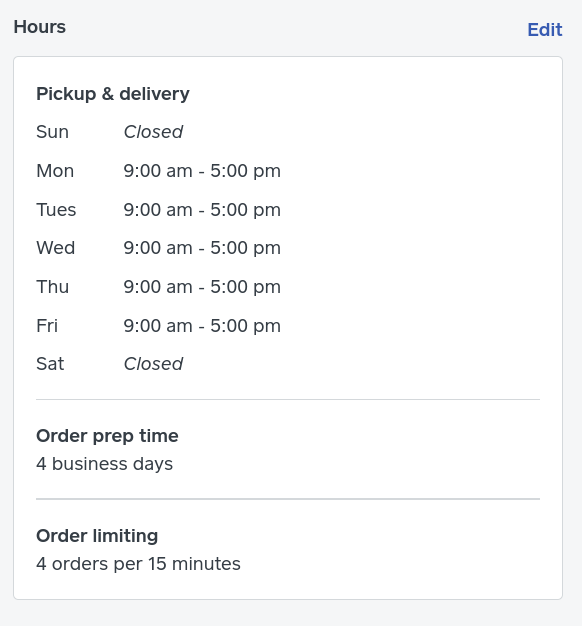
5) If your schedule and location change weekly how do you manage your location and store hours?
6) Food trucks: do you use scheduled pick-up or curbside or both?
Pre-COVID our lunch service from 11:00 - 3 pm would yield anywhere from 60 to 90 orders. That's a lot of tickets to manage online with these extra steps. Any advice, tips or hints would be appreciated.



- Subscribe to RSS Feed
- Mark Thread as New
- Mark Thread as Read
- Float this Thread for Current User
- Bookmark
- Subscribe
- Printer Friendly Page
Hey @careybeth721-
Thanks for posting in the Seller Community.
1) You can manage orders from the Order section of the Online Dashboard, or from the Square app.
2) If you would like to manage orders from the Square app, it would have to be on a tablet or iPad. Orders will not show up in the app if you are using a mobile device.
3) You can print the incoming orders, or handwrite. It's totally up to you, and depends on what hardware you have.
4) The different statuses for Pickup & Delivery orders would be Mark in Progress, Mark as Ready, Mark as Complete. From there you can filter between Active and Completed.
5) This adjustment would be have to be made manually in the Online Store Dashboard:
6) I'm not sure of any food truck sellers off hand, other than @lali who I've seen post in the Seller Community about their own truck, and may have some insight.
Please let me know if you have any questions about this. Perhaps @pessosices, one of our Super Sellers may have additional insight, or know other food truck sellers using the Square Online Store. Thanks for your time! 🧀


- Subscribe to RSS Feed
- Mark Thread as New
- Mark Thread as Read
- Float this Thread for Current User
- Bookmark
- Subscribe
- Printer Friendly Page
Hey @careybeth721
I don't have a food truck, but we're doing a lot of Online Orders, and I definitely second @isabelle 's recommendations!
Using a Tablet open to the Orders page, setting up a bluetooth printer to automatically print the orders, and mark them as Ready as you go should be the best & easiest solution!

- Subscribe to RSS Feed
- Mark Thread as New
- Mark Thread as Read
- Float this Thread for Current User
- Bookmark
- Subscribe
- Printer Friendly Page
We need something similar to Sign Up Genius!
Where we can have a link that limits to certain events (Example Grayhawk Community 9/30/2020)
They can select certain time slots, Then product they would like to order, finish and pay)
We are a moving food truck and we take orders in advance. Also we need to cap off the orders.
Sq could do a much better job at this than sign up genius.
- Mark as New
- Bookmark
- Subscribe
- Subscribe to RSS Feed
- Permalink
- Report

Square Community
Square Products