
- Home
- >
- Help
- >
- Online Store
- >
- Re: "Shop All" is gone

- Subscribe to RSS Feed
- Mark Thread as New
- Mark Thread as Read
- Float this Thread for Current User
- Bookmark
- Subscribe
- Printer Friendly Page
How do I switch my Square Online site template?
The title of this post has been edited from the original: Customize action button text for Featured Items in online store?
How can I change the text of the action button to be something other than the default text of "Shop Now?"



- Subscribe to RSS Feed
- Mark Thread as New
- Mark Thread as Read
- Float this Thread for Current User
- Bookmark
- Subscribe
- Printer Friendly Page
You should be able to switch templates, and the text within this button will be different depending on which template you're using, @umamikushi! It sounds like you're currently using the Shop All template, but you may want to use the Order Online template instead.
To switch templates, you'll start by heading over to your online store editor (Square Online overview > Website > Edit Site). Click the Pages drop-down in top left-hand corner, find the Category Pages section, click the three dots, then select Switch template.

Once here, you'll be able to switch between Shop All and Order Online. It's currently not possible to edit the text displayed on this button. See below for a screenshot including the descriptions of these two templates. Please let us know here if you have any other questions about this!

Community Moderator, Square
Sign in and click Mark as Best Answer if my reply answers your question.

- Subscribe to RSS Feed
- Mark Thread as New
- Mark Thread as Read
- Float this Thread for Current User
- Bookmark
- Subscribe
- Printer Friendly Page
Hi @TaniaClear - sorry to hear your frustration. There are only two different layouts to choose from - Shop All and Online Ordering. Hopefully we implement more options down the road.
In the meantime, I moved your post to a thread that walks through changing the layout.
Community Moderator, Square
Sign in and click Mark as Best Answer if my reply answers your question.

- Subscribe to RSS Feed
- Mark Thread as New
- Mark Thread as Read
- Float this Thread for Current User
- Bookmark
- Subscribe
- Printer Friendly Page
Hey @Pui-
What she means is that if you've already set up a Square Online Store, and would like to adjust the theme, you'll need to reference this thread.
Otherwise, you'd only see the ability to select a theme when you're first creating your Square Online Store. Does that make sense?


- Subscribe to RSS Feed
- Mark Thread as New
- Mark Thread as Read
- Float this Thread for Current User
- Bookmark
- Subscribe
- Printer Friendly Page
I went to adjust the theme but when I selected the other theme my website stayed the same.
- Subscribe to RSS Feed
- Mark Thread as New
- Mark Thread as Read
- Float this Thread for Current User
- Bookmark
- Subscribe
- Printer Friendly Page
Please contact us so we can look into this for you @Pui.

- Subscribe to RSS Feed
- Mark Thread as New
- Mark Thread as Read
- Float this Thread for Current User
- Bookmark
- Subscribe
- Printer Friendly Page
I'm having the same issue locating different themes for my website.

- Subscribe to RSS Feed
- Mark Thread as New
- Mark Thread as Read
- Float this Thread for Current User
- Bookmark
- Subscribe
- Printer Friendly Page
I do not see the Theme option on my site. It is a paid site and all I have is the Edit Site button. How do I change the theme?

- Subscribe to RSS Feed
- Mark Thread as New
- Mark Thread as Read
- Float this Thread for Current User
- Bookmark
- Subscribe
- Printer Friendly Page
Hey there, @soapbubbles -
Welcome back to the Community.
Once you click the Edit Site - do you see something similar to Valentina's Best Answer?
Or do you see something a little different?
I will keep an eye out for your reply👀.
Community Moderator, Square
Sign in and click Mark as Best Answer if my reply answers your question.
- Subscribe to RSS Feed
- Mark Thread as New
- Mark Thread as Read
- Float this Thread for Current User
- Bookmark
- Subscribe
- Printer Friendly Page
I only have an edit button with no other options. I created my site using square up. If I had been told I would have fewer options than creating it directly through Weebly I would have chosen that. I'm really confused as to why I have a Weebly site that doesn't function like a Weebly site.

- Subscribe to RSS Feed
- Mark Thread as New
- Mark Thread as Read
- Float this Thread for Current User
- Bookmark
- Subscribe
- Printer Friendly Page
HI, Square obtained Weebly 2018 and are one platform. Several options and features that were available for Weebly were discontinued.
I have used BigCommerce, Shopify, Wix, PappaShop and many other platforms. This, by far, is the easiest platform and offers so many options and features all for free! Many more paid features and options are available as your business grows.
Best advice, add pages, add sections, add stories, add galleries and click on every down arrow and 3 little dots you can find. All the features are easily found within drop down options. Square has broken down the features into little bits for easier navigation and creative control.
TERRI
- Subscribe to RSS Feed
- Mark Thread as New
- Mark Thread as Read
- Float this Thread for Current User
- Bookmark
- Subscribe
- Printer Friendly Page
Sayra.. does one need a paid plan to change themes... i have the free plan and the resulting website looks disqusting...

- Subscribe to RSS Feed
- Mark Thread as New
- Mark Thread as Read
- Float this Thread for Current User
- Bookmark
- Subscribe
- Printer Friendly Page
my website doesn't have themes to change please advise
- Subscribe to RSS Feed
- Mark Thread as New
- Mark Thread as Read
- Float this Thread for Current User
- Bookmark
- Subscribe
- Printer Friendly Page
Are you saying that you aren't seeing this option when you follow the directions outlined in the Best Answer?
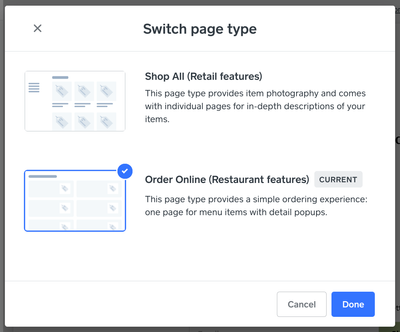
Let me know if this is what you aren't seeing, or if you are referring to something else.
Thanks, @Jadaoneill!
Community Moderator, Square
Sign in and click Mark as Best Answer if my reply answers your question.
- Subscribe to RSS Feed
- Mark Thread as New
- Mark Thread as Read
- Float this Thread for Current User
- Bookmark
- Subscribe
- Printer Friendly Page
I would like to change the boring default of weebly, but cannot find where is that button or menu, I upgraded to professional account still no luck. Very frustrating



- Subscribe to RSS Feed
- Mark Thread as New
- Mark Thread as Read
- Float this Thread for Current User
- Bookmark
- Subscribe
- Printer Friendly Page
Hi @craftblvd and welcome to the Community.
I moved your post to an existing thread where this question has been answered already on how to change your template.
Check out the Best Answer for details/steps on how to and what options you have.
Community Moderator, Square
Sign in and click Mark as Best Answer if my reply answers your question.
- Subscribe to RSS Feed
- Mark Thread as New
- Mark Thread as Read
- Float this Thread for Current User
- Bookmark
- Subscribe
- Printer Friendly Page
I LIKE SQUARE FOR THE FUTURE THEY FOR MAKING IT EASY FOR ME TO KEEP UP WITH MY INVENTORIES. BUT THE WEBSITE IS VERY DIFFICULT TO USE. IM ASKING WILL SQUARE ALLOW CUSTOMERS TO EDIT THEIR OWN TEMPLETS IN THE FUTURE RATHER THEN THE PRE MADE TEMPLETS THEY OFFER MAKING IT DIFFICULT TO. CUSTOMIZE AS I PLEASEE.

- Subscribe to RSS Feed
- Mark Thread as New
- Mark Thread as Read
- Float this Thread for Current User
- Bookmark
- Subscribe
- Printer Friendly Page
So if Square is associated with Weebly, why aren't there many options for customizations, even with a paid plan, besides the basic customizations (fonts, basic colors, etc)?
I don't want to change my template because I want the online store functions, but rather I want to know if there are other options to customize the theme of your online store website besides just the basics/ what's given to you when you use the online store template.

- Subscribe to RSS Feed
- Mark Thread as New
- Mark Thread as Read
- Float this Thread for Current User
- Bookmark
- Subscribe
- Printer Friendly Page
@LovelyHlub hello! This is a great question, but unfortunately one that I don't have a direct answer to. Just know that this is a feature request we are tracking. I've merged your post to an existing thread that will allow us to keep all the feedback in one place.
Community Moderator, Square
Sign in and click Mark as Best Answer if my reply answers your question.
- Subscribe to RSS Feed
- Mark Thread as New
- Mark Thread as Read
- Float this Thread for Current User
- Bookmark
- Subscribe
- Printer Friendly Page
I created a Weebly account considering making it a shop for my online business, but I feel like for now I would do better with a general website and not a "sales" type of site. Is there any way to change this once its already been created that way?

- Subscribe to RSS Feed
- Mark Thread as New
- Mark Thread as Read
- Float this Thread for Current User
- Bookmark
- Subscribe
- Printer Friendly Page
Hey @Jessica29-
I moved your question to this thread which should help answer your question. Let us know if not!
Community Program Manager, Square

- Subscribe to RSS Feed
- Mark Thread as New
- Mark Thread as Read
- Float this Thread for Current User
- Bookmark
- Subscribe
- Printer Friendly Page
Ive been trying to add a navigation button of a category but every time I try to do so the “Category” part doesn’t come up anymore. About a month ago I was able to do this with 3 other Categories but now I can. I went on to read some a instructions and they say I should see a Shop All in my editing pages area and all see is items not categories. Any help?
- Subscribe to RSS Feed
- Mark Thread as New
- Mark Thread as Read
- Float this Thread for Current User
- Bookmark
- Subscribe
- Printer Friendly Page
I think this is what you're looking for, @omartout!
I moved your post here so you can take a look at the Best Answer where I explained how to change the template for your Online Store - this is where you'll see the option to switch to the Shop All template. If you still have questions, let me know and we can dig in a bit more.
Community Moderator, Square
Sign in and click Mark as Best Answer if my reply answers your question.
- Subscribe to RSS Feed
- Mark Thread as New
- Mark Thread as Read
- Float this Thread for Current User
- Bookmark
- Subscribe
- Printer Friendly Page
Thank you, I still don’t see anything on my end when I follow those steps, I have attached a screen shot of what I see and Ill show you what I am trying to add in the Navigation and “Add by Category” doesn’t show up anymore. I used to be able to add a navigation link as a category now it doesn’t show up. Let me know what you think.


Square Community
Square Products